
Pinned

💎
⭐
27m •
ANNOUNCING: What's working in AI in 2026 (real projects, real revenue)
Quick news. We're doing our first virtual event, and the rule is simple: every person on stage has to show their actual work. The actual projects they're selling. The actual outreach they're using to land clients. The actual numbers behind it. No theory. No tutorials. Just what's working in 2026, taught by the people doing it. Waitlist's open. Get on it before tickets go live: -> What's working in AI in 2026 (real projects, real revenue) PS: Annual members of AIS+ get in for free. We will be announcing discounts for monthly members. If you’ve been thinking about joining AIS+, it’s a good time.
Pinned
💎
⭐
6h •
🚀New Video: Every Level of Claude Explained in 21 Minutes
I've spent over 400 hours inside Claude, and I'm breaking down exactly what separates someone stuck on level 1 from someone running five parallel sessions while they sleep, with the cheat codes to jump between each stage. Hope you enjoy!
Pinned
💎
⭐
4d •
Cape Town AI Mastermind: Behind the Scenes
In February, I spent a week in Cape Town, SA with some of the top AI entrepreneurs in the space for a mastermind. We had hundreds of community members join us. I met some amazing people and left feeling so energized and inspired. Which is why I've been uploading almost daily lately, haha! Anyways, just dropped a behind the scenes vlog if you're interested in checking it out. AIS is planning on doing big events and meetups regularly, so if this trip looked like fun, stay tuned for events in the future!

9h •
Social Media
I've just set up my X and Instagrams for my personal brand - @adamthorai on both (Limited content so far, especially on Instagram, unsure what direction to take it) Follow me and drop a comment of your own handles below and i'll give you a follow - intrigued to see what type of content everyone is posting!
1d •
#AISChallenge - Day 3
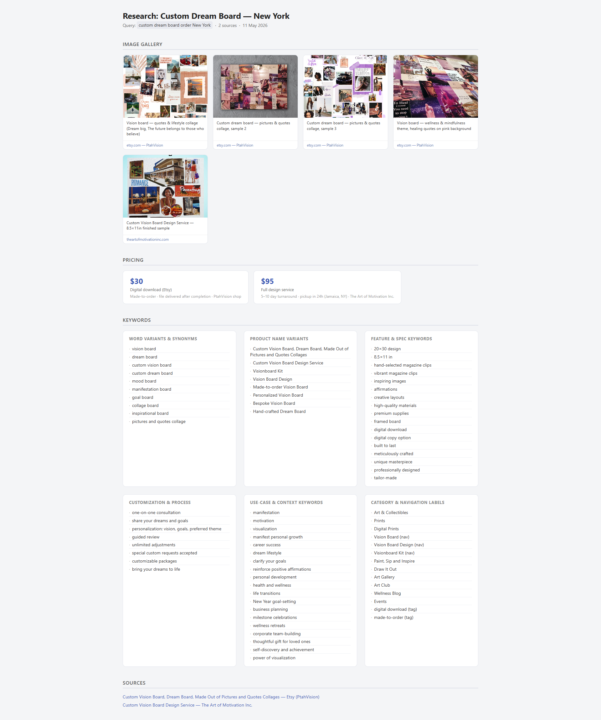
What I built: /research — buyer keyword extractor with HTML gallery output The skill searches the web via Firecrawl, scrapes the top results, and produces a self-contained HTML report you can open directly in a browser. It extracts product keywords organized by category (synonyms, product names, specs, use cases, navigation labels) + an image gallery pulled from every <img> tag on the page. Trigger: /research <topic> — or just say "research X for the UK market" and it picks it up naturally. One optimization I made: The first version returned a markdown text report. After watching it run, I realized the output was all words and no visual context — I had no feel for how the product actually looks on pages buyers visit. So I added formats: ["html"] to the Firecrawl call, extracted image URLs from <img src> tags, and rewrote the output as a styled HTML file with a product gallery. Now every report shows the actual photos customers see alongside the keywords. Second smaller one: I added a capital city rule, it automatically appends "Capital city" to the search query. If you say "German market" it appends "Berlin". This anchors results to where buyers in that country actually search from, instead of getting generic global results. Skill is ~130 lines. Built iteratively in one session by running real searches and adjusting based on what came back.
1-30 of 16,751

skool.com/ai-automation-society
Learn to get paid for AI solutions, regardless of your background.
Leaderboard (30-day)
1

+6102
2

🔥
+5246
3

+4507
4

🔥
+2314
5

+877
Powered by