
Pinned

💎
⭐
3d •
🚀New Video: Claude Code for Non-Coders (6 Hour Course)
This is a complete beginner course on becoming AI native with Claude Code, no coding background required. I take you from your very first prompt all the way to building your own skills, sub-agents, a second brain, and automations that run on their own in the cloud. It's all real examples and step-by-step builds, so you can follow along and walk away with AI systems that actually do work for you. Feel free to skip around using the timestamps below to whatever piques your interest.
Pinned

🔥
4d •
🏆 Community Wins Recap | July 4 – July 10
From AI operating systems and first client deliveries to open-source tools, second brains, and personal AI assistants, this week inside AIS+ showed that the best products often start by solving your own problems first. 🚀 Standout Wins of the Week inside AIS+ 👉 @Miguel Alfonso Murillo closed 3 clients using the AIOS he built for his own business, sharing how his journey evolved from experimenting with ChatGPT to running his operations with AI. 👉 @James Joens delivered his first client project just 11 days into AIS+, saving his client $1,400 on a single deal and following it up with his first in-person cold outreach meeting. 👉 @Jenni Saarenpää built her own AI-powered Wealth Analyzer after realizing the tool she wanted didn't exist, creating a personal FIRE planning app with powerful financial modeling. 👉@Konstantinos Karamatzianis built and open-sourced Session Guardian, solving Claude Code session limits for himself before sharing it with the entire community. 👉 @Girish Mohan created an AI Treasurer to manage expenses for a 100-person family festival, turning a real-life headache into a practical automation. ⸻ 🎥 Super Win Spotlight | @Jacob West Jacob joined AIS+ looking to build a business, not just learn AI. Since then, he has: - Built the confidence to leave his job and go all in on entrepreneurship - Closed larger AI projects by applying real business fundamentals - Shifted from learning tools to building a scalable business around them His biggest takeaway? Skills matter. But confidence comes from building, taking action, and surrounding yourself with people already doing what you want to do. 🎥 Watch Jacob's story 👇 ✨ Every week, members turn personal projects into client work, ideas into systems, and momentum into real businesses.

Pinned
💎
⭐
Jun 3 •
What do you get if you upgrade to AIS+?
Some of you have never heard of the AIS+ community. Others have but the part that trips you up is the actual difference between the two. Either way, this post will give you clarity. This free group is a bundle of quick resources pulled from my YouTube videos, plus a massive open community that anyone can join. It's a great place to get your bearings and see what's possible. But it's open to everyone, it can be noisy and overwhelming, and there's no path through it. You can get help from other members, but I rarely answer questions here. AIS+ is the opposite: - A step by step roadmap with a clear order, so you're never guessing what to do next - A much smaller community of people who are seriously committed to building and selling AI agents - I answer questions every day and run a weekly Q&A call where you can get direct access to me For the course material: The roadmap takes you from zero to building and selling AI agents, and the whole thing is built on the latest tech like Claude Code and Codex. We update it constantly. The old n8n material has been archived. It's still there if you want it, but it's no longer the focus, because the way you build today has moved on and the courses moved with it. Here's the actual roadmap inside, in order, with when each piece opens up: 1. Start Here (opens the moment you join). Gets you oriented. How the community works, the path ahead, and how to get help when you need it. 2. Build Your Portfolio (opens the moment you join). Why a portfolio matters, beginner level tutorials, and what types of projects to focus on. You end up with real work you can show a client. 3. Claude Code (opens the moment you join). This is now its own dedicated course. Build faster, turn ideas into working automations, and go deep on the tool serious builders are using right now. This takes you from beginner to advanced, step-by-step. 4. Get Your First Clients (opens after 30 days). Getting your first clients is hard, because you don’t have any case studies yet. So, we analyzed all of the success stories from our members and found they get their initial clients with two different techniques: warm outreach and Upwork. So, we teach both techniques in detail with exactly what to say, exactly how to position yourself when you have no proof.

just now •
Why Claude Max felt way less restrictive than Pro, even at 4x the usage
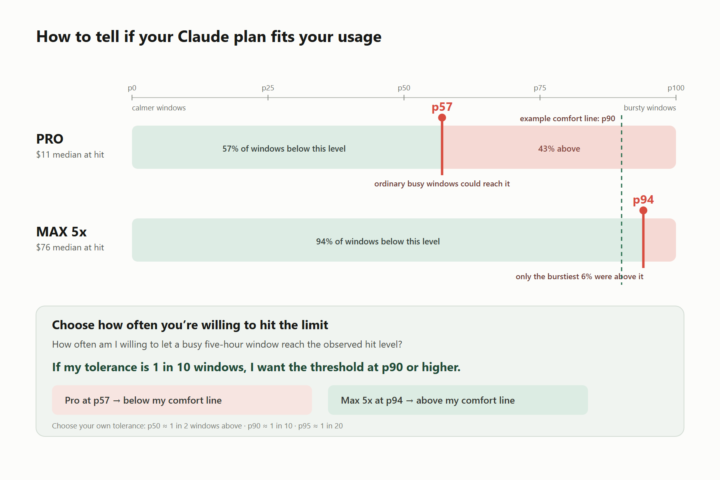
Between May 20 and June 1, I hit Claude's five-hour session limit 12 times on Pro. After moving to Max 5x, I hit it 3 times in the next 29 days. I wanted to know what was actually happening, so I mined 10 weeks of my own logs (the JSONL files Claude Code keeps under ~/.claude/projects). I found 18 session-limit hits across 10 weeks and 148 sessions: 12 on Pro, 3 around the upgrade, and 3 on Max 5x. A quick note: I was using subscriptions (like most people I assume), so these are not actual money I paid. I price the token fields in the logs at the API rates from the day they ran. That gives me one consistent unit for comparing very different models and token types, but it is still only a proxy for Anthropic's unpublished limit accounting. On Pro, 11 of the 12 hits happened after roughly $7.60-$16.80 of visible API-equivalent usage in that five-hour window. One outlier reached $24.40. The median was about $11. The reset countdowns added up to about 32 hours. That is time remaining until reset when each hit occurred, not a claim that I spent all 32 hours staring at the timer. In June 10, I started using Fable like every one else! I hit the limit three more times over the next 12 hours, and I upgraded. I treat those three hits as an ambiguous transition period rather than assigning them to either plan (I don't remember whether my limits reset or not). On Max 5x, the three hits landed at $58, $76, and $93 of visible API-equivalent usage. Anthropic says Max 5x provides five times Pro's per-session capacity. My API-value medians are closer to 7x. The part I did not expect was what happened to the distribution. My visible API-equivalent usage went from about $13 a day on Pro to $52 a day on Max, roughly 4x as much usage. With a plan offering 5x the per-session capacity, the naive expectation is that I should still hit the limit almost as often. I did not. The reason is that my usage is not spread evenly. The observed Pro hit level sat around the 57th percentile of my reconstructed Pro windows, so an ordinary busy window could cross it. The Max hit level sat around the 94th percentile of my Max windows. I generally needed one of my rare, bursty five-hour stretches to get there. That is the distinction that stuck with me: the limit itself is a quota, but whether I keep feeling it is a percentile question. The bigger plan did not just raise the ceiling. It moved the ceiling from the middle of my personal usage distribution into its tail.
0
0

just now •
Day1 - Newsletter I finished and fun
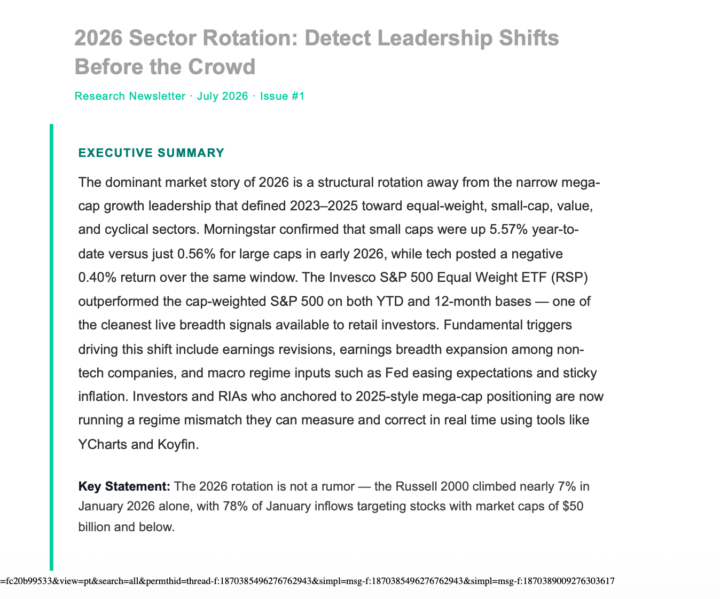
Hello together, I have finished my Day1 task. The first time I setup with Claude Code a (more or less) complete Workflow. Super interesting to see how Claude Code works, and a lot of things I learned beside like "how do I connect gmail with my workflow (was a nightmare)", "how do I define a design for the newsletter",... and so on. Perplexity is a really super tool for searching, kie.ai/nano banana doesn't convinced me so far because the diagrams or graphs can not express what is the real key message of chapter (or I was not able to tell clear enough what I need 😀). Maybe somebody has a best practice or tool "how to create the right graph" and can share with me. Thank you very much. Because I'm not an IT guy I learnt beside "what is git and how can I use it?" and how do I trigger workflows. But what really enjoyed me was to create stepwise a flexible workflow with adjustments of newsletter customer, language en/de, research topic and so on. Here is my second try/run of my newsletter workflow with tables and no graphs/diagrams anymore (I have still to clarify with Claude Code how to do this better🙄) - but I can use the research results for my other business...
0
0
1-30 of 21,468

skool.com/ai-automation-society
Learn to get paid for AI solutions, regardless of your background.
Leaderboard (30-day)
1

🔥
+7721
2

🔥
+7598
3

+6680
4

🔥
+4495
5

🔥
+3702
Powered by