Activity
Mon
Wed
Fri
Sun
Nov
Dec
Jan
Feb
Mar
Apr
May
Jun
Jul
Aug
Sep
Oct
What is this?
Less
More
Owned by Zak
Read SkoolMagazine For Free
Learn how to easily create your own online niche magazine in just 30 days (& practice on SkoolMagazine).
What Is Skool?
1.3k
5.0
Free
Skoolgrades
36
Free
Skooligans
623
Free
Imperium Academy™
80k
5.0
Free
📚The Skool Bookshop
199
5.0
Free
Template Skool
3.6k
5.0
$39/m
Word Crafters
191
5.0
Free
Author Skool
37
$9/m
7 contributions to Skool Extensions 🧩

🔥
Jun 20 •
Schedule Posts (VIP Feature 💎)
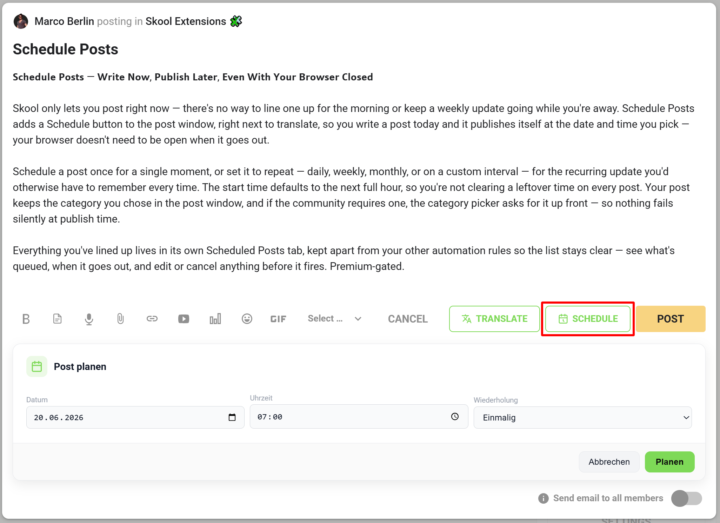
𝗦𝗰𝗵𝗲𝗱𝘂𝗹𝗲 𝗣𝗼𝘀𝘁𝘀 — 𝗪𝗿𝗶𝘁𝗲 𝗡𝗼𝘄, 𝗣𝘂𝗯𝗹𝗶𝘀𝗵 𝗟𝗮𝘁𝗲𝗿, 𝗘𝘃𝗲𝗻 𝗪𝗶𝘁𝗵 𝗬𝗼𝘂𝗿 𝗕𝗿𝗼𝘄𝘀𝗲𝗿 𝗖𝗹𝗼𝘀𝗲𝗱 Skool only lets you post right now — there's no way to line one up for the morning or keep a weekly update going while you're away. Schedule Posts adds a Schedule button to the post window, right next to translate, so you write a post today and it publishes itself at the date and time you pick — your browser doesn't need to be open when it goes out. Schedule a post once for a single moment, or set it to repeat — daily, weekly, monthly, or on a custom interval — for the recurring update you'd otherwise have to remember every time. The start time defaults to the next full hour, so you're not clearing a leftover time on every post. Your post keeps the category you chose in the post window, and if the community requires one, the category picker asks for it up front — so nothing fails silently at publish time. Everything you've lined up lives in its own Scheduled Posts tab, kept apart from your other automation rules so the list stays clear — see what's queued, when it goes out, and edit or cancel anything before it fires. --- 𝗣𝗼𝘀𝘁𝘀 𝗽𝗹𝗮𝗻𝗲𝗻 — 𝗝𝗲𝘁𝘇𝘁 𝘀𝗰𝗵𝗿𝗲𝗶𝗯𝗲𝗻, 𝘀𝗽𝗮̈𝘁𝗲𝗿 𝘃𝗲𝗿𝗼̈𝗳𝗳𝗲𝗻𝘁𝗹𝗶𝗰𝗵𝗲𝗻, 𝗮𝘂𝗰𝗵 𝗯𝗲𝗶 𝗴𝗲𝘀𝗰𝗵𝗹𝗼𝘀𝘀𝗲𝗻𝗲𝗺 𝗕𝗿𝗼𝘄𝘀𝗲𝗿 Skool lässt dich nur sofort posten — es gibt keine Möglichkeit, einen Beitrag für den Morgen vorzubereiten oder ein wöchentliches Update laufen zu lassen, während du weg bist. „Posts planen" fügt dem Postfenster einen Planen-Button hinzu, gleich neben „Übersetzen": Du schreibst einen Post heute, und er veröffentlicht sich von selbst zum Datum und zur Uhrzeit, die du wählst — dein Browser muss dafür nicht offen sein. Plane einen Post einmalig für einen einzelnen Zeitpunkt oder stell ihn auf wiederkehrend — täglich, wöchentlich, monatlich oder im eigenen Intervall — für das regelmäßige Update, an das du sonst jedes Mal denken müsstest. Die Startzeit steht standardmäßig auf der nächsten vollen Stunde, sodass du keine übrig gebliebene Uhrzeit bei jedem Post wegklicken musst. Dein Post behält die Kategorie, die du im Postfenster gewählt hast, und braucht die Community eine, fragt die Kategorie-Auswahl gleich danach — so scheitert nichts still beim Veröffentlichen.

🔥
7 likes • Jun 20
This was going to be a scheduled reply but...I was online so...
🔥
Jun 16 •
🔥 Moderator Found!
I’m excited to announce that I’ve found our new moderator: @Kimberly Armatys 🎉 She’ll be helping to bring more action, engagement, and fun into the community. Expect more discussions, challenges, and creative ideas Kimberly will also get deeper insight into the extension, early access to upcoming features, and the opportunity to provide direct feedback that helps shape future development. Please give Kimberly a warm welcome 👇🏼

🔥
3 likes • Jun 16
Oh oh..we better behave now @Kimberly Armatys is watching!
🔥
2 likes • Jun 16
@Kimberly Armatys oh oh...
🔥
Jun 2 •
⭐ Communities - Introduce your Community
⚠️ To all community owners. Let's introduce our communities here together with the help of the extension: 1. You create an introduction post of your community in the ⭐ Communities category. 2. Below we will exchange ideas with your community and also solve the individual puzzle 🧩 from your community teaser image. So, introduce your community straight away 🚀 --- ⚠️ An alle Communitybesitzer. Lasst uns hier gemeinsam mit Hilfe der Extension unsere Communitys vorstellen: 1. Du erstellst einen Vorstellungspost deiner Community in der Kategorie ⭐ Communities. 2. Darunter gehen wir in den Austausch zu deiner Community und lösen auch gleich das individuelle Puzzle 🧩 aus deinem Community-Teaserbild. Also, stell doch direkt mal deine Community vor 🚀
🔥
5 likes • Jun 2
Done :-)
🔥
Jun 2 •
SkoolMagazine
SkoolMagazine is made for Skoolers by Skoolers. Each month a new team of amateurs puts together an entire magazine with a little help from me (Zak). Our topic is Skool. Tips, advice, updates, history and more. All designed to take your Skool game to the top. oh...and its free. READ SKOOLMAGAZINE HERE
Poll
7 members have voted


🔥
Mar 30 •
Skool Extensions
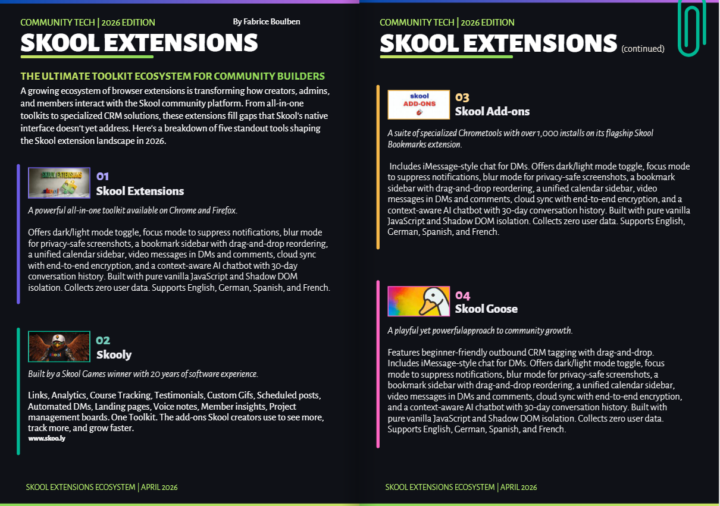
I’m writing an article for Skool Magazine exploring several extensions, and I’ve placed yours first because I genuinely appreciate its value. I would love to better understand what sets it apart from others in the ecosystem. For example, is it mobile-friendly, or does it offer unique features that improve usability or workflow? Any specific elements, design choices, or capabilities that distinguish your extension would be greatly appreciated for an accurate and thoughtful feature. Can you help me on that one please?
🔥
2 likes • Apr 24
Enjoyed the article with different tools and abilities of different extentions. Amazing what can be done.
🔥
2 likes • Apr 24
@Marco Berlin @Fabrice Boulben actually ran out of space to write all the cool features (there are so many).
1-7 of 7

🔥
@zak-king
Read SkoolMagazine: www.skoo.ly/readskoolmagazine | Skool IRL Cape Town Mayor
Active 4h ago
Joined Apr 14, 2026
Cape Town, South Africa
Powered by