Activity
Mon
Wed
Fri
Sun
Nov
Dec
Jan
Feb
Mar
Apr
May
Jun
Jul
Aug
Sep
Oct
What is this?
Less
More
AI Story Crafters
318
Free
Archi Savvy Pro
11
Free
The Parametric Circle
569
5.0
Free
How to Rhino
37.3k
Free
Grasshopper3D Challenge
543
Free
Read SkoolMagazine Here
424
Free
10 contributions to Skool Extensions 🧩

🔥
Mar 30 •
Skool Extensions
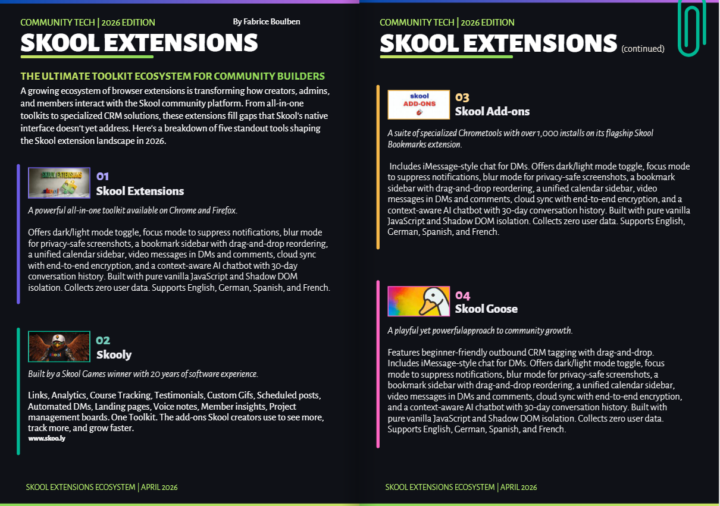
I’m writing an article for Skool Magazine exploring several extensions, and I’ve placed yours first because I genuinely appreciate its value. I would love to better understand what sets it apart from others in the ecosystem. For example, is it mobile-friendly, or does it offer unique features that improve usability or workflow? Any specific elements, design choices, or capabilities that distinguish your extension would be greatly appreciated for an accurate and thoughtful feature. Can you help me on that one please?
🔥
2 likes • Apr 15
Good news... it is almost here! Check out... https://heyzine.com/flip-book/32dc38d28d.html
🔥
2 likes • Apr 15
@Marco Berlin You are welcome

🔥
Apr 13 •
Video Download in Postings (Premium Feature 👑)
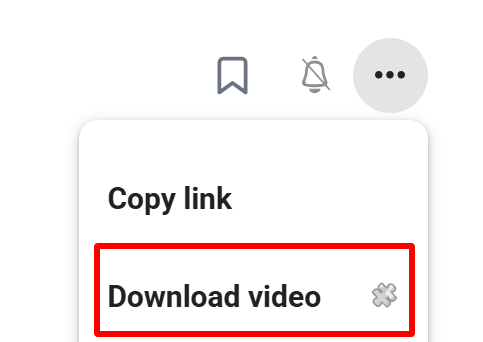
𝗩𝗶𝗱𝗲𝗼 𝗗𝗼𝘄𝗻𝗹𝗼𝗮𝗱 — 𝗦𝗮𝘃𝗲 𝗔𝗻𝘆 𝗦𝗸𝗼𝗼𝗹 𝗩𝗶𝗱𝗲𝗼 𝗮𝘀 𝗠𝗣𝟰 Skool posts often contain valuable video content — tutorials, walkthroughs, live replays — but there's no built-in way to save them for offline viewing. Video Download adds a "Download video" entry directly to the 3-dot menu of any post that contains a video. One click and the full-quality MP4 lands in your downloads folder. Under the hood the extension detects the video in the post, extracts the HLS stream URL, and sends it to a secure server-side ffmpeg transmuxer. The stream is remuxed to a valid MP4 container without re-encoding — lossless, fast, and ready to play in QuickTime, Windows Media Player, VLC, or any other standard player. A toast shows the download progress and confirms when the file is ready. Perfect for archiving course content, watching on the go, or keeping a backup of your own community's material. --- 𝗩𝗶𝗱𝗲𝗼 𝗗𝗼𝘄𝗻𝗹𝗼𝗮𝗱 — 𝗝𝗲𝗱𝗲𝘀 𝗦𝗸𝗼𝗼𝗹-𝗩𝗶𝗱𝗲𝗼 𝗮𝗹𝘀 𝗠𝗣𝟰 𝘀𝗽𝗲𝗶𝗰𝗵𝗲𝗿𝗻 Skool-Posts enthalten oft wertvolle Video-Inhalte — Tutorials, Walkthroughs, Live-Aufzeichnungen — aber es gibt keine eingebaute Möglichkeit, sie für die Offline-Nutzung zu speichern. Video Download fügt einen "Video laden"-Eintrag direkt ins 3-Punkte-Menü jedes Posts mit Video ein. Ein Klick, und die MP4 in voller Qualität landet im Downloads-Ordner. Im Hintergrund erkennt die Extension das Video im Post, extrahiert die HLS-Stream-URL und schickt sie an einen sicheren server-seitigen ffmpeg-Transmuxer. Der Stream wird ohne Neukodierung in einen gültigen MP4-Container remuxt — verlustfrei, schnell und sofort abspielbar in QuickTime, Windows Media Player, VLC oder jedem anderen Standard-Player. Ein Toast zeigt den Download-Fortschritt und bestätigt, wenn die Datei fertig ist. Perfekt zum Archivieren von Kursinhalten, zum Anschauen unterwegs oder als Backup für das Material deiner eigenen Community.
🔥
3 likes • Apr 13
Wow cool!

🔥
Mar 28 •
Bookmarks Disappearing
This extension has changed the way I use Skool, with bookmarking being of the real gems included! There seems to be a bug when having multiple tabs of Skool open and trying to save bookmarks, they appear to save but once you close each tab and then head back into Skool or refresh the page, they all disappear. Just wanted to give you a heads up and see if you could look into that. Thanks!!
🔥
2 likes • Apr 8
@Antonio Totino @Antonio Totino 😁
🔥
0 likes • Apr 9
@Antonio Totino @Antonio Totino
🔥
Mar 30 •
Course Overview (VIP Feature 💎)
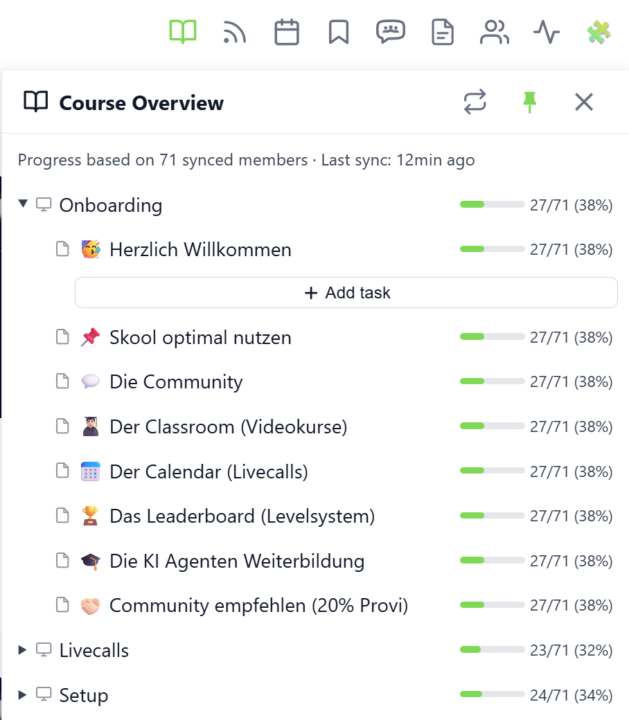
𝗖𝗼𝘂𝗿𝘀𝗲 𝗢𝘃𝗲𝗿𝘃𝗶𝗲𝘄 — 𝗬𝗼𝘂𝗿 𝗘𝗻𝘁𝗶𝗿𝗲 𝗖𝗹𝗮𝘀𝘀𝗿𝗼𝗼𝗺 𝗦𝘁𝗿𝘂𝗰𝘁𝘂𝗿𝗲 𝗮𝘁 𝗮 𝗚𝗹𝗮𝗻𝗰𝗲 Managing a Skool classroom with multiple modules, folders, and pages means a lot of clicking and scrolling to understand the full picture. Course Overview adds a dedicated sidebar panel that shows your complete course structure as an expandable tree — every module, every folder, every page — without leaving the page you're on. Click the book icon in your toolbar to open the panel. Each module shows as a collapsible row with a folder icon for subfolders and page icons for individual lessons. Click any module to expand it and reveal its nested content, loaded directly from Skool's data. The tree remembers which modules you've expanded, so your view stays consistent as you navigate. The real power comes from the completion stats. If you've synced your members' course progress, each module displays a green progress bar showing what percentage of your members have started it. Hover over the bar to see member names, or click it to open a popup with the full list — complete with avatars, tags, and pipeline status. A note at the bottom shows how many synced members the percentages are based on. Hit the refresh button to reload the course structure or update completion stats. The panel respects the 24-hour sync cooldown and shows when the next sync is available. You can pin the panel to keep it open while you browse, resize it by dragging the left edge, or close it when you're done. Course Overview is available for admins and owners only, and works on any page within your community. The feature can be toggled in the Toolkit Settings under the Admin section. --- 𝗞𝘂𝗿𝘀ü𝗯𝗲𝗿𝘀𝗶𝗰𝗵𝘁 — 𝗗𝗲𝗶𝗻𝗲 𝗴𝗲𝘀𝗮𝗺𝘁𝗲 𝗖𝗹𝗮𝘀𝘀𝗿𝗼𝗼𝗺-𝗦𝘁𝗿𝘂𝗸𝘁𝘂𝗿 𝗮𝘂𝗳 𝗲𝗶𝗻𝗲𝗻 𝗕𝗹𝗶𝗰𝗸 Eine Skool-Classroom mit mehreren Modulen, Ordnern und Seiten zu verwalten bedeutet viel Klicken und Scrollen, um das Gesamtbild zu verstehen. Die Kursübersicht fügt ein eigenes Sidebar-Panel hinzu, das deine komplette Kursstruktur als aufklappbaren Baum zeigt — jedes Modul, jeden Ordner, jede Seite — ohne die aktuelle Seite zu verlassen.
🔥
4 likes • Mar 30
Great stuff here... keep going! 🔥

🔥
2 likes • Mar 27
Nick That is a brilliant idea!
1-10 of 10

🔥
@fabrice
Passionate about architecture and computational design, always exploring creative and innovative design solutions.
Active 1h ago
Joined Mar 23, 2026
INTJ
Sawston UK
Powered by