Activity
Mon
Wed
Fri
Sun
Aug
Sep
Oct
Nov
Dec
Jan
Feb
Mar
Apr
May
Jun
Jul
What is this?
Less
More
Memberships
Eurosom
230 members • Free
4 contributions to Eurosom

Mar 2 •
Task 3: Server Security & Protection (UFW, SSH Hardening, and Logging)
For this task, I secured the server by configuring UFW, hardening SSH, restricting unnecessary ports, and enabling logging. I used the following commands to complete the setup: 1. Configure UFW (Firewall Setup) ---------------------------------------------------------- First, I used these commands to allow SSH access from my IP, enable the firewall, and verify its status: - sudo ufw allow from {your-ip-address} to any port 22 - sudo ufw enable - sudo ufw status verbose 2. Harden SSH -------------------------------------------------------- To improve security, I edited the SSH configuration file using: - sudo nano /etc/ssh/sshd_config Inside the file, i changed Port 22 to Port 2222 Changed PermitRootLogin yes to PermitRootLogin no Then I used these commands to allow the new port and apply the changes: - sudo ufw allow 2222 - sudo systemctl reload ssh 3. Restrict & Manage Ports -------------------------------------------------------- To open HTTPS and manage firewall rules, I used: - sudo ufw allow 443 - sudo ufw status numbered - sudo ufw delete <rule-number> 4. Enable Logging & Monitor Activity -------------------------------------------------------- To enable logging and monitor suspicious activity, I used: - sudo ufw logging on - sudo tail -f /var/log/ufw.log - sudo tail -f /var/log/auth.log
0
0
Feb 27 •
Task 2: Network Configuration & Monitoring
Following up on server deployment, here is my guide for Task 2 covering Network Configuration and Monitoring. Whether we are connecting a web framework to a backend database or ensuring our mobile applications can reliably reach our APIs, understanding how to diagnose network traffic on a Linux server is essential. Below are the modern, standard commands used to configure, test, and monitor a Debian/Ubuntu server's network. 1. Interface & IP Configuration The older ifconfig command is largely deprecated on modern Linux systems. To find the server's local IP address, MAC address, and check if the network interface (like eth0 or ens3) is physically "UP", we use the modern ip tool. Command: ip a (or ip addr show) 2. Routing and Gateways If the server is failing to send data to another subnet, we need to check its internal map—the routing table. This tells us the default gateway (router) the server is using to reach the outside world. Command: ip route 3. DNS Diagnostics (Domain Resolution) When our server can ping an IP address but fails to connect to an external domain (like a third-party API), it is usually a Domain Name System (DNS) issue. To query the DNS servers and get a detailed breakdown of the request and answer, we use the Domain Information Groper tool. Command: dig eurosom.com 4. Advanced Connectivity Testing ping is great for checking if a server is awake, but it does not tell us if a specific application port is open through the firewall. To test if a remote server is accepting connections on a specific port (for example, port 3306 for a remote database), we use Netcat. Command: nc -zv {ip-address} {port} Note: The -z flag tells it to scan without sending data, and -v makes the output verbose so we can see the success or failure message. 5. Real-Time Bandwidth Monitoring If a server is suddenly running slowly and the CPU/RAM look normal, the network bandwidth might be maxed out. To get a live, constantly updating view of our server's network traffic, we can use iftop.
1 like • Feb 28
@Dr Issa Guled Mahadsanid Dr issa
Feb 27 •
Task 1 Submission: Server Deployment & Package Management
Waxaan soo diyaariyay commands-ka ugu muhiimsan sida aan u maareyno xirmooyinka aasaasiga ah (Package Management) iyo cilad bixinta, anigoo ku salaynaya heerka aan ku bartay course-ka CLOUD ENGINEERING. 1. Initial Server Deployment & Baseline Setup -------------------------------------------------------------------------- Marka aad soo gasho server cusub, mudnaanta ugu horeysa waxay tahay inaad update gareyso packages-kaaga si aad isaga badasho packages-kii dulduleelada lahaa. Marka hore update ku samee list-ka packages-ka u baahan in dib u habayn lagu sameeyo. Kadib upgrade dheh. Upgrade labo qaab ayuu leeyahay: Upgrade caadi ah – Dependencies-ka aan loo baahnayn way sii jiri karaan. Full-upgrade (qoto dheer) – Wuxuu ka saaraa packages ama dependencies-ka aan loo baahnayn ama kuwa xannibaya update-ka cusub. commands ka nalaga rabo inaa isticmaalno waxay qoran yihiin sida tan: - Soo qaado liiska ugu dambeeya ee softiweerka: sudo apt update - Si nabad ah u rakib cusboonaysiinta la heli karo: sudo apt upgrade - Samee cusboonaysiin qoto dheer (waxay meesha ka saartaa xirmooyinka duugoobay ee xannibaya cusboonaysiinta): sudo apt full-upgrade 2. Rakibidda iyo Habaynta Web Server-ka -------------------------------------------------------------------------- Marka aasaaska la sugo, waxaan soo dagsan karnaa softiweerka loo baahan yahay si aan u maareyno web-server-ka. Tusaale ahaan waxaan isticmaaleynaa Apache Server. - soo dagso apache server: sudo apt install apache2 - Xaqiiji in adeeggu active yahay oo uu shaqaynayo: systemctl status apache2 - kadib si aad u isticmaasho start dheh : sudo systemctl start apache2 - si uu si automatic ah isu daaro marka server ka reboot lagu sameeyo isticmaal sida: sudo systemctl enable apache2 3. Maareynta Installation ka aan automatic ahayn ee manual ka ah sida (.deb Packages) -------------------------------------------------------------------------- Softiweerada oo dhan lagama heli karo APT. Marka aan installation ku samaynayno packages gaar ah oo .deb ah, waxaan isticmaalnaa hab ka duwan APT.
0 likes • Feb 28
waaku soo daray Dr sharaxaad walba Command ka aan isticmaalay ayaa raacsan
Feb 8 •
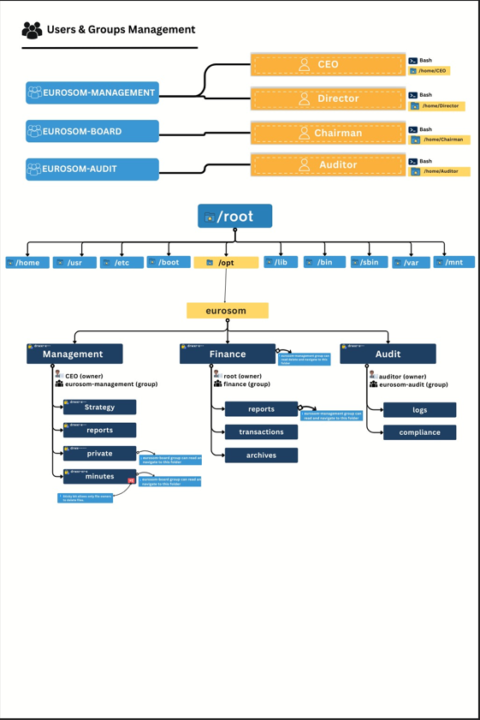
🔐 Executive-Level Access Control in Linux — Real-World Diagram
I was given a task to create an executive access control diagram for a corporate Linux environment, with a strong focus on visibility, security, and auditability. This diagram represents a real-world enterprise structure where: - Executives can view financial data but never modify or delete it - Strategy documents are editable only by management - Board-level data remains isolated and protected - Auditors have read-only visibility across the entire system - sudo access is restricted to monitoring and audit commands only - Full ACL + auditd tracking ensures accountability and traceability Technologies & concepts applied: - Linux users and groups - Least-privilege access model - POSIX permissions with ACLs - Sticky bit for controlled deletions - Restricted sudoers rules - auditd for compliance and activity tracking Feedback, critique, and improvement suggestions are welcome. #Linux #DevOps👨💻 #SystemAdministration #Security #ACL #Audit #IAM
0 likes • Feb 9
@Dr Issa Guled Thanks Dr.issa
1-4 of 4