Activity
Mon
Wed
Fri
Sun
May
Jun
Jul
Aug
Sep
Oct
Nov
Dec
Jan
Feb
Mar
Apr
What is this?
Less
More
Memberships
Pathway To Salesforce (PTS)
724 members • Free
26 contributions to Pathway To Salesforce (PTS)

26d •
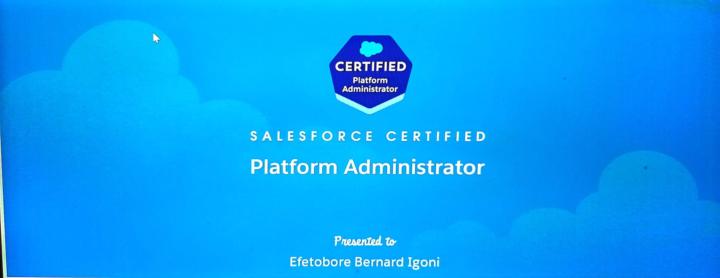
Congratulations to me everyone on my Salesforce Certified Platform Administrator Exams
Hi Efetobore Bernard Igoni, Congratulations on earning Salesforce Certified Platform Administrator! Test Taker Name: Efetobore Bernard Igoni Exam: Salesforce Certified Platform Administrator Result: Pass Date Completed: March 28, 2026 Review section-level scoring Configuration and Setup: 78% Object Manager and Lightning App Builder: 56% Sales and Marketing Applications: 100% Service and Support Applications: 67% Productivity and Collaboration: 50% Data and Analytics Management: 80% Automation: 78% Agentforce AI: 40% I want to encourage all of us here on this platform to take the test if you are due to take the test. How do you know you are due ? 1) Make post of where you are constantly ,so you can be advised by Godwin 2) If you observe the break down above, you should try and cover all that aspect before writing the exam. 3) You can leverage the Pathway AI to learn most of the topics are there and you just have to practice 4) Past questions are good but you can't depend on past questions alone 5) Goto Trailhead and practice Modules related to the breakdown ahead . I also want to say thank you to our Mentor @Godwin Mbah ,our amiable instructors @Divine Lantum and @Josephine Nti ,i really appreciate you guys for your supports. Please don't be angry i didn't score 100% in all the section "Na book i nor Know" but i trust you will knock it 100%. Thanks so much for reading me.

1 like • 26d
Congratulations @Efetobore Igoni 🎉

Mar 5 •
🔥 SPEAKING AT A LIVE EVENT IN LONDON TOMORROW: COME SEE ME IN PERSON😊
Hey team, I've been invited to speak at a live in person event tomorrow evening in London . I'll be talking about CRM, AI and automation so if you're in London or around, this is one you don't want to miss! I've shared all the details on LinkedIn. Please go check it out, like and comment on the post i will really appreciate that 🙌 Link below 👇 Click Here to Go To LinkedIn Post Kind regards Godwin

1 like • Mar 6
Wishing you the best @Godwin Mbah
2 likes • Dec '25
@Divine Lantum , there you go
Nov '25 •
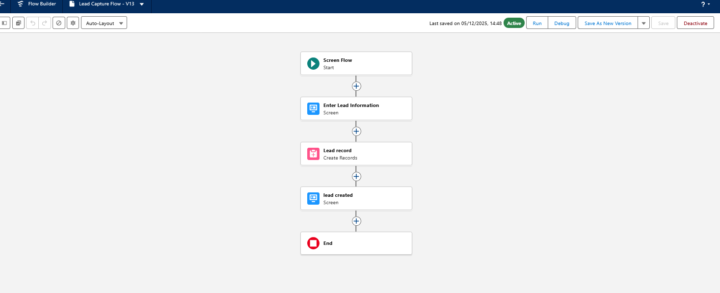
OLD STUDENTS: 🎯 PROJECT TITLE: Smart Entry – Your First Screen Flow Challenge: USE TODAYS CLASS TO COMPLETE
🏢 COMPANY BACKGROUND: You’ve just been hired as a Junior Admin for SwiftMoves Ltd, a UK-based logistics company helping small businesses move packages and equipment across the country. The business is growing fast, and users are struggling to enter data correctly and quickly. You’ve been asked to create simple Screen Flows to guide users through data entry — no more messy record creation! This is your first Flow project, and you’ll build 3 beginner-level Screen Flows, one each for Leads, Accounts, and Opportunities. 🔧 YOUR TASK: Create 3 Screen Flows, each on a different object. These should all: - Use Screen Elements for guided input - Save the data to the relevant object - Include basic input validation (e.g., required fields) - Be beginner-friendly and clean 🧩 FLOW 1 – Lead Capture Flow Business Use Case:The Sales team wants a quick way to log new leads during phone calls. Requirements: - Create a Screen Flow on the Lead object - Fields to include: - First Name - Last Name - Company - Email - Lead Source (Dropdown picklist) - After the user enters details, save the record and show a confirmation screen - Make Email a required field 🧩 FLOW 2 – New Business Account Creation Business Use Case:Admins are creating business accounts manually. They want a flow that captures only key fields. Requirements: - Create a Screen Flow on the Account object - Fields to include: - Account Name - Industry (Dropdown) - Type (Customer, Partner, Prospect) - Website (Optional) - After submission, show a screen that says: “Account [Name] has been created!” - Account Name and Type should be required 🧩 FLOW 3 – Opportunity Quick Entry Business Use Case:Sales reps want a simplified form to create an Opportunity from anywhere — they don’t want to see the full layout. Requirements: - Create a Screen Flow on the Opportunity object - Fields to include: - Opportunity Name - Close Date - Stage (Dropdown) - Amount - Related Account (Lookup)

3 likes • Dec '25
Working on it
Nov '25 •
📣 (ADVANCED STUDENTS) AUTOMATION MODULE DROP – STUDY TIME INSTEAD OF CLASS!
Hey team! 👋 We were meant to kick off Automation in Salesforce during tonight’s session, but there will be no live class this evening. Instead, you’ll use the session time to study this essential Trailhead module on automation. This will prepare you with everything you need to know about: ✅ Workflow Rules (legacy) ✅ Process Builder (legacy) ✅ Flow Builder (the future) ✅ Choosing the right automation tool ✅ Best practices for automation in Salesforce This is a core part of your Admin journey — so don’t skip it. Go through the full trail, take notes, and be ready. We’ll go deeper in the next live session, but this gives you a solid foundation. 🔗 Study the Automation Trail here: https://trailhead.salesforce.com/en/content/learn/trails/automate_business_processes Let’s get you fluent in automation so we can build powerful flows next class 🚀 #Automation #TrailheadSession #PathwayToSalesforce #SelfStudy #AdminSkills

2 likes • Nov '25
Thanks for sharing, starting this morning
1-10 of 26

Active 6d ago
Joined Sep 9, 2025
Powered by