Activity
Mon
Wed
Fri
Sun
Jan
Feb
Mar
Apr
May
Jun
Jul
Aug
Sep
Oct
Nov
What is this?
Less
More
Memberships
Agent Zero
1.7k members • Free
AI Automation Agency Hub
272.6k members • Free
16 contributions to Agent Zero

Sep '24 •
v0.7 ready for testing
https://github.com/frdel/agent-zero/tree/testing v0.7 is ready for testing in testing branch on github. Main branch remains unchanged. I couldn't make a video today, so I'll try tomorrow, here's a quick list of the changes: - UI improvements: biggest changes are design revamp by @Alessandro Frau and utility framework messages that you can turn on/off. Some bug fixes, automatic autoscroll switching based on scroll position in window. Also a progress indicator is added right above the chat input to show you what is going on right now. - automatic memory: agent can now remember memories and solutions after each monologue and recall them at the start of each monologue. It will also replace older memories that are very similar by newer versions so it does not grow unnecessarily. - memory management: agent has access to all areas of memory including solutions and can manage them. Thresholds have been fixed, memory areas, filter conditions, timestamps added, memory formatting improved. - knowledge import: files inside knowledge folder are automatically imported to agent memory. Knowledge folder now has subfolders for default and custom knowledge files, default is for framework pre-built knowledge, custom is for you and is ignored by git. Under these folders are subfolders by memory areas, for example solutions. This way you/I can tech A0 lots of solutions to problems and it does not pollute the system prompt as they are only recalled when needed. I added example file for youtube download procedure. - extension framework: /python/extensions folder now contains subfolders where scripts can be placed and these will be executed at various positions of the message loop process. This way the main agent.py code will stay clean and short and all the memory extensions and features can be developed independently. - tool prompt split into one file for each tool, all files named agent.system.tool.*.py are loaded automatically

4 likes • Sep '24
There is a boatload of amazing here ....I'm not going to lie though.... The tool naming is a tiny part of the bonuses here but.... Massive amount of awesomeness for me 😄 😄 😄

Sep '24 •
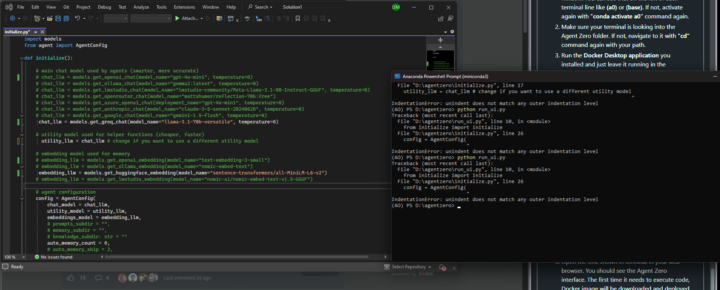
python run_ui.py ERROR. I do not why at the end of the process when typing python run_ui.py
First error message (AO) PS D:\agentzero> python run_ui.py Traceback (most recent call last): File "D:\agentzero\run_ui.py", line 10, in <module> from initialize import initialize File "D:\agentzero\initialize.py", line 17 utility_llm = chat_llm # change if you want to use a different utility model ^ IndentationError: unindent does not match any outer indentation level After adding a # before utility_llm = chat_llm # change if you want to use a different utility model System sends me the next error message: (AO) PS D:\agentzero> python run_ui.py Traceback (most recent call last): File "D:\agentzero\run_ui.py", line 10, in <module> from initialize import initialize File "D:\agentzero\initialize.py", line 26 config = AgentConfig(
1 like • Sep '24
Cheat whenever possible - The error you're seeing is an IndentationError, which occurs when the Python code is not properly indented. In Python, indentation is crucial as it defines the structure and scope of code blocks. Looking at the code in the image, there are a few issues: 1. The initialize() function definition is not properly indented. It should be at the root level (no indentation). 2. The contents of the initialize() function (the comments and variable assignments) are over-indented. They should be indented one level inside the function. 3. The config = AgentConfig(...) line and its contents are also over-indented. They should be at the same level as the initialize() function definition. To fix this, you need to adjust the indentation of your code. Here's how it should look:😇

0 likes • Sep '24
@Chadwick Jones pffffttttt..... this is not the A0 you are looking for 😁
1 like • Sep '24
@Chadwick Jones haha understandable 😁

Sep '24 •
Happy Saturday, Agent Zero Team!
Good day to all you degenerate developers! <3 Today, I would like to discuss TOOLS! That's right, the one thing that 'supposedly' differentiates us from our closest primate relatives: tools and the ability to use them effectively. From that perspective, I would imagine even though an AI model cannot pick up a hammer, it could probably destroy more laptops more quickly than the fastest hammer-wielding monkey in the universe! We are not here to talk about breaking our laptops, however. (At least not yet.) Tools are the arms and legs of our AI models. They are the bridge between thought and action, between plan and execution, between imagination and reality! Without tools, lions and bears would be enjoying a pollution-free, permanent vacation on this spinning rock, and the world would be a completely different place with a lack of what we, as humans, would consider "progress." That's why we are going to use this opportunity to share ideas with each other, either new or known, for the types of tools that are: A) Crucial: must-have tools in every AI agent "toolbox." B) Specialized: tools for specific scenarios or tasks. More complex by nature. C) Conceptual: tools for which you may not have found or made code for, but would like to see. Participate in today's conversation by leaving a comment about different tools that you or someone else has created, which you believe are worth noting for the community. Don't assume anyone already knows—you could be making a massive difference in a fellow A0 developer's or tester's life! - What are the coolest tools you've ever seen or used? - What are the most useful tools you've seen or used? - What is a list of tools that you think the community should know about? Leave a link to your favourite tool depot, or describe your top 5 favourite tools that others likely won't know about and could benefit from! Thank you in advance for participating, Happy Saturday AZ TEAM!
1 like • Sep '24
@Dylan Radske This would be phenomenal - I may already have access to the Gemini voice based conv so I may be able to find out whats needed for api access - I just need time to make it happen.... Ill keep you updated -
1 like • Sep '24
@Dylan Radske I may have lied that it would take time.... I think we can start here - https://ai.google.dev/gemini-api/docs/quickstart?lang=python - I think the pain point will be having advanced as it seems to allow us to do much more from the google admin console.... not sure as like yourself - I am not an expert in any way shape or form.... I just tinker with what I enjoy lol 🤩

Sep '24 •
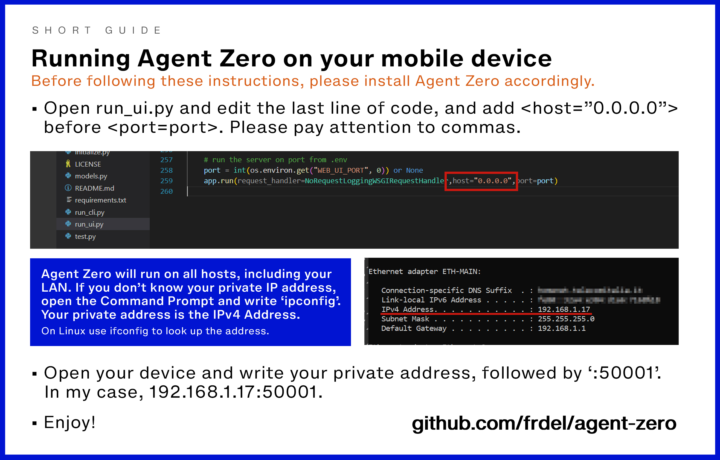
Running Agent Zero on your mobile device
I made a short guide that explain the basics on how to set up your Agent Zero instance to run simultaneously on all your hosts. Access the instance from your phone or tablet. Before the last step of the process, you should clearly run Agent Zero through the terminal in the standard way. • add host="0.0.0.0" in last line of run_ui.py. You can input your private IPv4 address here instead of using all hosts, if you already know it. • Run Agent Zero • Access Agent Zero through your mobile device, writing "private-address:50001" as URL. Enjoy!
0 likes • Sep '24
̿̿ ̿̿ ̿̿ ̿'̿'\̵͇̿̿\з= ( ▀ ͜͞ʖ▀) =ε/̵͇̿̿/’̿’̿ ̿ ̿̿ ̿̿ ̿̿ (╯°□°)╯︵ ┻━┻ ✧ദ്ദി( ˶^ᗜ^˶ )
2 likes • Sep '24
Previous comment may have dated me a bit....... 😆
1-10 of 16

Active 281d ago
Joined Aug 31, 2024
Powered by