Activity
Mon
Wed
Fri
Sun
Jun
Jul
Aug
Sep
Oct
Nov
Dec
Jan
Feb
Mar
Apr
What is this?
Less
More
Owned by Tanja
⭐️ Der Raum für alle Inhaber im lokalen Einzelhandel, die nicht mehr alleine kämpfen wollen. Gemeinsam schaffen wir stationären Handel! ⬇️
Memberships
Design mit Struktur & KI
441 members • Free
3 contributions to Skool Extensions 🧩

🔥
17d •
Calendar Subscribe
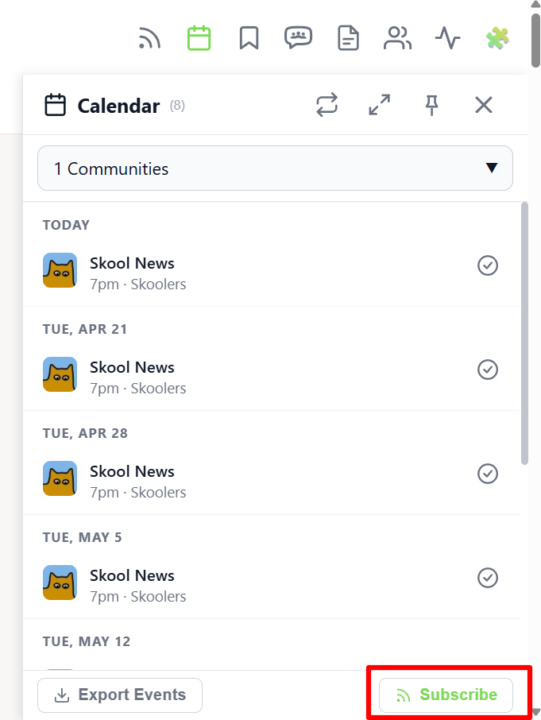
𝗖𝗮𝗹𝗲𝗻𝗱𝗮𝗿 𝗦𝘂𝗯𝘀𝗰𝗿𝗶𝗯𝗲 — 𝗦𝗸𝗼𝗼𝗹 𝗘𝘃𝗲𝗻𝘁𝘀 𝗶𝗻 𝗬𝗼𝘂𝗿 𝗣𝗲𝗿𝘀𝗼𝗻𝗮𝗹 𝗖𝗮𝗹𝗲𝗻𝗱𝗮𝗿 You already have Google Calendar, Apple Calendar or Outlook open all day — so why check a separate sidebar to know when the next Skool event starts? With Calendar Subscribe you get a personal iCal feed URL that pulls every event from every Skool community you're part of directly into the calendar app you already use. Open the Calendar Sidebar and click the Subscribe button in the header. A dialog shows your private iCal URL together with one-click instructions for Google Calendar, Apple Calendar, Outlook (Desktop) and Outlook.com — copy the link, paste it into your calendar app's "Add by URL" / "Subscribe" dialog, and you're done. Your external calendar refreshes the feed automatically, so newly created Skool events appear without you lifting a finger. The feed is personal to your account and covers every community you've joined — no per-community setup, no manual exports, no missed live calls. Whenever you leave or join a community, the feed updates on the next sync. Combined with the Attend button and the per-event Add-to-Calendar menu, Calendar Subscribe turns Skool into a first-class part of your everyday scheduling workflow. --- 𝗞𝗮𝗹𝗲𝗻𝗱𝗲𝗿-𝗔𝗯𝗼 — 𝗦𝗸𝗼𝗼𝗹-𝗘𝘃𝗲𝗻𝘁𝘀 𝗶𝗻 𝗱𝗲𝗶𝗻𝗲𝗺 𝗽𝗲𝗿𝘀ö𝗻𝗹𝗶𝗰𝗵𝗲𝗻 𝗞𝗮𝗹𝗲𝗻𝗱𝗲𝗿 Du hast Google Kalender, Apple Kalender oder Outlook sowieso den ganzen Tag offen — warum also extra in eine separate Sidebar schauen, um zu wissen, wann das nächste Skool-Event startet? Mit dem Kalender-Abo bekommst du eine persönliche iCal-Feed-URL, die jedes Event aus jeder deiner Skool-Communities direkt in die Kalender-App zieht, die du ohnehin nutzt. Öffne die Kalender-Sidebar und klick auf den Abo-Button im Header. Ein Dialog zeigt deine private iCal-URL zusammen mit Klick-für-Klick-Anleitungen für Google Kalender, Apple Kalender, Outlook (Desktop) und Outlook.com — Link kopieren, im "Per URL hinzufügen" / "Abonnieren"-Dialog deiner Kalender-App einfügen, fertig. Dein externer Kalender aktualisiert den Feed automatisch, sodass neu erstellte Skool-Events ohne dein Zutun erscheinen.

6 likes • 17d
Das ist sehr cool! Endlich habe ich die verschiedenen Termine auch auf meinem Handy immer dabei. Vielen lieben Dank!
🔥
Mar 14 •
Right-Click Quick Actions
𝗥𝗶𝗴𝗵𝘁-𝗖𝗹𝗶𝗰𝗸 𝗤𝘂𝗶𝗰𝗸 𝗔𝗰𝘁𝗶𝗼𝗻𝘀 — 𝗦𝗵𝗼𝗿𝘁𝗰𝘂𝘁𝘀 𝗪𝗵𝗲𝗿𝗲 𝗬𝗼𝘂 𝗡𝗲𝗲𝗱 𝗧𝗵𝗲𝗺 The extension adds context-sensitive right-click menus to key elements on Skool, giving you instant access to actions that would otherwise require multiple clicks or page navigations. Right-click on any event in the Calendar sidebar and you get five options to export it to your personal calendar: Google Calendar, Apple Calendar, Outlook, Outlook.com, or Yahoo. Google opens a pre-filled event in a new tab. The other four download the event as an ICS file directly through Skool's API — no copy-pasting of dates or titles needed. Right-click on the notification bell in the navbar and you'll see "Customize notifications", which opens Skool's notification settings page in a new tab. A shortcut to a page that's otherwise buried several clicks deep. Right-click on any category chip in your community feed (admin/owner only) and you get "Edit Categories", which opens the community settings directly on the categories panel — skipping the three-step navigation through Settings, Community, and Categories. All context menus adapt to your current theme (dark or light mode) and follow the extension's language setting. --- 𝗥𝗲𝗰𝗵𝘁𝘀𝗸𝗹𝗶𝗰𝗸-𝗦𝗰𝗵𝗻𝗲𝗹𝗹𝗮𝗸𝘁𝗶𝗼𝗻𝗲𝗻 — 𝗔𝗯𝗸ü𝗿𝘇𝘂𝗻𝗴𝗲𝗻 𝗴𝗲𝗻𝗮𝘂 𝗱𝗼𝗿𝘁, 𝘄𝗼 𝗱𝘂 𝘀𝗶𝗲 𝗯𝗿𝗮𝘂𝗰𝗵𝘀𝘁 Die Extension fügt kontextsensitive Rechtsklick-Menüs an wichtigen Elementen auf Skool hinzu und gibt dir sofortigen Zugriff auf Aktionen, die sonst mehrere Klicks oder Seitenwechsel erfordern würden. Rechtsklick auf ein Event in der Kalender-Sidebar zeigt dir fünf Optionen zum Export in deinen persönlichen Kalender: Google Kalender, Apple Kalender, Outlook, Outlook.com oder Yahoo. Google öffnet ein vorausgefülltes Event in einem neuen Tab. Die anderen vier laden das Event als ICS-Datei direkt über Skools API herunter — kein Kopieren von Daten oder Titeln nötig. Rechtsklick auf die Benachrichtigungs-Glocke in der Navbar zeigt „Benachrichtigungen anpassen" und öffnet Skools Benachrichtigungseinstellungen in einem neuen Tab. Eine Abkürzung zu einer Seite, die sonst mehrere Klicks tief versteckt ist.

1 like • Mar 15
Ich arbeite mit einem Mac und habe keine "Rechtsklick"-Funktion. Was mache ich dann?
🔥
Mar 13 •
Copy to Module (Admin Feature 👑)
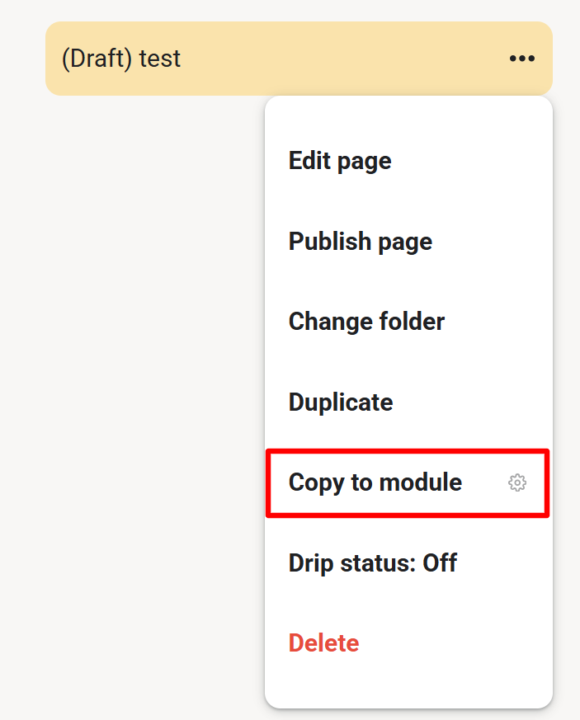
𝗖𝗼𝗽𝘆 𝘁𝗼 𝗠𝗼𝗱𝘂𝗹𝗲 — 𝗗𝘂𝗽𝗹𝗶𝗰𝗮𝘁𝗲 𝗟𝗲𝘀𝘀𝗼𝗻𝘀 𝗔𝗰𝗿𝗼𝘀𝘀 𝗠𝗼𝗱𝘂𝗹𝗲𝘀 As a community admin, sometimes you need the same lesson in multiple modules — for a "Best Of" collection, restructuring your course, or making content available in different contexts. Copy to Module lets you duplicate any lesson (including its video) into another module with just a few clicks. Open any lesson's 3-dot menu and select "Copy to module". A dialog appears where you choose the target module from a dropdown. Click "Copy" and the extension handles the rest — duplicating the page content, preserving the video, and placing it in your chosen module. Once done, you're automatically redirected to the new copy. No more manually recreating lessons or losing video associations when reorganizing your course content. --- 𝗜𝗻 𝗠𝗼𝗱𝘂𝗹 𝗸𝗼𝗽𝗶𝗲𝗿𝗲𝗻 — 𝗟𝗲𝗸𝘁𝗶𝗼𝗻𝗲𝗻 𝘇𝘄𝗶𝘀𝗰𝗵𝗲𝗻 𝗠𝗼𝗱𝘂𝗹𝗲𝗻 𝗱𝘂𝗽𝗹𝗶𝘇𝗶𝗲𝗿𝗲𝗻 Als Community-Admin brauchst du manchmal die gleiche Lektion in mehreren Modulen — für eine "Best Of"-Sammlung, eine Kurs-Umstrukturierung oder um Inhalte in verschiedenen Kontexten verfügbar zu machen. Copy to Module lässt dich jede Lektion (inklusive Video) mit wenigen Klicks in ein anderes Modul duplizieren. Öffne das 3-Punkte-Menü einer beliebigen Lektion und wähle "In Modul kopieren". Ein Dialog erscheint, in dem du das Zielmodul aus einem Dropdown wählst. Klick auf "Kopieren" und die Extension erledigt den Rest — dupliziert den Seiteninhalt, behält das Video bei und platziert alles in deinem gewählten Modul. Anschließend wirst du automatisch zur neuen Kopie weitergeleitet. Kein manuelles Neuerstellen von Lektionen mehr und kein Verlust von Video-Verknüpfungen beim Reorganisieren deiner Kursinhalte.
3 likes • Mar 13
Tolle Idee. 👍🏻
1-3 of 3

@tanja-weishaupt
⭐️ Ich bringe ins Tun, was zu lange nur gedacht wurde.
Für Ladeninhaber im stationären Handel, die wirklich etwas bewegen wollen.
Active 15m ago
Joined Mar 13, 2026
ENFJ
Hattingen, NRW
Powered by