Activity
Mon
Wed
Fri
Sun
May
Jun
Jul
Aug
Sep
Oct
Nov
Dec
Jan
Feb
Mar
Apr
What is this?
Less
More
Memberships
The Escape Blueprint
26 members • Free
AI After Dark
15 members • Free
Digital Business after 40
68 members • Free
Skill & Soul Studio
120 members • Free
Love me France - Vacay Or Stay
75 members • Free
Skool Geeks
83 members • Free
AI Creator Bootcamp
2.7k members • $9/month
Brand Like a Boss
142 members • Free
AI and Grow Rich with PLR.me
561 members • Free
8 contributions to Skill & Soul Studio

🔥
2d •
i Finally have my store up and running
Skill & Soul Studio Store Honest opinions let me know what you think, you can be as brutally honest as you want. I can take it


1 like • 50m
Thank you! I need subscribers now so I look legit---I'm going after speaking/workshops gigs and that's the place people will "check me out". My huge personal fb friends list is mostly artists who are very anti-AI, on camera actors and industry visual artists, and I get it, but I can't count on them to support this. Thanks for helping 😊
1 like • 49m
@Manda Jackson hey btw I'm going through your tutorials here and your AI Clarity coach is belong me figure out my offers! Thank you 😊

3d •
Building your own Chat GPT
I am an actual beginner and so far I have used GPT for polishing ideas, grammar checks, creating structure, so simple things. But I have heard how people are training their own GPT. Are you guys able to reflect on your pwn experience, how skilled are you with tech, how challenging was the set up, how long did it take you? I am curious but feel already overwhelmed without even starting heheee

1 like • 11h
Btw--anyone--I'm giving detail for those who may be interested in what a function/use case might look like and go do it for yourself. Because that's how I've learned. I don't mean to "Extra", lol.
1 like • 2h
@Manda Jackson Thank you Manda--I do have it doing mostly what you suggested, but I guess Chatgpt can't connect with EXCEL yet, as you've said. Maybe I should switch to Claude. currently though, I've been able to do an entire sheet paste into EXCEL (my tax deductions gpt I created did that) with pretty much ease.
🔥
5h •
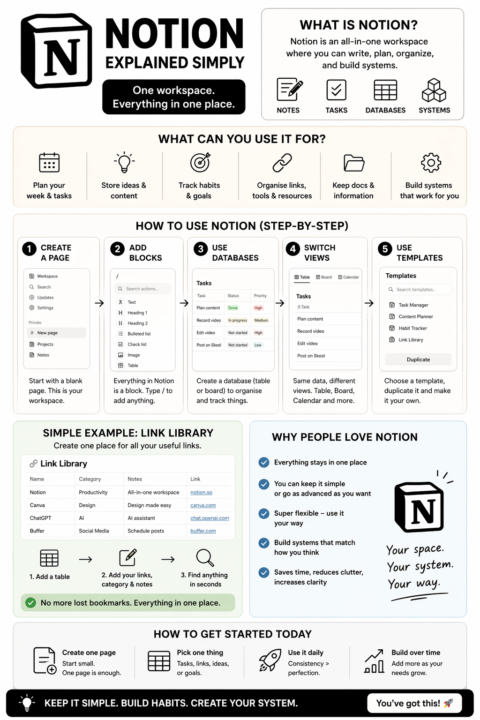
What Notion is
Notion is an all-in-one workspace where you can keep notes, tasks, documents, and systems in one place.Instead of using 5 different apps, you build everything inside one tool. Think of it as:Notes + To-do list + Database + Simple system builder How people actually use it - Plan their week or tasks - Store content ideas or business docs - Track habits or goals - Organise links, tools, and resources - Build simple systems that keep everything in one place How to use Notion (basic setup) 1. Create a page Start with a blank page. This is your workspace. 2. Add blocks= Everything in Notion is a “block”Type / to add things like: - text - headings - checklists - tables 3. Use databases (this is where it becomes powerful) Create a table or board to organise things Example: - Task manager - Content planner - Link library 4. Switch views Same data, different views: - Table (list view) - Board (like sticky notes) - Calendar 5. Use templates Instead of building from scratch, duplicate a template and edit it to fit you Simple example (so it clicks)Create a “Link Library” page: - Add a table - Columns: Name | Category | Notes | Link - Now every tool you find goes in one place No more scattered bookmarks Why people like it - Everything stays in one place - You can keep it as simple or as advanced as you want - You build systems that match how you think
1 like • 2h
Thank you! I will have to look at more tutorials on this, but Organizing all of this cyber info is really needed....
🔥
18h •
Link Library
You're not disorganised. Your links just don't have a system. So I built one. Link Library Save everything once. Find it instantly. A clean Notion database to keep all your tools, links, and resources in one place — without the mess. What you can do with it: - Tag links by category so everything stays organised - Add quick notes so you remember why you saved it - Search and find anything in seconds No more digging through tabs, bookmarks, or random notes. Duplicate it and start using it straight away. This is part of the bigger shift inside this community. Less scattered. More structured. Easier to actually use what you save. Check it out Here - Link Library

2 likes • 6h
I'm so interested---but I don't know anything about Notion. I feel so overwhelmed by all the tools I'm having to learn. What's the cliff notes (that's how old I am) on Notion? What's the easiest way to start? Does it co.e as part of Google workspace or something?
🔥
1d •
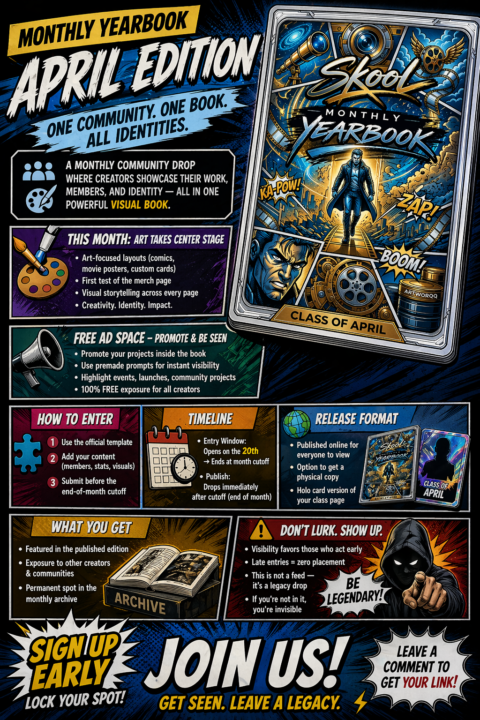
Monthly Yearbook (April Edition) April 20 → April 29
This is one of my favourite things we’re doing right now. It’s basically a monthly community drop where creators showcase their work, members, and identity - all in one visual book. This month we’re playing around more with the style - comics, - movie posters, - custom cards and testing a merch page for the first time There’s also free ad space in there so if you’ve got something you’re working on, you can actually put it in front of people If you want to be part of it you just use the template, add your stuff, and send it through before the cutoff Once it’s done, it gets published online and you can grab a physical copy or a holo card version if you want something tangible You’ll be in the edition, people will see your work, and it stays in the archive If you want the link, just comment and I’ll send it over
2 likes • 6h
Send me the link!
1-8 of 8
@susan-peahl-2034
AI Consultant and Digital Content Creator
Active 10m ago
Joined Apr 19, 2026