

🔥
1d •
🛠 Creator Toolbox
Cursor Think of Cursor as an AI-first coding workspace, not just a code editor. If you've ever wished ChatGPT could actually jump into your project, understand all of your files, make changes across multiple documents, fix bugs, and build features without endless copy-and-paste, that's the problem Cursor is trying to solve. It combines an editor with AI agents that understand your entire codebase and can perform multi-step development tasks. What Cursor Does Cursor helps you: Generate code from plain English Edit multiple files simultaneously Understand an existing codebase Refactor old code Find and fix bugs Explain unfamiliar code Automate repetitive programming tasks Instead of saying: "Write me some HTML." You can say: "Build a responsive pricing page with three plans that matches the rest of my website." Cursor plans the work, edits the relevant files, and can even test the results depending on your workflow. The 20% That Gives You 80% of the Value You don't need every feature. These five provide most of the benefit. 1. AI Agent Instead of generating snippets, Cursor can complete multi-step tasks across your project. Example: "Add user login to my app." It identifies the relevant files, updates them, and connects the pieces together. 2. Codebase Understanding Cursor indexes your project. You can ask: Where is authentication handled? Which file controls pricing? What happens after checkout? It answers using the actual project rather than isolated snippets. 3. Natural Language Editing Highlight some code and simply describe what you want. Examples: Make this faster Convert to TypeScript Simplify this function Add comments Fix this bug No need to rewrite everything manually. 4. Smart Autocomplete Cursor predicts much larger chunks than traditional autocomplete. It often finishes entire functions or suggests coordinated edits across multiple lines. 5. Agent Mode Give Cursor a larger objective. Examples: Build a dashboard Add a contact form Create an API

🔥
Dec '25 •
Week 1- Day 1: Understanding AI Models
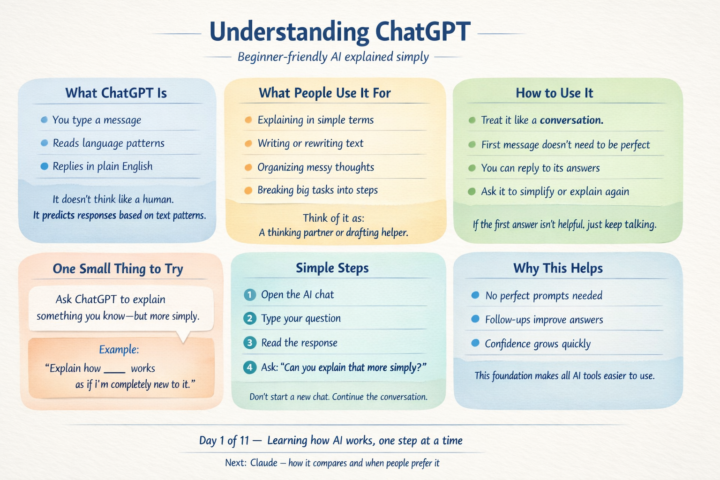
What ChatGPT actually is ChatGPT is a large language model (LLM). That means it has been trained on a large amount of text so it can understand and respond to written language. In simple terms: - You type messages - It reads the words and patterns - It responds in natural language - It does not “think” or “know things” the way a human does. - It predicts helpful responses based on language patterns. - You don’t need technical skills to use it — if you can type a message, you can use it. 🔧 What people commonly use it for Most beginners use ChatGPT for everyday things like: - Asking questions they don’t want to Google - Getting explanations in simpler language - Writing or rewriting messages, emails, or notes - Organising thoughts when their head feels cluttered - Breaking a big task into smaller steps You can treat it like: - A thinking partner - A drafting helper - Or a second set of eyes 🧭 How to use it (important mental model) ChatGPT works best as a conversation, not a one-off command. That means: - Your first message does not need to be perfect - You can respond to its answer - You can ask it to explain again, simplify, or try a different angle - You are not “doing it wrong” if the first answer isn’t great. - You just keep talking. ✅ One small thing to try today Ask ChatGPT to explain something you already understand — but more simply Why this works: - There’s no pressure to check accuracy - You can focus on how it explains things - You learn how follow-ups improve answers Example: “Explain how [something you already know] works as if I’m completely new to it.” 🪜 Simple step-by-step - Open the AI chat tool - Type your question in plain language Read the response - If it feels too complex, reply with: “Can you explain that more simply?” Do not start a new chat. - Just continue the conversation. 💡 Why this helps - You learn that AI responds to clarity, not clever wording - You get comfortable using follow-ups - You build confidence without needing “prompt skills” - This is the foundation for using any AI model.
🔥
Mar 15 •
Run AI Locally With Ollama
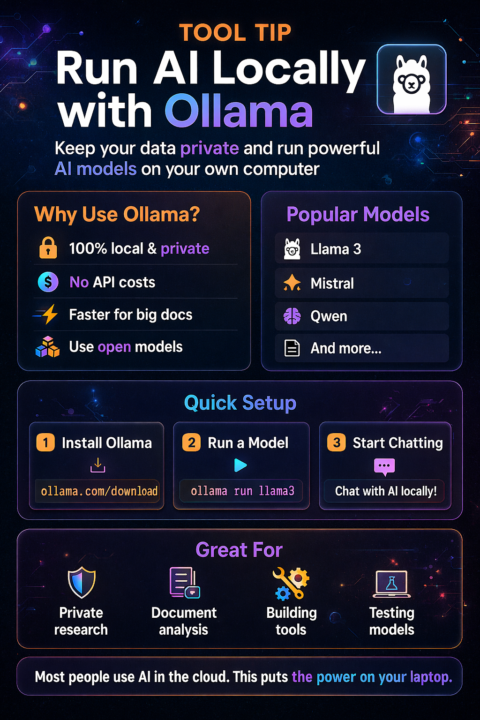
Most people use AI through websites. But there’s a tool called Ollama that lets you run AI models directly on your computer. Why that matters: • Your data stays local • No API costs • Faster for certain tasks • You can run open models like Llama, Mistral, and Qwen What people use it for: • private document analysis • building local AI assistants • testing different models • creating custom workflows Simple setup: Install Ollama Run a model (example: ollama run llama3) Start chatting with the model locally It’s not for everyone. But if you’re building tools or experimenting with AI systems, it’s incredibly useful. Sometimes the most powerful tools aren’t the ones everyone is talking about. Have you ever run an AI model locally, or only through websites?
🔥
11d •
🎨 Looking for FREE AI chats that can generate images?
There are more options than ever, and most have free plans or daily free generations. Here's a list worth bookmarking: 🤖 Chat-based AI with image generation • ChatGPT 🔗 https://chatgpt.com • Google Gemini 🔗 https://gemini.google.com • Microsoft Copilot 🔗 https://copilot.micrsoft.com • Grok 🔗 https://grok.com • Meta AI 🔗 https://www.meta.ai • Le Chat (Mistral) 🔗 https://chat.mistral.ai • Qwen Chat 🔗 https://chat.qwen.ai • Poe 🔗 https://poe.com • HuggingChat 🔗 https://huggingface.co/chat 🎨 Dedicated AI image generators • Leonardo AI 🔗 https://leonardo.ai • Ideogram 🔗 https://ideogram.ai • Playground AI 🔗 https://playground.com • Tensor.Art 🔗 https://tensor.art • SeaArt AI 🔗 https://seaart.ai • Mage.space 🔗 https://www.mage.space • Adobe Firefly 🔗 https://firefly.adobe.com • PicLumen 🔗 https://www.piclumen.com - Nightcafe 🔗 RB'S link to NightCafe If I've missed one of your favourites, add it in the comments so we can build an even bigger list. AI tools breed faster than rabbits with venture capital.
🔥
18d •
TOOL TIP: BUILD YOUR OWN DATASET
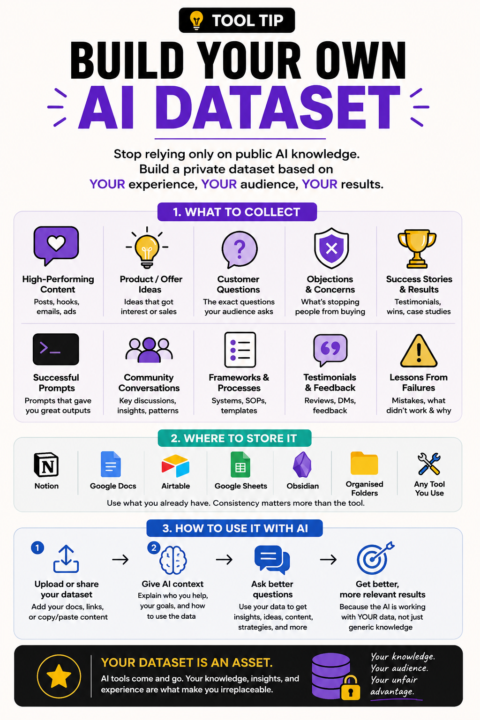
When I say "dataset" I don't mean anything technical. I mean creating a collection of information that has already worked for you. Mine would include things like: • Social posts that got engagement • Product ideas that sold • Customer questions • Common objections • Community discussions • Successful prompts • Testimonials • Frameworks I've developed • Lessons learned from failed projects You can store it in: • Google Docs • Notion • Airtable • Obsidian • A spreadsheet • A folder of organised documents The goal isn't to collect more information. The goal is to collect your information. Over time, this becomes far more valuable than downloading another prompt pack because it reflects your audience, your experience, and your results. If you lost access to every AI tool tomorrow, what information would you wish you'd saved?
1-30 of 101
powered by

Suggested communities
Powered by