Activity
Mon
Wed
Fri
Sun
Nov
Dec
Jan
Feb
Mar
Apr
May
Jun
Jul
Aug
Sep
Oct
What is this?
Less
More
Creator Boost Tribe
9.2k
Free
18 contributions to Creator Boost Tribe

Oct '24 •
Links in the description...
How do I make a link in the description? I have my webbsite, Insta and FB there, but I cant make links out of them. :S How do I do that?

4 likes • Oct '24
They will turn into links once the video is published, just include the full address.

Oct '24 •
Doing a 180 with my thumbnail strategy
I'm going to create my thumbnail before I film my video. https://vidiq.com/blog/post/make-youtube-thumbnails-before-filming/ Creating my thumbnail after shooting the video is hitting all wrong for me. I have poured all my energy into making this video that I now have no patience to create a thoughtful thumbnail. I do put time and energy into my title, hook, and intro as well as what I want the thumbnail to convey. However, at the end it feels like the last hour before Thanksgiving guests arrive. I'm so exhausted that I don't care if the rosemary cocktail sprigs are too big, the mashed potatoes are over mashed, and I forgot the rolls. I'm done and I need this to be over!! That is what the last bits before publishing feels like. I don't expect every part of this journey to be a Zen moment but I do think that I am going to at least give myself the beginning part of the video process a fighting chance and make it the first thing I work all while I am still fresh and enthused. The method that I use to take my picture feels antiquated. I stand against my white wall, take several pictures with my iPhone using a tripod and the timer on my phone. I think the picture quality sucks.Not only that I completely paid no attention to my Hook and I am randomly doing poses. Somebody please help I'm making myself nuts🙏🤣 I'm sharing my channel and if anyone would be interested in checking out my thumbnail picture quality I sure would appreciate it. https://www.youtube.com/channel/UCXx-e45p5gt4PD1F7gCfrzQ xo, Darlia
3 likes • Oct '24
Creating the thumbnail ahead of time works well for me. Like you mentioned if you leave it to the end, you often don't spend the correct amount of time on it. I normally do it the night before, then I have time to think about it, while I'm editing the video, and change anything that I might want to tweak. Highly recommend doing the thumbnail before hand (and the title)
Oct '24 •
Where to get B-Roll?
Hey, Has anyone found a good place to get B-Roll Memes (w/ sound) to use in your videos? Obviously you can always search for them on youtube, but that can be a painful process. Any suggestions?
1 like • Oct '24
@Jennifer Meredith Yeah, I was just looking for more streamlined ideas, looking for service people may use, instead of having to search google all the time.
1 like • Oct '24
@Wendy Unger-Moore Ok cool. I'll have to check it out

Oct '24 •
Going Backwards in Monetization
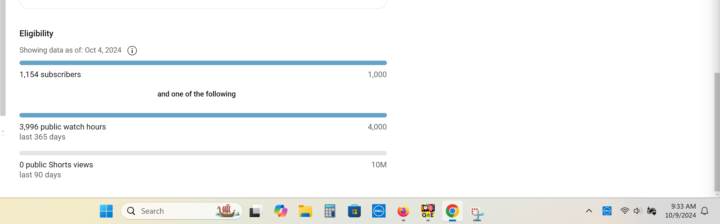
I was four hours away from being monetized! But because I had a video that had a lot of views 366 days ago, now I am many hours away. I'll keep plugging away. I started making videos in the end of July 2023 and have been making videos ever since. I haven't stopped. I've published 87 videos. I have accumulated 4.7K watch hours. YouTube doesn't give an exact number. But as of the last 365 days, I have 3,703.20 hours, which is less than what the earn tab says since it is dated October 7. I am going backwards! So frustrating!
2 likes • Oct '24
I feel your pain. similar thing happened to me. I was at 3.7k at day 365, now as the rolling year continues you're always competiting against your past self, on what videos you did. Currently I'm at 1.8 K. It sucks.
3 likes • Oct '24
@Shelina Virjee Well things are looking up now. I think I've finally found my grove now, up to 2900 subscribers and each video I've been publishing has 2K-5K views. Hopefully, if everything contiunues, it will work out.
Oct '24 •
Favorite Online Tools...
Hey, I thought this might be a good thread for everyone. If you list some of your favorite online tools, that assist in making your YouTube creation just a little easier. I'll start with my top 3. Add more of your own below. Make sure to add the link and let us know if it's free or requires a subscription. 1) Cloud Convert | Link: https://cloudconvert.com/webp-to-png Free service that allows you to convert WEBP images files to a more useable format. WEBP is quickly becoming a popular format to use to reduce the size of images, but is hard to use properly with editing programs. Convert all of those file to Transparent PNG's. The service is free, and you don't even have to sign up, if you do sign up with your primary e-mail or even a burner e-mail, you are able to convert more files 2) Adobe Express | Link: https://www.adobe.com/express/ A great program that quickly allows you to remove the background from most image files. You don't have to sign up, you can go straight to the EDIT button and find REMOVE Background. This is a great resource for help with Thumbnail creation 3) Adobe Audio Enhance | https://podcast.adobe.com/enhance Another great tool, that can really clean up your audio, and enhance it to the next level. I've used this a lot. Works perfectly if you stay within the limits (1 Hour audio / 500 mb). Tip if you have a large WAV file, save it as MP3 to reduce the file size, then upload the MP3 to the site to be processed.
0 likes • Oct '24
Anyone else with some good online tools to share? I feel there are like some real gems around that people are missing out on.
1-10 of 18
@sean-hennebury-1513
Easy going Canadian who enjoys collecting Toys and sharing them with people.
Active 530d ago
Joined Sep 25, 2024
Ottawa, Canada
Powered by