Activity
Mon
Wed
Fri
Sun
Jul
Aug
Sep
Oct
Nov
Dec
Jan
Feb
Mar
Apr
May
Jun
What is this?
Less
More
Memberships
Chase AI Community
67.7k members • Free
AI Launchpad
29k members • Free
AI Money Lab
82.2k members • Free
AI Workshop Lite
26.6k members • Free
AndyNoCode
34.2k members • Free
AI Automation First Client
1.8k members • Free
AI Automation Mastery
29.7k members • Free
AI Automation Agency Hub
324.8k members • Free
AI Automation (A-Z)
158.2k members • Free
92 contributions to AI Automation First Client

30d •
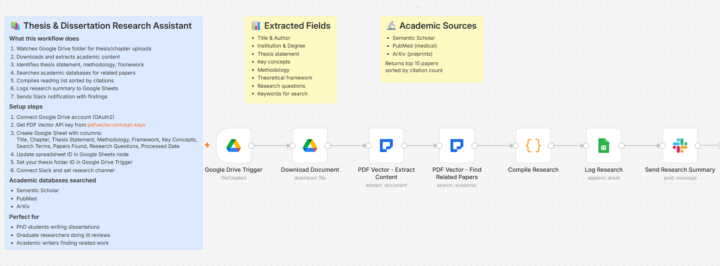
Sister-in-Law's PhD Advisor Thought She Hired a Research Assistant. She Just Had a Better System.😁
Sister-in-law, 18 months into her PhD. Literature review consuming her existence. 247 papers to process. Advisor wanted synthesis by month end. Called me crying. "I can't read fast enough." THE ACADEMIC OVERWHELM Each paper: 20-40 pages. Dense methodology sections. Results scattered across tables and figures. Citations leading to more papers. Taking notes by hand. Losing track of what she'd read. Couldn't remember which paper said what. "Did Study A or Study B find the correlation? I know I read it somewhere." Searching through 247 PDFs manually for one finding. Hours lost. THE RESEARCH HELPER I BUILT Papers go into folder organized by topic. Workflow processes each one. Extracts key information. Authors, methodology, sample size, main findings, limitations, how it connects to her research question. Searchable database. "Which studies found correlation between X and Y?" Instant answer with citations. Cross-references findings. "Studies A, C, and F found positive correlation. Study B found none. Study D found negative." Generates properly formatted citations automatically. THE ADVISOR'S REACTION Submitted literature review. Advisor's response: "This is remarkably well-organized. Did you hire help?" She didn't. Just stopped drowning and started swimming. "The synthesis section reads like you actually understood the connections between studies." She did. Because she could finally see them. Defense is next year. Says the research system is the only reason she's still in the program. The extraction struggles with heavily formatted academic papers. Lots of equations and charts sometimes confuse it. But captures methodology and findings reliably. PhD students are drowning. This is a life raft. Wow this is the json i would like to share to all reader. What research are you trying to make sense of?
0
0

30d •
Which boring automation would you sell first? 🤔
If you had to get one paid automation client in the next 30 days, which offer would you pick? A) Real estate agents Lead follow-up plus document checklist after someone submits an inquiry. B) Small law firms Client intake plus document sorting before the first consultation. C) Bookkeepers or CPAs Receipt and invoice extraction into a clean spreadsheet. D) Recruiters Resume screening plus candidate follow-up tracker. E) Local service businesses Missed-call follow-up plus quote request tracking. My pick would be B or C. Not because they sound the most exciting. Because the pain is easy to understand. Documents come in. Someone manually checks them. Fields need to be copied. Follow-up gets missed. The business already knows it is wasting time. That is much easier to sell than: "I build AI agents for your business." For a first client, I think the best offer is usually boring, specific, and close to money or admin pain. What would you choose? A, B, C, D, E, or another niche?
3 likes • 30d
I’d pick C too ❤️ Bookkeepers already deal with messy receipts and invoices every week, so the pain is easy to understand. A simple “send docs in, get a clean review sheet out” workflow feels boring, but very sellable.
1 like • 30d
[attachment]
May 13 •
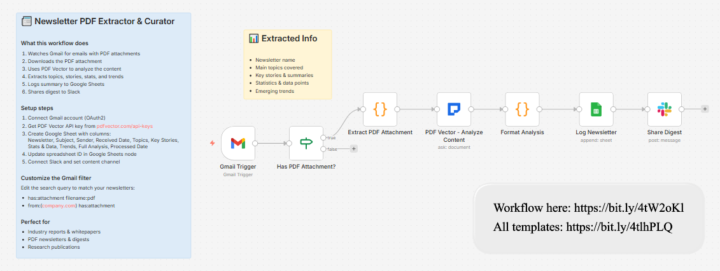
Subscribed to 47 Newsletters. Read Maybe 3. Inbox Was a Graveyard. 🫢
Started subscribing to newsletters. Productivity tips. Parenting advice. Recipe roundups. Industry news. Local events. Good intentions. Terrible execution. THE NEWSLETTER GRAVEYARD 47 active subscriptions. Average 4 emails per week each. That's 188 emails weekly I was ignoring. "I'll read it later." Later never came. Just guilt scrolling past unread stacks. Occasionally something important buried in there. School fundraiser deadline. Recipe I actually wanted. Missed both because they drowned in the pile. Tried unsubscribing. Got through 12. Gave up. Life happened. THE CURATOR I BUILT All newsletters route to a separate folder. Workflow processes them daily. Extracts the actual content. Summarizes key points. Categorizes by topic. Daily digest: One email with summaries from everything. Organized by category. Links to full versions if I want more. Flags action items. Deadlines. Events. Things that need response. The rest? Summarized and archived. There if I need it. Not cluttering my inbox. THE INBOX SANITY Before: 188 weekly emails ignored, important things missed, constant guilt. After: One daily digest, action items highlighted, actually read the summaries. Discovered I only care about 8 of the 47 newsletters. Unsubscribed from the rest guilt-free because I could see I never clicked through to full articles. Those 8? I actually read now because they're not buried. Found out about a community event I would have missed. Was buried in a newsletter I hadn't opened in 3 weeks. The summarization isn't perfect on heavily formatted newsletters. Image-heavy ones lose context. But captures text-based content well. Inbox feels manageable again. I really want to share this json to everyone in this group What newsletters are you subscribed to that you never actually read?
0
0
May 12 •
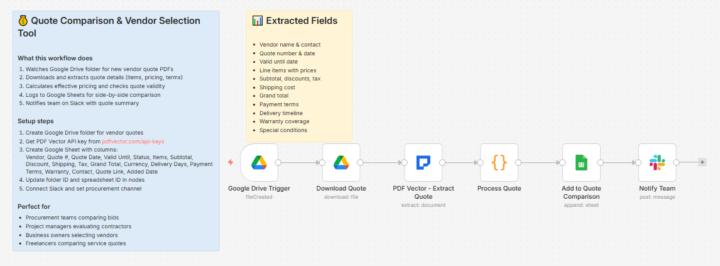
My Friend Was About to Accept a $14,000 Quote. Buried on Page 3 Was a $2,200 Hidden Fee. 🫢
Friend remodeling her kitchen. Three contractor quotes. Looked at the bottom line numbers. Ready to sign. "Wait. Did you read the whole thing?" THE QUOTE COMPARISON NIGHTMARE Contractors format quotes differently. Some itemize everything. Some bundle. Some have fees buried in fine print. Quote A: $42,000 total Quote B: $38,000 total Quote C: $44,000 total Obvious choice, right? Quote B wins. Except Quote B had a $2,200 "materials handling fee" on page 3. And a $1,800 "site preparation" charge that Quotes A and C included in their base price. Quote B wasn't actually cheaper. It was more expensive AND harder to compare. THE COMPARISON HELPER I BUILT Upload all quotes. Workflow extracts every line item, fee, charge, timeline, warranty term. Creates side-by-side comparison. Not just totals. Every component broken out. Flags hidden fees. Highlights what's included versus what's extra. Shows warranty differences. Timeline comparison too. Quote A: 6 weeks. Quote B: "estimated 8-10 weeks." Quote C: 5 weeks with penalties for delays. THE INFORMED DECISION Before: Compare bottom lines, miss hidden fees, surprise charges during project. After: True apples-to-apples comparison, hidden costs visible, better negotiation position. Friend went back to Quote B contractor. "I see you have a $2,200 handling fee that the others include in their base." Fee disappeared. Saved her $2,200 from one conversation. Used the same workflow when we got HVAC quotes last summer. Found one quote that didn't include permit costs. Would have been a $400 surprise. The extraction needs clear PDFs. Handwritten quotes don't work well. But most contractors send typed estimates now. This is the workflow i would like to share in group What hidden fees have you found buried in quotes?
May 10 •
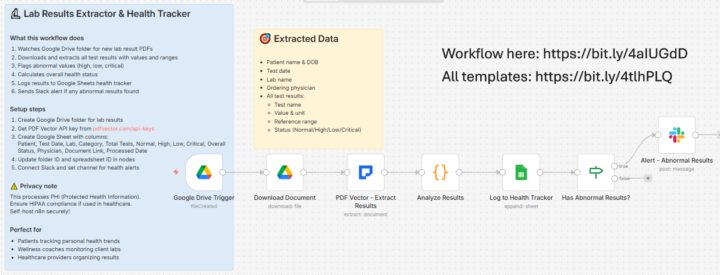
Almost Took the Wrong Medication Because I Misread My Own Lab Results 🫣
Got my bloodwork back. Numbers everywhere. Reference ranges I didn't understand. Notes that seemed concerning but maybe weren't. Googled some values. Made myself anxious. Called the doctor's office. Waited 3 days for a callback. THE HEALTH TRACKING MESS Every lab result as a separate PDF. Different formats from different labs over the years. Wanted to see trends but couldn't compare anything easily. Cholesterol this visit. Cholesterol last visit. Were the numbers actually different or just different lab formats? Mentioned a concerning number to my husband. He looked at it. "That's within normal range. You're reading the wrong column." Almost asked my doctor about starting medication for something that wasn't even a problem. THE TRACKER I BUILT Lab results go into folder. Workflow extracts all the values, reference ranges, dates. Flags anything outside normal range. More importantly: tracks trends over time. Cholesterol going up? Down? Stable? Visible at a glance. Color codes concern levels. Green means fine. Yellow means watch. Red means call doctor. Added a notes section for what the doctor actually said about each result. THE PEACE OF MIND Before: Anxiety spiral, misreading results, unnecessary worry, couldn't track trends. After: Clear dashboard of my health numbers, trends visible, only worry about actual concerns. Shared it with my mom. She's got years of results from multiple doctors. Finally seeing her numbers organized helped her have a better conversation with her cardiologist. The extraction struggles with handwritten doctor notes. Some older results from scanned faxes don't parse perfectly. But captures the actual lab values reliably. Worth the setup for the anxiety reduction alone. This is the workflow i want to share How do you keep track of your family's health records?
1
0
1-10 of 92

@sarah-martinez-5730
Former legal admin → mom → n8n learner. Self-hosting to avoid Zapier costs. Building document automation workflows. Let's learn together! Phoenix, AZ
Active 30d ago
Joined Nov 15, 2025
Phoenix, AZ