Activity
Mon
Wed
Fri
Sun
Mar
Apr
May
Jun
Jul
Aug
Sep
Oct
Nov
Dec
Jan
Feb
What is this?
Less
More
Memberships
Learn Microsoft Fabric
15.3k members • Free
Fabric Dojo 织物
349 members • $67/month
Power BI Park
261 members • $69/m
7 contributions to Learn Microsoft Fabric

🚀
Feb '25 •
Fabric Free Trial (update from Microsoft)
Hey everyone, for those of you who are asking about the Fabric Free Trial (see this previous thread), I just received the following update from Microsoft: "To answer your questions, we have stopped supporting Fabric trial capacities on newly created Entra and M365 tenants, which many users previously set up for testing and learning. Unfortunately, the ease of creating these tenants for trial capacities led to usage patterns that we cannot continue to support, so we are unable to provide trials for this class of tenant. We recommend initiating Fabric trial capacities on tenants associated with your work or school organization—rather than spinning up new tenants. Trial capacities remain available on established tenants that demonstrate multi-product usage of Microsoft services." So I believe the methods you can take now are either: 1) If you work for a company that uses Fabric - use your company's tenant 2) If not, or you don't want to use your company tenant, purchase an F2 (or higher) for practicing/learning, and pause/ resume as and when you need it. For reference, an F2 is ~ $0.35 per hour. Thoughts?

0 likes • Aug '25
@Will Needham I’m planning to create a Microsoft account from my college. If I do it now, can I use it for the Fabric trial?
🚀
Nov '24 •
New community on Skool for Power BI
Injae Park (Microsoft MVP and part of the Power BI Core Visuals team) has launched a new Skool community for Power BI Developers - focusing on building beautiful reports, and how to leverage the power of AI in report design and development. Plus, there are lots of great bonuses in there! First 100 people get to lock in the early bird-rate: 👉🔗 https://www.skool.com/powerbipark/about

2 likes • Nov '24
I've joined as a early bird.😍
Nov '24 •
I'm excited to share that I passed the DP-600 exam!
Huge thanks to @Will Needham for their amazing, knowledge-packed videos. I highly recommend watching these videos in full—they’re incredibly helpful. Also, don’t forget to take the Microsoft Learn practice tests multiple times to assess your understanding.
1 like • Nov '24
@Will Needham 🙏🌹
2 likes • Nov '24
@Mubaraq Abdulmaleek Thank you so much! For the next step, I’d like to put everything I’ve learned into practice with Fabric Dojo and gain hands-on experience. If you have any ideas or recommendations on how I can deepen my skills, I’d love to hear them!
Oct '24 •
Seeking Additional Resources for DP-600 Exam
I’ve watched all of @Will Needham ’s videos and gone through the references he provided to prepare for the DP-600 exam. I’ve also taken the Microsoft practice tests multiple times (though the questions were repetitive). Can anyone recommend additional resources or practice questions to further help with preparation? Also, do you think the videos and references are enough to fully prepare for the exam?
0 likes • Oct '24
Thank you very much Will
Sep '24 •
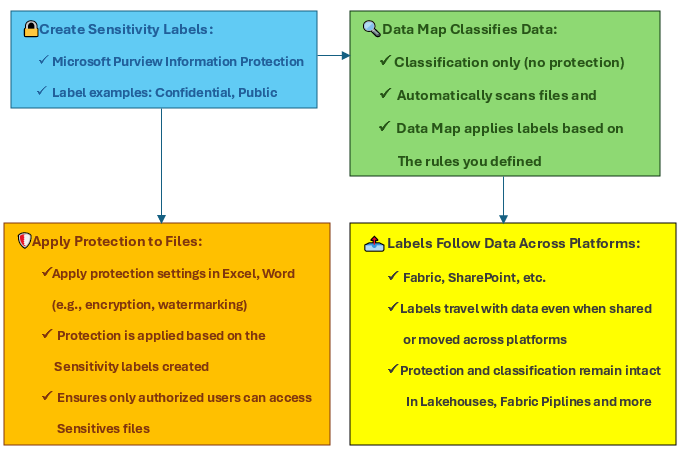
🚀 Deep Dive: Sensitivity Labels and Data Classification in Microsoft Fabric & Purview 🔒
Data security isn’t just about where you store your data—it’s about how well you know and classify it. This week, let’s dive deeper into how Microsoft Fabric and Purview work together to ensure your sensitive data stays protected across all platforms. 🔑 Automated Data Classification: Microsoft Purview automatically scans your data sources, applying sensitivity labels based on rules you define. This ensures that sensitive information, like personal or financial data, is immediately recognized and protected. 🛡️ Protection Across Platforms: Once data is labeled, it’s protected everywhere—whether in Power BI, Excel, or any shared documents. Your labels follow the data across all services, providing end-to-end security. 📊 Seamless Governance: Sensitivity labels help you enforce policies automatically, ensuring that data remains secure, even as it moves across different systems within your organization. Flowchart Representation of Sensitivity Labels and Data Classification Process 📊 please see the flowchart in below! 👇 Here’s a visual breakdown of how Sensitivity Labels work from creation in Microsoft Purview, to classification in the Data Map, and protection across services like Microsoft Fabric: Create Sensitivity LabelsUse Microsoft Purview Information Protection to define labels (e.g., "Confidential", "Highly Confidential"). Labels include protection features like encryption or watermarking and trigger automatic classification when sensitive information like credit card numbers is detected. Data Map Classifies DataThe Data Map scans data sources and applies labels based on the rules you've defined. It classifies the data but does not apply protection at this stage.Apply Protection to FilesOnce sensitivity labels are applied to files (such as those in Excel or Word), protection features like encryption or access restrictions are enforced. Labels follow the data, ensuring that only authorized users can access it.Labels Follow Data Across PlatformsWhether your data moves to Power BI, SharePoint, or Microsoft Fabric, the protection and classification remain intact, providing seamless governance.
0 likes • Sep '24
I would like to know about your thought🙏
1-7 of 7

@sahar-radmehr-7191
I’m Sahar! I’m a Data Engineer with experience in building data pipelines and using tools like Microsoft Fabric and Azure.
Active 8d ago
Joined Sep 5, 2024
Powered by