Activity
Mon
Wed
Fri
Sun
Apr
May
Jun
Jul
Aug
Sep
Oct
Nov
Dec
Jan
Feb
Mar
What is this?
Less
More
Memberships
Learn Power Apps
2.5k members • Free
5 contributions to Learn Power Apps

Aug '24 •
Process Automation with Power Apps
Hi everyone! Thank you Darren for a warm welcome! I'm a newbie! I'm offering consultancy to a company to improve their repetitive tasks that they make over microsoft dynamics. They pull various reports from the system in the morning and make one big report for the sales managers in the field. So my first task is to make this process automated. Unfortunately the system manager didn't allow me to have an API access. Still, I have a user access. I was trying to find another reliable way that I can systematically have to those reports and compile in one excel/airtable sheet as they do manually. Not sure if power apps would be helpful for this sort of process. Thanks in advance!

2 likes • Aug '24
Hi @Mucahid Cakici if you have user access you will need to utilise Power Automate desktop and create a flow that periodically logs in to get data and saves it into a database of your choice and query that database with PowerBI. PowerApps will not be the right choice for this.
Aug '24 •
PowerAutomate word online limitations
Hi Everyone, I’m working on a project that requires me to populate a word template in PowerAutomate.The columns I need to map are about 52 but word is only retrieving 46 has anyone faced this issue before? Kind Regards,
1 like • Aug '24
@Kendall Outlaw thank you

Aug '24 •
Filtering a Lookup Value from a Collection.
I have a gallery with a collection of data from the Students Dataverse table and adding a column from the Activities Dataverse table. ClearCollect(lStudent_col, With( { Items: SortByColumns( AddColumns( Students As S , AcummulatedPoints, Sum(Filter(Class_Activities, FK_Attending_Student.Surname = S.Surname), Points) ),"AcummulatedPoints", SortOrder.Descending)} , ForAll(Sequence(CountRows(Items)), Patch(Last(FirstN(Items,Value)), {RowNumber:Value}))); See Image Attached. I have added a Lookup Column to provide me with the State. "State: " & LookUp(Students As S, ThisItem.Email_Link = C.Email_Link, C.State) I need to filter off of all records in that State: Lookup Column with a value of "Inactive". How do I append this filtering to the Gallery?
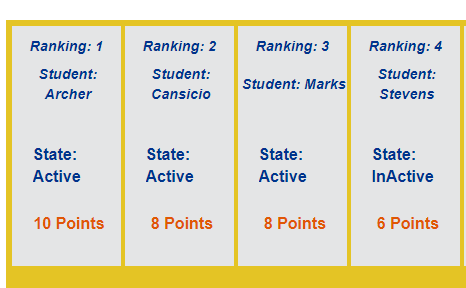
2 likes • Aug '24
Hi Merry You might want to try this ClearCollect( lStudent_col, With( { Items: SortByColumns( AddColumns( Filter( // Filter to include only records with "State" = "Inactive" Students As S, LookUp(Students, Email_Link = S.Email_Link).State = "Inactive" ), "AcummulatedPoints", Sum( Filter(Class_Activities, FK_Attending_Student.Surname = S.Surname), Points ) ), "AcummulatedPoints", SortOrder.Descending ) }, ForAll( Sequence(CountRows(Items)), Patch( Last(FirstN(Items, Value)), {RowNumber: Value} ) ) ) ); This filters the Students table to include only those students whose State is Inactive and proceeds with the rest of the operations (calculating accumulated points, sorting, and adding row numbers) Please lmk if it works.
Aug '24 •
Power Platform Solutions Error
Hi All, I recently joined an organisation that is starting it's journey with Power Platform.So I have had to create and configure the development ,test and production environments to ensure solutions follow the recommended ALM. I have created solutions and within those solutions I have PowerApps canvas app, Power Automate flows using teams connector.However, every time I try to open the solutions I get the error in the picture and this is not getting me worried as I've tried to troubleshoot but with no success I have tried Clearing my browser data and closed it down Logged out of my account and logged back in Tried using incognito Checked if I have the Environment maker / System Admin role (I have) Also checked if permissions have changed in m365 admin center but nothing has changed None of the above seems to work I would really appreciate your help on this please. Many thanks!

0 likes • Aug '24
@Darren Neese Thank you Darren, do you think this maybe related to my PowerApps license? I checked my plans and I have the community plan,is this sufficient for a developer or I need a different license?
0 likes • Aug '24
@Darren Neese Thank you!

Aug '24 •
Power automate - Create CSV table action - SOLVED
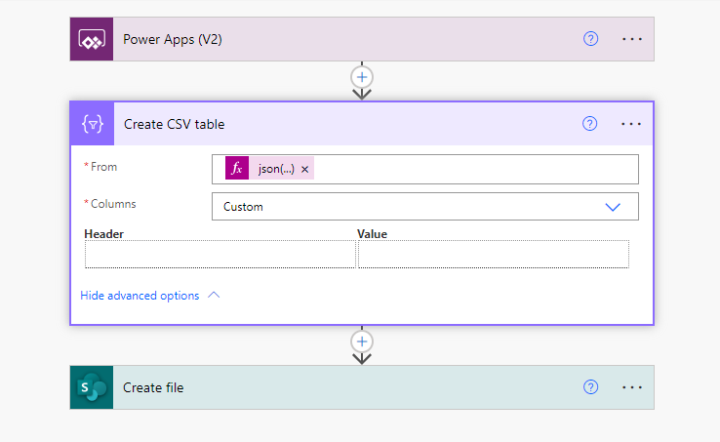
Is anyone here familiar with the 'create csv table' action in power automate? Specifically, the advanced option to sort the columns from the input. I used this flow to do an export of a gallery in my app, but I'm not really sure how to handle the 'Header' and 'Value' options to create the custom column order.
1 like • Aug '24
Hi Jen.. I have worked on something similar before however the powerfx is slightly different. I have attached the powerfx code for the user to download the csv file from the UI.I have also attached the structure of the flow and have put a snippet of where you are having issues. So Header is the column name you want in the csv and you map that with the value extracted from JSON file by using an expression e.g item()?['Item'].Please let me know if this helps:) Powerfx: Set(varurl,Export.Run(JSON(Removed_from_Service.AllItems,JSONFormat.IncludeBinaryData & JSONFormat.IgnoreUnsupportedTypes)).url);Launch(varurl)
1 like • Aug '24
@Elvis Eyobor yes it does:)
1-5 of 5

Active 485d ago
Joined Aug 5, 2024
Powered by