Activity
Mon
Wed
Fri
Sun
Apr
May
Jun
Jul
Aug
Sep
Oct
Nov
Dec
Jan
Feb
Mar
What is this?
Less
More
Memberships
Learn Power Apps
2.5k members • Free
12 contributions to Learn Power Apps

Aug '24 •
Teams Deployment Automation
I have created an application that is being deployed in a Teams Channel. To make the application pull that Channels list of users we are manually entering the Team ID into the App. Everything done within the application is stamped with that specific Teams ID. (This is a label text field hidden within the application itself.) Is there a way to make the Application detect its environment and automatically pull that data? As is stands I will need to have multiple copies of the application. Thoughts?
1 like • Aug '24
This might make a good Live Stream demonstration. 🙂
Aug '24 •
Filtering a Lookup Value from a Collection.
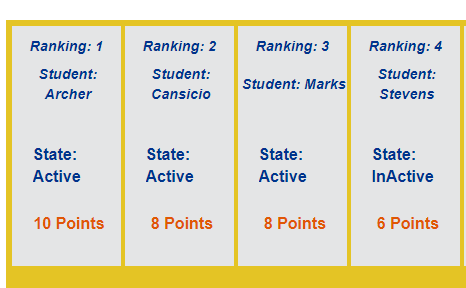
I have a gallery with a collection of data from the Students Dataverse table and adding a column from the Activities Dataverse table. ClearCollect(lStudent_col, With( { Items: SortByColumns( AddColumns( Students As S , AcummulatedPoints, Sum(Filter(Class_Activities, FK_Attending_Student.Surname = S.Surname), Points) ),"AcummulatedPoints", SortOrder.Descending)} , ForAll(Sequence(CountRows(Items)), Patch(Last(FirstN(Items,Value)), {RowNumber:Value}))); See Image Attached. I have added a Lookup Column to provide me with the State. "State: " & LookUp(Students As S, ThisItem.Email_Link = C.Email_Link, C.State) I need to filter off of all records in that State: Lookup Column with a value of "Inactive". How do I append this filtering to the Gallery?
3 likes • Aug '24
Thanks Ru, I wasn't able to make that work. So, I opted to break the process apart. I move the Collection query to run with App_OnStart then filtered the Collection like this: Filter( Student_col As SC, LookUp(Student As S , SC_Email_Link = S.Email_Link, S.State in "Active") ) This solves the removal of the "Inactive" participants. (Dropped students.) Thank you again and have a great day. - Merry

Aug '24 •
Does This Link Work for You?
I've had some tell me that the link to our web site doesn't work for them. I've checked it on my side and it works, but I want to make sure it works for everyone across the globe. Please comment below if it works for you or not, and what country/state you're in. I need to give this information to my web host so they can fix the problem. Thanks so much, guys! 😊👍 - https://superpowerlabs.co/

1 like • Aug '24
Works in the Pacific Northwest.
Sep '23 •
Introduce Yourself to the Rest of the Group!
I'd love to hear more about each of you, what your goals are, and what you're currently working on with Power Apps! ...if you have a cool workstation set up, share it! I'll go first...

4 likes • Jul '24
Greetings from the Pacific Northwest, Being an Expert Excel user, I naturally migrated to the Power BI tool set and have produced some very advanced reports and tool sets for my team members for a few years. Lately the Power BI work has been fulfilling its function, so I was asked to move into Power Apps and help the Development team out with their backlog. (My company is amazingly patient about resource upskilling.) I am not what I would call a developer, but I'm learning by the seat of my pants, and I've been given access to a couple great resources that know their stuff to get me over the humps. I've joined Skool about a month ago and found much of the content to be useful. The downloaded file example is great for a reference tool. However, I've found I needed to find my own solutions as I am building a process gamification application from scratch. It would be cool to see this group do a similar demonstration leveraging the Dataverse tables since the rules seem to be different for Dataverse than for other data resources. Wish I had bandwidth to participate in the Excelleration program. But alas there are only so many hours in a day.
Jul '24 •
Sorting a Gallery by a Calculated Foreign Key Value
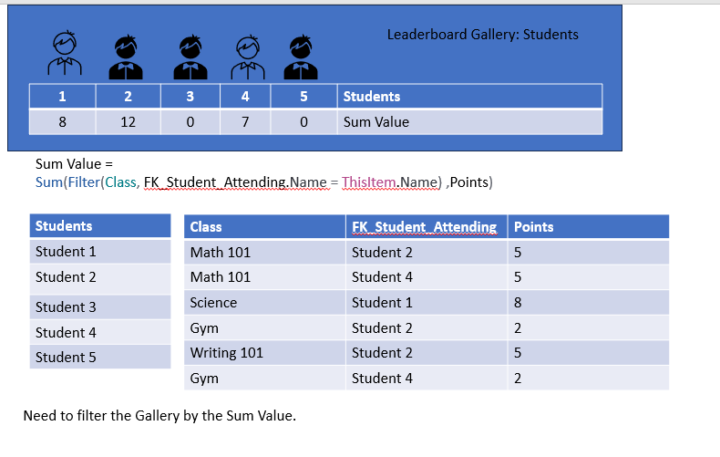
I have 2 tables Students and Classes. They have a one-to-many relationship. I am using a Foreign Key to calculate the total points for each class. I want to create a leaderboard that sorts those participating students by the calculated value. Obviously, these tables have more columns and data, but the attached image should clarify what I'm trying to accomplish. Any guidance of course is always greatly appreciated.
0 likes • Jul '24
I was able to resolve this leveraging an AddColumn with the following code: SortByColumns( AddColumns(Students As S , AcummulatedPoints, Sum(Filter(Classes, FK_Attending_Student = S.Student) ,Points) ),"AcummulatedPoints", SortOrder.Descending, "Lastname" , SortOrder.Ascending)
1-10 of 12

Active 516d ago
Joined Apr 16, 2024
Powered by