Activity
Mon
Wed
Fri
Sun
Feb
Mar
Apr
May
Jun
Jul
Aug
Sep
Oct
Nov
Dec
What is this?
Less
More
Memberships
Learn Microsoft Fabric
14.7k members • Free
The Consulting Blueprint
34 members • $45/m
22 contributions to Learn Microsoft Fabric

Apr '25 •
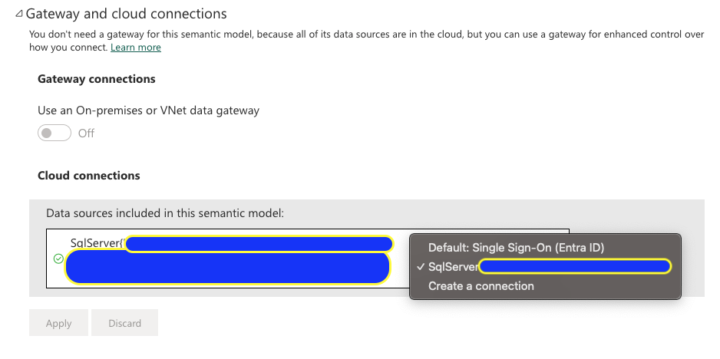
Changing Semantic Model Connection
Feels like this should be more strait forward, but we have a report, semantic model and data storage, in this case a DW. We have a prod and non prod for each, so 2 workspaces. I would like to just change the connection string on the semantic model to point to our prod connection but I don't have the option in the drop down even though exists, also if I do create new, it doesn't update this one or allow me to, just creates a new connection and closes. Am I doing something wrong here?

0 likes • Apr '25
good to know

Feb '25 •
What's the best way to load multiple Excel files, each with multiple sheets, from a SharePoint folder into MS Fabric Warehouse?
I have over 26 Excel files, each named in the format DPI-YYYY-MM-DD (e.g., DPI-2023-01-06, DPI-2023-01-20, DPI-2023-02-03, etc.). Each file contains seven sheets (Sheet 1 to Sheet 7), and I need to load them into a Data Warehouse in MS Fabric. What would be the most efficient and ideal approach to accomplish this? Any suggestions?
2 likes • Feb '25
In my experience the data formating to use Df2's will mean you are bound to getting your schema perfect and cause issues at ANY change anyway.. Ive been doing a similar task and would recommend a notebook, its a steep learning curve, but its worth it. then you can iterate over all files in the folder and ingest by running the NB, you will still need to get the files into the LH but you could set up a pipeline to run the nb on a schedule. chatgpt is your friend for bug fixes.
Feb '25 •
Gen2 DF issues, G1 != G2
Hi folks, having quite a few errors with G2 Dataflows, even when using a .pqt and importing the exact G1 df to a G2 its failing substantially, Ive been trying a bunch of stuff with switching of Fast copy/Enable Staging, and writing to a LH or not, even when its at its most simple form it seems to fail. Granted there is a bit going on in this DF, originally it was 4 merges in each of 2 queries and then a join. Ive moved half to a notebook but there still seems to be considerable issues and differences, just wondering if others are experiencing the same issues? my final state will move all of the transform to a NB, but surely DF's should still perform as G1! Similar issues: https://community.fabric.microsoft.com/t5/Service/Dataflow-Gen2-Issue/m-p/3275868 https://community.fabric.microsoft.com/t5/Dataflow/Couldn-t-refresh-the-entity-because-of-an-issue-with-the-mashup/m-p/3506887 https://community.fabric.microsoft.com/t5/Dataflow/Gen2-Dataflow-Failed-to-insert-a-table/m-p/3372458 Additional questions: do Dataflows use Datafactory in the background? this would make sense if the schemas are not perfect, it needs the same treatment as delta schema rules etc. why cant the errors be more helpful?! Cheers Ross
0 likes • Feb '25
@Will Needham thanks i’ve been doing exactly that and while it’s mostly correct there is still a fair amount of bug fixing and conform to do, I think the G1 dfs were a lot more forgiving! It’s also teaching me a lot and forcing me into good habits!
0 likes • Feb '25
@Anthony Kain as mentioned to will when it works it’s great but for this particular project it’s 4 source files merged and filtered into one, and then another secondary version of the same files that is also merged 4 times, finally the 2 results are merged and filtered. so it was a bit of a mess of a DF, it’s taken me a few days to pull it together but it’s now all landed in the LH. I think the next step will be repeating the process quarterly and simplifying it.

Feb '25 •
Load Excel file to Files area of lakehouse
I am using a notebook to load an Excel file (downloaded from a website) into a folder in the Files area of a lakehouse - I thought this would be pretty straightforward, but I must be missing something: from datetime import datetime import pandas as pd url = "https://<url_of_excel_file" output_path = "Files/sales_targets/" + datetime.now().strftime("%Y%m%d") # load Excel file from URL and replace spaces in column names df = pd.read_excel(url) df.columns = df.columns.str.replace(' ','') # create directory if it doesn't exist mssparkutils.fs.mkdirs(output_path) df.to_excel(output_path + "/targets.xlsx") Is df.to_excel the correct method here, or should I be using PySpark instead?
2 likes • Feb '25
I dont know if you can load from a URL direct to a Lakehouse, have you tried uploadng to the lakehouse first? if so the path would be /lakehouse/default/files try the right click on the file to get the spark or pandas code if its not working, or try passing in the ABS or other paths as shown here: https://fabric.guru/importing-files-from-fabric-lakehouse-into-power-bi-desktop I doubt fabric will allow you to download directly to the LH from a URL if thats what your trying to do.
0 likes • Feb '25
@James Coulter do you mean you are loading a file from a url and writing to a table? if so i’d love to see how, I’m trying to add multiple files to build an updated table but the best i can do is iterate over files in the ‘files’ folder.

🚀
Feb '25 •
Feedback on the getting started experience for new Fabric developers
Hey everyone, I know many of you are currently struggling to get started with Fabric. You can provide Microsoft with some valuable feedback to share your experiences about getting started with Fabric, and the free trial experience: Feedback form for new Fabric developers: https://aka.ms/FabricGettingStartedFeedbackDoc?wt.mc_id=onboardingresearch_includes_content_cnl_learncomm Hopefully we can make it a better experience for all.
0 likes • Feb '25
Submitted!
1-10 of 22

@ross-garrett-5838
Data Analyst, engineer with a few years experience, but really still learning. Working with fabric for about 6 months in dev, not prod.
Active 124d ago
Joined Jun 3, 2024
ENFJ
Canberra, Australia
Powered by