Activity
Mon
Wed
Fri
Sun
Oct
Nov
Dec
Jan
Feb
Mar
Apr
May
Jun
Jul
Aug
Sep
What is this?
Less
More
Owned by Robert
Design a professional-looking book, from cover to interior. Find simple guides and tips to avoid DIY design mistakes that hurt credibility and sales.
Skool Events Daily
475 members • Free
Skool Extensions 🧩
927 members • Free
Raw Leader Premium & VIP
20 members • Free
Solomon’s Temple
76 members • $347/month
Learn
471 members • Free
Resolve School
331 members • $9/month
Affinity Creatives
2.4k members • Free
Claude Code Club
8.3k members • $9/month
The Raw Course Launch Lab
604 members • Free
15 contributions to Typographic North

Jul 24 •
Why should you spend time and money to make something look nice?
It’s an age-old question, but one I still hear in various forms. For designers and creatives immersed in their craft, the answer is obvious. Or is it? Perhaps the question has been buried by years of work. It’s not always obvious to a business why anyone should care to make their content visually appealing. Isn’t the content itself enough? This question is particularly difficult to answer when asked by someone who has a budget in their hands. Who looks at the bottom line, aiming for cost reduction. Aren’t these invoices from the designer an obvious excess? I still struggle with these thoughts. And, while I certainly hold the view that beauty in itself is an invaluable asset, I’m well aware of the balance between form and function. Content should convey a message in a manner that resonates with the viewer. In my work, I often aim for less, helping the readers understand the text without any unnecessary friction. Why do you think someone should pay for design?

🔥
2 likes • Jul 25
@Kris Hus Definitely an age-old question, and for good reason. From a book cover perspective, I like to say that a design that fits what the shopper is looking for is one of the main things that stops the scroll and earns the click before a sale can happen. And that kind of design isn’t stumbled upon by accident. It takes an understanding of the audience, the genre, visual hierarchy, and what needs to communicated, etc. Then, the interior, A+ Content on KDP, and the other supporting visuals then carry that experience forward. Like @Zak King mentioned, maintaining a consistent look across those elements also helps build familiarity, trust, then authority, etc. I think the same applies to any business. The design and branding introduce the business before a potential client has had the chance to fully understand what it offers. Beauty without substance won’t take a business very far, of course, but strong content can still lose opportunities when it’s presented through amateur-looking design.
Jul 17 •
Three languages in one sign
I saw this old street sign in Kristinestad, Finland, today. The area is bilingual, with both Finnish-speaking and Swedish-speaking inhabitants. And the history shows even a Russian influence. This trilingual street sign with a very broad character set shows a good understanding of all the nuances among sign painters and printers back then.

🔥
1 like • Jul 17
Pretty interesting, especially considering how old it looks. Hats off!
Jul 2 •
Summer setting ☀️
Summers always seem to be both very calm and very busy for me. I finally have some time to catch up on projects that have been on hold for months, and then realise the amount of work that has to be done. I'm starting to typeset a book of collected poems this week. They are very simple in form, which makes it both easy and quite difficult to get right. What are you working on this summer?

🔥
1 like • Jul 16
I know that summer calm/busy mix feeling 😊 ... and I agree 💯 simple layouts can be deceptively hard to get right. I’m working on a mix of book design projects and catching up on some course/community content.
Mar 25 •
Work in progress Wednesday | 2026.03.25
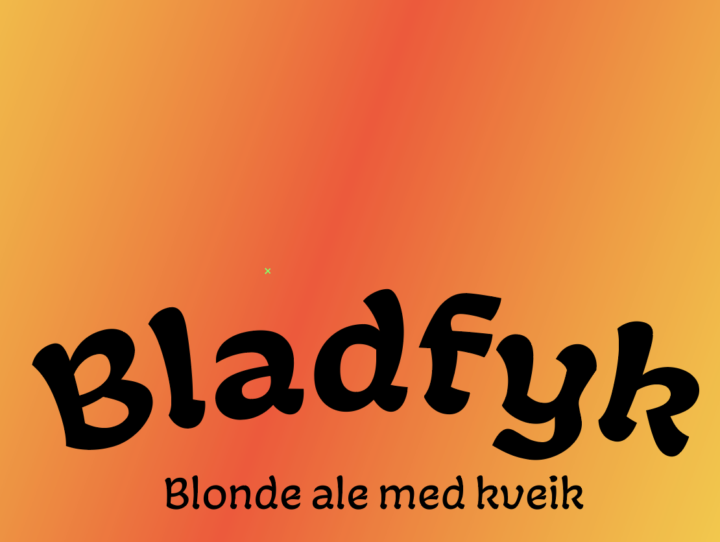
Sketching out some beer labels. Fun, but I always remind myself that I'm no illustrator :-) What are you working on?
🔥
1 like • Apr 13
This looks really cool. What font is that?
🔥
1 like • Apr 19
@Kris Hus Thanks! I'll add this one to my toolkit 🙂
Feb 25 •
People do, in fact, judge a book by its cover
Your report is ready to be published. But there’s one small thing you can add to get it noticed. Things move slowly, then quickly. The project you’ve been working on for two years now needs to be put out there, its results shared with the world. Finally, the time has come: the paper is to be published! But it was supposed to be available, like, yesterday. You’ve been tinkering with the text document. Changed the headlines, moved some footnotes around. Rewritten the introduction 12 times. Started adding in some colours. It looks alright, but could do with some touch-up. Alas, there’s no time for design. I understand. We can’t start designing this 80-page report now and put it on the website in an hour. We’ll make sure to plan for design work next time. However, here’s what a publication designer can do in a very short time: Wrap your document in an appealing cover. You’ll export your document as it is, but the designer can make a 1, 2, or 4-page cover that envelops the document, turning it from bland to striking. This way, the work will get noticed. It will invite readers into the text and create a mood for the work. The cover can then be used in social media posts, shared in e-mails, put on posters and shared anywhere. It’s simple, quick and very effective. Cover design is not mere decoration; it’s an invitation to the reader that will be well worth the investment. If you’re looking to elevate your next report or paper with an appealing cover, let’s talk

🔥
1 like • Apr 13
"... Cover design is not mere decoration; it’s an invitation to the reader that will be well worth the investment..." this is so on point 💯
1-10 of 15

🔥
@robert-alan-3942
Passionate about systems and book design, I've designed several books for authors and editors. I love streamlining & simplifying design processes.
Active 34m ago
Joined Oct 11, 2024
INTJ
Canada