Activity
Mon
Wed
Fri
Sun
Aug
Sep
Oct
Nov
Dec
Jan
Feb
Mar
Apr
May
Jun
Jul
What is this?
Less
More
Memberships
The Jaw Journey
89 members • Free
Chase AI Community
72.2k members • Free
AI Automation Society
424.7k members • Free
AI Automation Vault
21.3k members • Free
The RoboNuggets Network (free)
57.8k members • Free
Automatable Free
18.9k members • Free
PM Masters in Physical Goods
9 members • Free
Davie's Free Ecom Course
73k members • Free
Building in public by Daniel
16.1k members • Free
7 contributions to AI Automation Society

3h •
Hermes Agent vs VS Code
Hi, I'd like to ask if it's necessary to use Hermes Agent, and what advantages it offers over a platform like VS Code? Currently, I'm using VS Code with Claude and Codex in a standard file-based setup. I would appreciate it if you guys could explain this, thank you.😁

🔥
29d •
AI vs AI Agent?
Unpopular take: most people confuse "AI" with "automation" and it's costing them time. AI = pattern recognition. It takes input, finds patterns, gives output. ChatGPT answering your question = AI. An AI AGENT is different — it takes ACTION. "Send me my top customers" → it reads your data, analyzes it, writes a report, sends the email. No human needed in the loop. Once you separate these two ideas, you start seeing automation opportunities everywhere — every repetitive task someone complains about is a potential agent. Curious if others here are experimenting with agent's vs just using chatbots? what's your favourite tool to work with?
Poll
72 members have voted

0 likes • 3h
Hi Muskan, thanks for your explanation. I used to get confused at the beginning when I first approached AI Agent, then AI Automation. Such a huge to absorb

5d •
The old automation vs AI automation
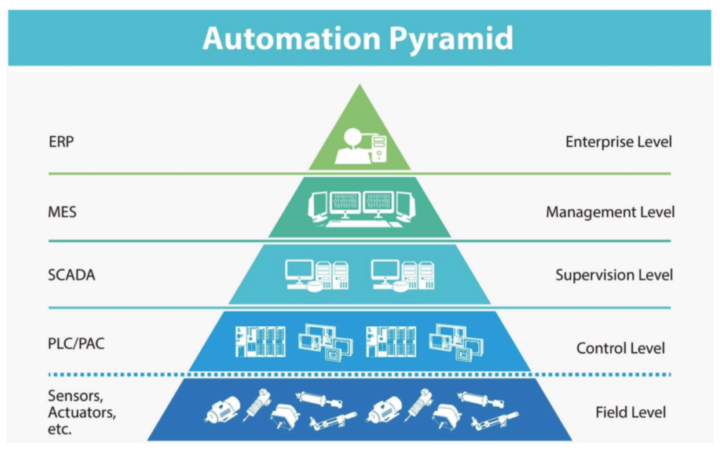
A few days ago, I read an article on automation from a hardware perspective and found it very interesting, as the hardware industry has already developed a roadmap for it. On the pyramid's first level, we have sensors and actuators; from an AI automation perspective, these are the connections to MCP servers, WebSocket or server action endpoints, and any other connections we create from the automation to the outer world. That is the eyes, ears, and hands of the system we create. On top of the eyes and hands, we have what is called the "control level"; this level is where the automation logic resides, meaning that at the control level we decide what we do with the data we collect and what actions we execute programmatically. The next level, the supervision level, serves as the interface between automation and humans, enabling process control and oversight. N8n covers this layer partially; it provides logs (a record of what is done, the actor, and when it was done) and real-time control that allows a human to stop the entire flow. But if a client's automations fail and nobody finds out until something breaks downstream, you're really still living at the Control level with a false sense of supervision. To change that, you need to deliver monitoring, alerting, and execution dashboards, as well as human-review interfaces. On top of it, we have the management level. From here, a human can understand the automation's flow and, crucially, the status and flow of the business (reports, KPIs, etc.), so decisions can be made based on the data provided and processes improved, either within the automation itself or through improvement points it surfaces. Finally, we have enterprise-level; here, an automation should be plugged directly into the business ERP (e.g., Power BI), instead of living on an independent system. Once this level is reached, the automation stops being a paid service and becomes a business level. The jump from level 2 or 3 to level 4 is mostly a reporting/analytics build-out. The jump from level 4 to level 5 is more of a positioning shift, becoming embedded in how the client thinks about their business, not just a vendor running their workflows.
1 like • 1d
nice, thanks for your share

💎
⭐
2d •
🚀New Video: Claude Code + Clay Makes Lead Generation Actually Fun
Finding leads is the thing that blocks most people from landing their first client, so in this video I connect Claude Code to Clay and build a lead generation machine you run entirely in plain English. Claude Code is the orchestrator and Clay handles the data, sourcing real businesses, enriching them with verified emails and phone numbers through its waterfall, and writing a personalized email for every single lead. I run a real HVAC example that pulled 50 fully enriched leads with custom subject lines and bodies for about 12 dollars in credits, then take the whole list into Clay to buy domains, warm them up, and launch the campaign. If you have been putting off cold outreach because the data and the tools felt like too much to manage, this is the easiest way I have found to do it.
4 likes • 1d
Nice. As a Sales rep looking for new lead I think Clay vs Claude Code is a good choice. The issue is just the price of subscription.
1 like • 1d
[attachment]
💎
⭐
Jun 3 •
What do you get if you upgrade to AIS+?
Some of you have never heard of the AIS+ community. Others have but the part that trips you up is the actual difference between the two. Either way, this post will give you clarity. This free group is a bundle of quick resources pulled from my YouTube videos, plus a massive open community that anyone can join. It's a great place to get your bearings and see what's possible. But it's open to everyone, it can be noisy and overwhelming, and there's no path through it. You can get help from other members, but I rarely answer questions here. AIS+ is the opposite: - A step by step roadmap with a clear order, so you're never guessing what to do next - A much smaller community of people who are seriously committed to building and selling AI agents - I answer questions every day and run a weekly Q&A call where you can get direct access to me For the course material: The roadmap takes you from zero to building and selling AI agents, and the whole thing is built on the latest tech like Claude Code and Codex. We update it constantly. The old n8n material has been archived. It's still there if you want it, but it's no longer the focus, because the way you build today has moved on and the courses moved with it. Here's the actual roadmap inside, in order, with when each piece opens up: 1. Start Here (opens the moment you join). Gets you oriented. How the community works, the path ahead, and how to get help when you need it. 2. Build Your Portfolio (opens the moment you join). Why a portfolio matters, beginner level tutorials, and what types of projects to focus on. You end up with real work you can show a client. 3. Claude Code (opens the moment you join). This is now its own dedicated course. Build faster, turn ideas into working automations, and go deep on the tool serious builders are using right now. This takes you from beginner to advanced, step-by-step. 4. Get Your First Clients (opens after 30 days). Getting your first clients is hard, because you don’t have any case studies yet. So, we analyzed all of the success stories from our members and found they get their initial clients with two different techniques: warm outreach and Upwork. So, we teach both techniques in detail with exactly what to say, exactly how to position yourself when you have no proof.
1 like • 1d
do you think what stage is the right time to move up to AIS+, from newbie ?
0 likes • 1d
@Sgt Poulson Nice, do you think what stage is the right time to move up to AIS+, with the purpose of using AI to level up my existing work ?
1-7 of 7
