Activity
Mon
Wed
Fri
Sun
Sep
Oct
Nov
Dec
Jan
Feb
Mar
Apr
May
Jun
Jul
Aug
What is this?
Less
More
Poster Print on Demand
10.9k members • Free
7 contributions to Poster Print on Demand

Mar 16 •
134 sales in 1.5 months!
Quick little success story + a couple shoutouts 🙌 I opened my Etsy shop two months ago, still unsure of what exactly I wanted to sell, and uploaded my first listing half a month later after seeing one of Tom’s TikTok videos, and it pushed me to actually give it a go instead of just thinking about it and leaving my shop empty. Fast forward a bit and we’ve now had around 134 sales since opening, which might be small to some people but it’s a great start for me and proof that the process works. Wanted to give a quick shoutout to the PrintShrimp team. Their prices have stayed really competitive while still keeping the quality high, and the customer service has been great. One of my customers had an issue with an order after the delivery banged up the poster a little bit, and they got back to me the next day, ready to replace it, no questions asked, which makes a huge difference when you’re running a store. And of course, the biggest shoutout is to Tom for the TikTok content that got me started in the first place. Keep pumping the content bro, there are many people like me that just needed an inspiration on what to sell and how to get started, and your videos provided that. Still early days, but excited to keep creating 🚀
1 like • Mar 18
@Nicky Pemberton Honestly, I was the same at the start, but I now see the benefit so much that I upgraded plans. It's 10000% worth it. It's way more "artistic" looking than Nano Banana Pro or ChatGPT, and you get to have more creative control over the output. The only nitpick I have with it is that it SUCKS when it comes to text, but that's where I use ChatGPT to fix it. I tend to use it on desktop, as they don't have an official app yet.
2 likes • Mar 19
@Nicky Pemberton I mostly use ChatGPT to “rectify” any issues (usually text related) midjourney makes. For example, say I was making a “LONDON” travel poster, 9/10 times, midjourney will somehow screw the text up, and spell something like “LNDAN” So I take the image, go on ChatGPT and say something along the lines of “There is a typo on the text, it should say LONDON instead of LNDAN, fix the typo” and make sure to give it as many constrains as possible so that it doesn’t take any creative liberties like “do not change spacing, colors, style…..” etc
Mar 3 •
Etsy Payment Processing
Hey guys, Curious to know if anyone has come across this issue, and if there's anything I can do on my end. I started selling on my shop just over a month ago, and just crossed over the 50 sales mark (mentioning as I'm not sure if it's relevant). Today, I got an email for the first time, saying that Customer X bought something, but the payment is being processed and I should not dispatch anything until it's approved. 5 minutes later, it was rejected/failed and I lost out on that sale. Was a bit bummed, but I assumed maybe the customer's card declined. Cut to the afternoon, I get a similar notification (not on email, but I caught it Etsy orders page), fortunately, this was approved after 5 minutes. And now, I've got yet another order stuck in payment processing, I've been waiting for more details for a couple of hours now. Is my shop being flagged by Etsy for something? Or is it pure coincidence that three customers had payment issues in a day?
0 likes • Mar 4
@Mihai Volintiriu Makes sense, was just concerned that Etsy was flagging my shop for whatever reason

Feb 10 •
How many visits daily on your shop? (Pls include amount of listings you have)
Personally, 500 listings and average 50 daily visits. Currently running no ads.
1 like • Feb 17
97 listing, started 3 weeks ago. Recently I've been getting between 60 - 100 visits, and average around 600 - 800 views (via ads). This has translated to around 1-2 sales a day so far. Hoping to break to 5 sales a day by May

Feb 5 •
Canva Upscaling & Converting Advice
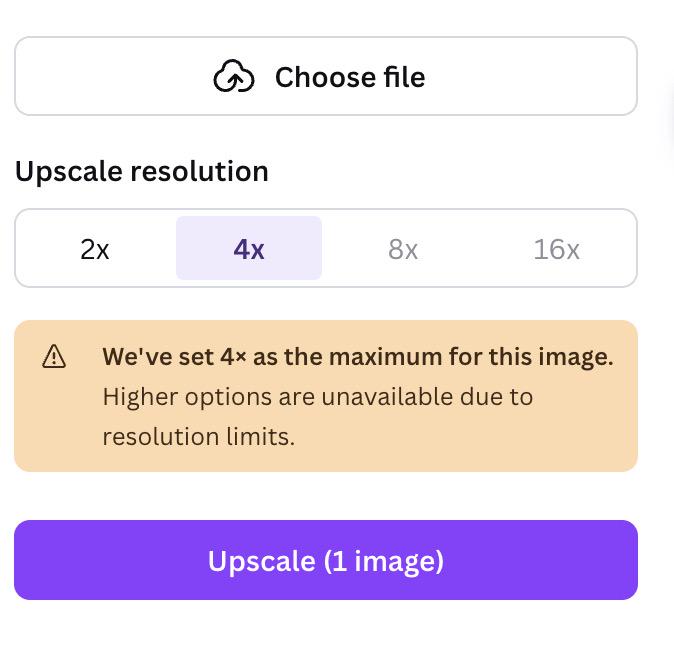
Hey Gang! I'm new to the POD world and watched all of Tom's videos. I would just like to ask the question regarding upscaling. I'm temporarily using Canva for creating my designs. However when downloading the design should I be exporting it in 3.125x instead of 1x? As I have just been following Tom's method by download it in 1x but upscaling in 4x which I feel doesn't really do anything, this then isn't in 300dpi so I then go to the website he mentioned to convert. However i've just seen the pixels aren't as large compared to when exporting in 3.125x Anyone got any advice? Hope that makes sense :) Thank You Andy
1 like • Feb 6
Personally, I've been using a separate tool to upscale, and then in canva I just select the max size. Sometimes this leads to a massive file size that print shrimp can't handle, so I set max size to 75MB. I also checked photopea and this leads to dpi automatically being 300, so I don't need to do dpi conversion
Feb 3 •
SKU's for different sizes
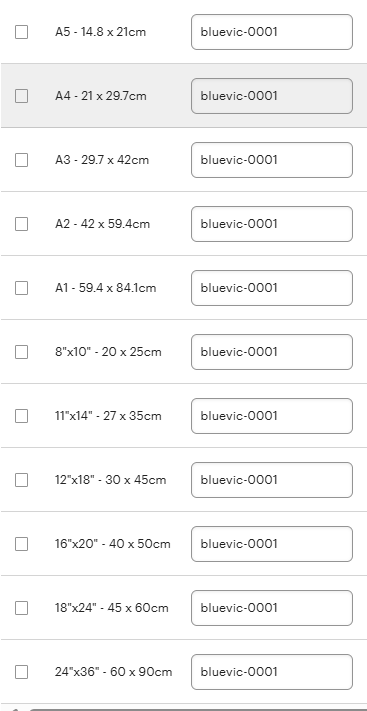
Apologies I know this has been asked a lot but I just wanted to make absolute sure. For the one print regardless of the different sizes you would name the sku as exactly the same for all. please see attached snippy of my variation page. Is this right? Its just slightly confusing me because the Esty listing says refer to variations for SKU's for varying sizes
1 like • Feb 4
@Mihai Volintiriu I’m not sure if this is correct? (correct me if I’m wrong), but for printshrimp integration, SKU should vary by size. Say I have two sizes A1 and A2, the we need to create a “Size” variation on Etsy and each size option has its own unique SKU. Here is a sample of a listing I have which had a sale that printshrimp was able to correctly identify. Or is there something I’m missing?
1 like • Feb 4
@Mihai Volintiriu @Chloe Mitchell Thanks guys! Tom also responded and looks like I might have watched an out of date video on this. This is going to be a massive time saver!
1-7 of 7