Activity
Mon
Wed
Fri
Sun
Jan
Feb
Mar
Apr
May
Jun
Jul
Aug
Sep
Oct
Nov
Dec
What is this?
Less
More
Memberships
KI Agenten Campus
2.2k members • Free
KI-Roadmap: ChatGPT bis n8n
7.5k members • Free
AI Automation Society
213.9k members • Free
AI Automation Agency Hub
276.3k members • Free
33 contributions to AI Automation Society

May 23 •
Is anyone really good with Gmail in n8n?
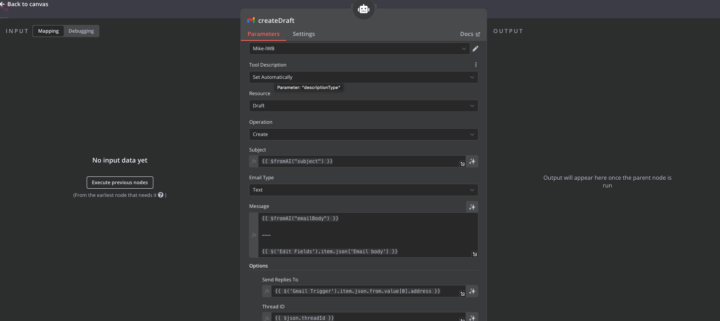
This workflow is for customer support automation for one of our clients. However I want to send email reply to draft, becuase it needs to be manually checked. When I send reply back to the customer, he will receive email but won't see previous conversations (his question about customer support). Let me know if you any ideas how to change that.

0 likes • May 23
Hi @Martin Križaj, You can keep the whole conversation in the same Gmail thread by passing the original message’s **threadId** to the Gmail node that creates your draft. If you start the workflow with the Gmail Trigger ("New Email"), the trigger output already contains `threadId`. Just map that value into the **Thread ID** field under *Options* of the Gmail node when you create the draft (or when you later send it). Gmail will automatically attach the new draft/reply to the existing conversation. If you prefer to build the raw MIME yourself, include both `In-Reply-To` and `References` headers set to the original `messageId` — that has the same effect. This way the customer sees the full history in a single thread while you still have a draft for manual review first. Hope that helps! ✅

May 20 •
Problems with qdrant database
Hey everyone. I've built a cluster in Qdrant.tech for someone and i wanted to search it with the built in feature in cluster ui in points tab. Everytime I tried searching with metadata or id or anything else im getting api key invalid error. I have tried using management keys and cluster keys with read and write ability but i always get this message. JWT Key also is not working and i dont have preview access tokens tab (Status: 403, message: {"error":"forbidden"}). Also I can see every single record in every collection. Im added to this cluster as a admin. If you ever worked with this or had similar problem and overcame it i would be very grateful for help Edit. I've solved the issue, all i needed to do was add indexes to metadata or make indexes from them idk. Here is curl to do it: curl -X PUT "https://yourendpoint/collections/yourcollectionname/index" \ -H "Authorization: Bearer <your-qdrant-api-key>" \ -H "Content-Type: application/json" \ -d '{"field_name":"metadata.name_of_metadata_piece","field_schema":"keyword"}'
1 like • May 20
Hi Dominik, it sounds like there might be an issue with the API key permissions or the cluster's configuration. As an admin, you should typically have access, so it might be worth double-checking the API key settings and ensuring the JWT token is correctly generated with the necessary access rights. If the issue persists, consider reaching out to Qdrant's support for further assistance. I hope this helps!

May 15 •
cURL Button Missing in HTTP Request Tool (inside AI Agent)
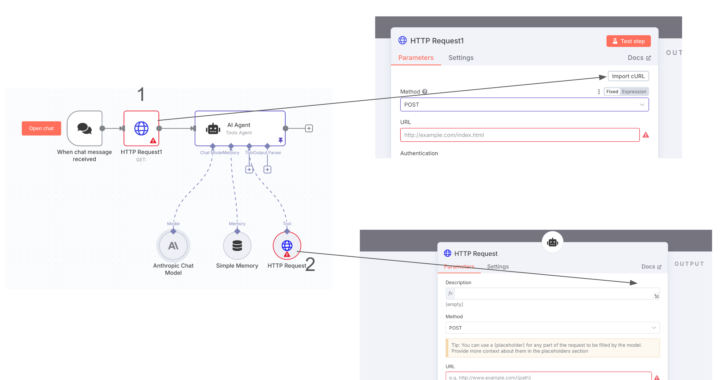
Hi everyone 👋 I'm currently working with an AI Agent in n8n and noticed something odd about the HTTP Request tool integration. 🔍 When I use a regular HTTP Request node in a workflow (see point 1 in the image), I can see and use the “Import cURL” button just fine. However, when the HTTP Request is used as a tool inside an AI Agent (point 2 in the image), the “Import cURL” button is missing from the UI. This makes it harder to quickly debug or copy the request. I’m on n8n version 1.85.4, which I believe is recent enough to include this feature. I’ve also seen in some webinars that the cURL button should be available even for HTTP tools inside agents. ➡️ Is this a known limitation or a bug?➡️ Has anyone managed to get the cURL button to show in this context? Thanks in advance! Emanuele
1 like • May 20
Great observation, Emanuele! The 'Import cURL' feature might not be available in certain contexts within n8n, especially inside AI Agent workflows. Manually entering the request details is a good workaround. It's also great to hear that this feature is available in version 1.90.0. If you need any further assistance, feel free to ask!

May 20 •
Chat answer
Hello community, I hope you are doing well. I am deeply sorry for this dumb question... However, I am building an AI Agent and I would like to test it directly on N8N chat. I have found the chat trigger but I am unable to find the "tool" or "hook" that will make my agent answer in the N8N chat. May you help me please ? Best PL
1 like • May 20
Great suggestion, Leon! Integrating an AI Agent with n8n chat can be achieved by using a chat action node or configuring a webhook to handle the AI's responses. This way, you can ensure seamless interaction within the chat flow. If you need further assistance with setting up the webhook or chat action node, feel free to ask!

May 16 •
Route Planner Agent - Google Maps API's [Kinda Solved]
Hey guys 👋 I'm trying to figure out how I connect my n8n instance with the Google Maps Directions API and ask for an effective route based on a list of addresses 🗺️ So my workflow is intended to work like this: - A have a spreadsheet full of clients with their corresponding addresses, and last inspection dates. - Each client needs inspection of their facilities on a given time each year. - I now want to connect a chat trigger to an AI agent, that has the spreadsheet and the Google Maps Direction API as tools. Based on these tools it should be able to read the 'last inspection date" and address from the sheet and based on my demand from the chat, it should reply with a list in chronological order displaying which clients to visit based on their address and last inspection date. All I know is that I have to connect the Google Maps Directions API by using an HTTP request node - and that's it 😳 Have any of you guys had any luck with this? 🙏
1 like • May 18
Integrating the Google Maps Directions API with n8n can be done effectively by using Google Sheets to store addresses and the SplitInBatches node to manage waypoints. As Valentin Ffrench suggested, this approach allows for efficient routing. Additionally, consider using filters to optimize routes based on specific criteria. This integration can enhance route planning and improve workflow efficiency.
1-10 of 33