Activity
Mon
Wed
Fri
Sun
Jun
Jul
Aug
Sep
Oct
Nov
Dec
Jan
Feb
Mar
Apr
What is this?
Less
More
Memberships
AI Automatisering Danmark 🇩🇰
35 members • Free
Mester Manualen
22 members • Free
AI Workshop Lite
21.3k members • Free
AI Growth Tribe
2.7k members • $7/month
The Next Level
2.3k members • Free
AI Automation Society
353k members • Free
AI Automation Agency Hub
314.6k members • Free
OM
Online Mentorforløb
2.6k members • Free
AI Fellowship Hub
8.6k members • Free
12 contributions to AI Automation Society

18d •
AIOS - building
Hey everyone, I've been looking into the idea of an AI operating system (as you see in the video below with Liam). I'm just wondering if any of you guys have put any thought to the process of actually building all your files around AI, on top of i.e. Claude Code inside of Visual Studio Code. If any of you guys are already doing it or are experimenting with it, how do you add a safety feature so Claude can't accidentally delete all of your files or your clients' files? Hope to hear from you 🙏 https://www.youtube.com/watch?v=yd9tr0xqg-Y
1 like • 5d
Hi @Lana Frei, yeah I know :) I am already using the setting.loca.json file to allow, deny and ask for permission when needed :) But thanks! Good for others reading this post to know!

💎
⭐
Sep '25 •
🚀New Video: How to Automate ANY Content with Poppy and n8n (no code)
In this video, I show how to use Poppy AI with n8n to completely automate your content creation process. $25 OFF Poppy AI HERE Poppy lets you build specialized AI assistants that can be trained on almost anything, YouTube videos, TikToks, Instagram posts, websites, or even your own local files. Just drag and drop the media, and your Poppy assistant can use it to get smarter. From there, you can connect Poppy with n8n to automate research, content generation, or any part of your creative workflow. The best part is that it’s all no-code, making it simple and powerful for anyone to start building AI-driven content systems.
7 likes • Sep '25
@Yash Chauhan Hey Yash How are the tokens in Poppy billed? Do you have to connect API keys or does the yearly payment include token usage? It seems that you're using it 😁
May '25 •
[SOLVED] Flowise chatbot & Supabase SQL Editor error
Hey guys So I previously built a chatbot with the help of @Mirko Salzer in Flowise. The knowledge base for the chatbot I upserted into a Supabase Vector Database, so the chatbot queries the database and thereby answers the user's question. The chatbot worked without issues. However, now that I have exported the chatflow from my Flowise instance so I can import it into a business' Flowise instance I receive an error message when chatting with it. It does apparently not read my database and retrieve any information. Kinda weird since it worked in my own instance with the exact same SQL code. - You can see my Flowise chatflow in picture 1. - You can see the error message in picture 2. - You can see the SQL Editor code I used to set up my Supabase DB. Any clues? :) I have tried running it through chatgpt and will keep doing so - but it just doesn't make much sense.
![[SOLVED] Flowise chatbot & Supabase SQL Editor error](https://assets.skool.com/f/b51c57150c70495899bf4bc8aaee8166/ff6fd324670f45df8c192b5c9ac6916cf52880f030a4456bbe849a8e5b8dbc4b-md.png)
0 likes • May '25
Hey Everyone I've been struggling with this problem for 1,5 days straight, and what I've learned is that I lack knowledge. I'm quite new to this whole Database thing, but I solved it. So to anyone who might need this - here's the solution. The picture also shows the solution. This is all due to a one line mess up. Here's a Github thread for the answer as well: https://github.com/orgs/supabase/discussions/23207 Set search_path = public (doesn't work) It has to say: >>>>>Set search_path = public, extensions<<<<< Why this works you can figure out yourself by asking an LLM :) Here is my fully working SQL Editor syntax for Supabase: create schema if not exists extensions; create extension vector with schema extensions; -- Recreate the table with the correct vector reference create table documents ( id bigserial primary key, content text, metadata jsonb, embedding extensions.vector(1536) -- Note the new schema prefix ); -- Recreate the function create or replace function match_documents ( query_embedding extensions.vector(1536), match_count int default null, filter jsonb default '{}' ) returns table ( id bigint, content text, metadata jsonb, similarity float ) language plpgsql set search_path = public, extensions as $$ #variable_conflict use_column begin return query select id, content, metadata, 1 - (documents.embedding <=> query_embedding) as similarity from documents where metadata @> filter order by documents.embedding <=> query_embedding limit match_count; end; $$;
May '25 •
Route Planner Agent - Google Maps API's [Kinda Solved]
Hey guys 👋 I'm trying to figure out how I connect my n8n instance with the Google Maps Directions API and ask for an effective route based on a list of addresses 🗺️ So my workflow is intended to work like this: - A have a spreadsheet full of clients with their corresponding addresses, and last inspection dates. - Each client needs inspection of their facilities on a given time each year. - I now want to connect a chat trigger to an AI agent, that has the spreadsheet and the Google Maps Direction API as tools. Based on these tools it should be able to read the 'last inspection date" and address from the sheet and based on my demand from the chat, it should reply with a list in chronological order displaying which clients to visit based on their address and last inspection date. All I know is that I have to connect the Google Maps Directions API by using an HTTP request node - and that's it 😳 Have any of you guys had any luck with this? 🙏
1 like • May '25
@Nico Asd Okay! That's an honest thought! Thank you 🙏 I figured out how to set up all the API Keys I need in n8n, so now it's all about figuring out how to make my use case user friendly, so it's not over-engineered 🙂
0 likes • May '25
@Oliver B. Yes you are completely right. I figured it out. Thanks! The criterias for an optimized route is the hardest part - that has to come from the business 🙂
May '25 •
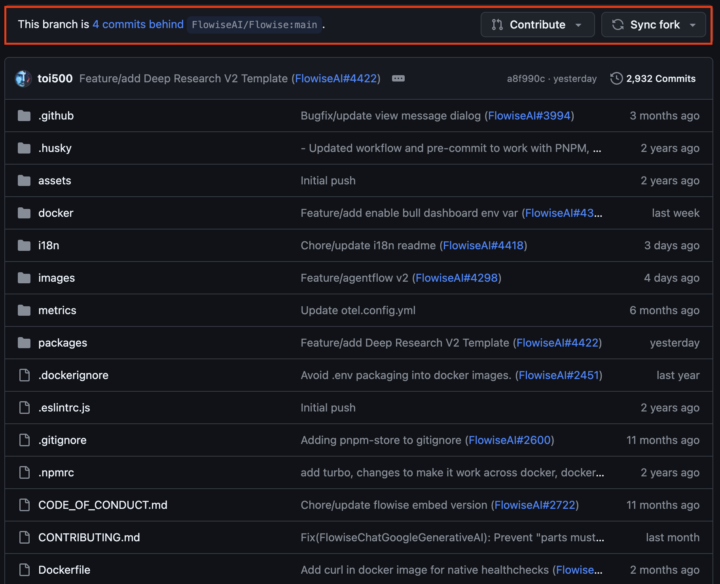
Does Flowises' open source code on Github automatically update node version?
So I've been wondering if I manually have to update the node version for my Flowise instance, or if clicking the "Sync fork" once in a while on Github will do the work? I guess at some point node versions will reach their End of Life and needs to be updated.... What do you guys say?
2
0
1-10 of 12

@peter-kaad-5246
Hi everyone,
I’m from Denmark and work with AI and automation software. I bridge the gab between the dream and reality.
Active 5d ago
Joined Apr 16, 2025
ENFP
Powered by