Activity
Mon
Wed
Fri
Sun
Jan
Feb
Mar
Apr
May
Jun
Jul
Aug
Sep
Oct
Nov
Dec
What is this?
Less
More
Memberships
Learn Power Apps
2.5k members • Free
3 contributions to Learn Power Apps

Sep 17 •
Security Issue
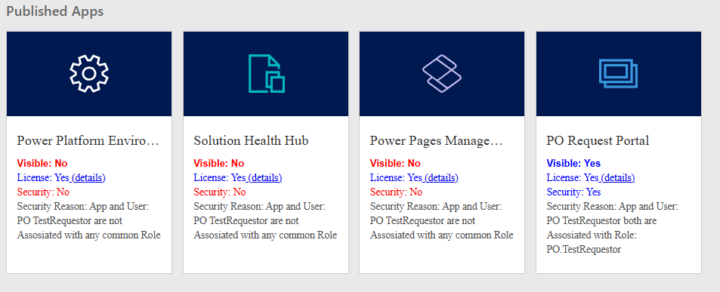
I have my test users assigned with basic, app opener, and their custom roles. Any insights to this message? The test users can view the app on mobile but no environment/app visibility on desktop browser. I have confirmed users have the security roles assigned, those roles give access to the app, the environment has the users assigned, and the app has the securities added in and is shared with the users. If anyone has any insights pls lmk

Jun 7 •
PowerApps Competitors
Who has tried other lowcode platforms out there.. Share you experience with us.. i wanna hear it😃
1 like • Sep 15
Has anyone checked out Base44? I've seen so many ads but haven't gotten time to look at if it's any good.
Sep 12 •
Test Users Can’t See Sandbox Environment
Hello All! I’ve been building a model-driven app in my developer environment using Dataverse and everything works fine from my own account. To prepare for testing, I created a new Sandbox environment and imported my solution there. I also set up two dedicated licensed test accounts (Power Apps Premium) and added them into the Sandbox environment with the correct security roles (Basic User plus custom roles such as Agent/Requestor). From my side as the developer, the app runs as expected. I’ve also shared the app to the test accounts directly from the solution, assigning them the appropriate roles. However, when logging in as the test users, they cannot even see the Sandbox environment in the environment picker — only the Default environment shows up. Because of that, they can’t attempt to open or use the app at all. It feels like I’m missing one key step to make the Sandbox visible to end users, even though they’re licensed, added to the environment, assigned Dataverse roles, and the app has been shared with them. Has anyone run into this before or have ideas on what else might need to be done? Any guidance would be greatly appreciated.
0 likes • Sep 15
@Savage Babajide This is super helpful, thank you.
0 likes • Sep 15
@Savage Babajide Giving them system admin gave them immediate access into the environment. I shared the app which they could also see. Which was great a big breakthrough for me since I've been stuck here. However, when I changed their security role to the custom role I made, they lost access to the app and environment. Do you have any suggestions/idea as to what's going wrong? :/
1-3 of 3