Activity
Mon
Wed
Fri
Sun
Sep
Oct
Nov
Dec
Jan
Feb
Mar
Apr
May
Jun
Jul
Aug
What is this?
Less
More
Owned by Michael
Master Jira, JSM & Confluence with practical coaching to improve your project management and advance your career
Teach, Talk, Tennis 🎾
461 members • Free
AI Income Lab
2.9k members • $29/month
Skoolers
161.4k members • Free
Atlassian Everything
295 members • Free
The Raw Course Launch Lab
608 members • $9/month
Aligned Entrepreneur Network🌐
618 members • Free
Sell While You Sleep
1.1k members • Free
Agile Community
929 members • Free
32 contributions to ProjectFlow Academy

Nov '22 •
👋 Welcome to ProjectFlow Academy!
Hey and welcome to the ProjectFlow Academy! Whether you are a solo admin or managing a stack for a bank, you are in the right place. How to navigate this group: 1. The Free Resources (SOPs) Go to the Classroom tab. I have uploaded PDF checklists for JSM onboarding, automation rules, and permission schemes. These are free for all members. 2. The "Emergency Button" (1-on-1 Help) If you are fighting a fire and can't wait for a forum reply, I offer a limited number of "Rapid Fire" Workshops ($200-$300) for members only. - Go to Classroom > Start Here > 2-Hour "Deep Dive" Workshop. - (Note: These slots usually book out 1 week in advance). 3. Introduce Yourself! Drop a comment below so we know who is here: - Where are you based? - Are you Jira or JSM user / admin? - What is the #1 thing holding your backlog hostage right now? Let's build something clean. 🚀

0 likes • Mar 29
@Russ H Great! So what you are working on now?
0 likes • 16d
@Tonia Montgomery Hey how is it going, nice to see you in the group
Jul '25 •
Jira Service Management Assets: The Complete Setup Guide (Honest Review)
After implementing JSM Assets for enterprise clients like BBC and Vodafone, I'm sharing the unfiltered truth about this CMDB tool - including why I have mixed feelings about it. JSM Assets lets you build a Configuration Management Database directly in Jira Service Management. Instead of agents typing "Dell Inspiron 15" into tickets, they select from your asset database. When someone reports a laptop issue, the ticket automatically links to that specific asset record, creating a complete audit trail. Getting Started: You need a Premium license - no way around this. The good news? I recently got a 60-day trial instead of the usual 30 days. Worth requesting to properly test the tool. The Brutal Truth About Limitations: Here's what Atlassian doesn't highlight. You cannot connect to AWS, Azure, or Microsoft Intune. If you need cloud infrastructure discovery, this won't work. The reporting is awful - slow, unreliable, and often returns no data even when assets exist. I've tested extensively and it's consistently disappointing. Also, you can't edit field names in the default templates. Want "Lease Details" instead of "Lease Contract"? You'll need to delete and recreate fields or start from scratch. Setup Process: Navigate to Assets from your JSM menu after activating Premium. You'll see three templates: IT Assets Management (comprehensive hardware/software setup), HR Assets (employee equipment), and Custom Schema (blank template). I recommend testing with IT Assets Management but using a blank schema for production to avoid field restrictions. The template gives you a solid hierarchy: Hardware → Computers → Laptops → Specific Models. Adding objects is simple - click the plus button, name your object, select an icon, and choose the parent category. You can configure unlimited custom attributes like purchase date, warranty expiration, cost center, and vendor details. Integration Magic: The real power comes from connecting assets to JSM request types. This needs two steps: create custom fields using AQL (Assets Query Language) to populate dropdowns from your asset database, then add these fields to your request forms.
0 likes • Mar 29
Thanks! New updated 2026 version is coming soon.
Dec '25 •
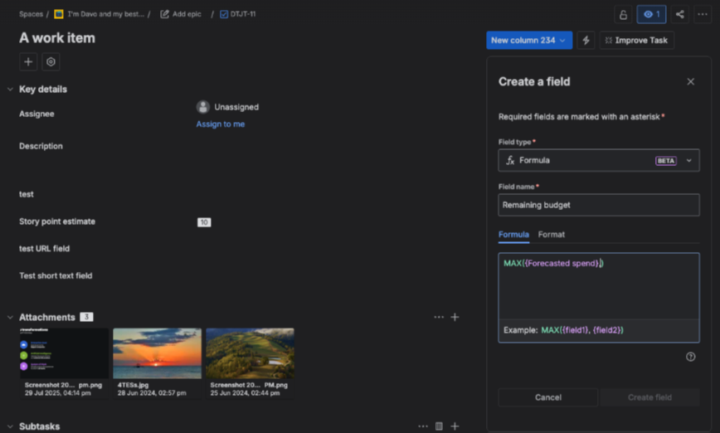
Jira Just Got Smarter: Formula Custom Fields Are Here
Atlassian just dropped something I've been waiting years for — Formula Custom Fields in Jira Cloud. This is rolling out now in open beta, and it's a genuine game-changer for how we handle calculated data in Jira. Let me break down what this means for you and why I'm excited about it. What Are Formula Fields? Think of them as Excel formulas, but native to Jira. You create a custom field that automatically calculates values based on other fields in your issue. No more manual calculations, no more "I forgot to update that field" moments. Real-world examples: - Risk scoring — multiply Probability × Impact to get an automatic risk rating - Cost calculations — Hours Estimated × Hourly Rate = Project Cost - Effort rollups — sum multiple effort fields into a single total - Date estimates — calculate target dates based on other date fields - Business impact scores — combine multiple factors into one weighted score The formula runs automatically. The field updates itself. You just read the result. How It Works Formula fields are a new custom field type. You set up the formula once, and Jira calculates the output for every issue where that field exists. Key things to understand: The fields are read-only — they display calculated values, you can't manually override them. This is actually a good thing because it means your data stays consistent. Formulas work within a single issue — you can't pull data from child issues or linked issues (yet). So if you're hoping to roll up Story Points from subtasks to a parent, that's not what this does. This calculates values from fields on the same issue. Once you pick an output type (number, text, date), you can't change it — you'd need to create a new formula field. So plan ahead. What's Available Now (December 2025) If you're on a team-managed project (Business, Software, or Service), you can start using this today: - Reference number custom fields and integers - Use mathematical operators and functions - Output as numbers, currency, or percentages - See results on issues and in the All Work view
1
0
Dec '25 •
🔥 Big Changes Coming to ProjectFlow Academy
I'm completely refreshing the community with new 2026 content. Next 30 days: - ✅ This and next week: Assets Mastery 2026 - ✅ Week 2-3: Confluence Crash Course 2026 - ✅ Week 3-4: Multi-Project Visibility Mastery - ✅ Plus: Weekly live Q&A every Wednesday 2 PM All content = updated UI, real enterprise examples, Python automation scripts. Founding members: You're locked in at current rates forever. Even as prices go up for new members. First course drops Monday. Let's go. 🚀
0 likes • Dec '25
Thanks you! Yes, the best if you can wait - First 10 videos will be live by the end of the week. Also all course should be ready week after. I know you are my VIP client so we can talk about this 1 on 1 or during Wednesday calls :)
Sep '25 •
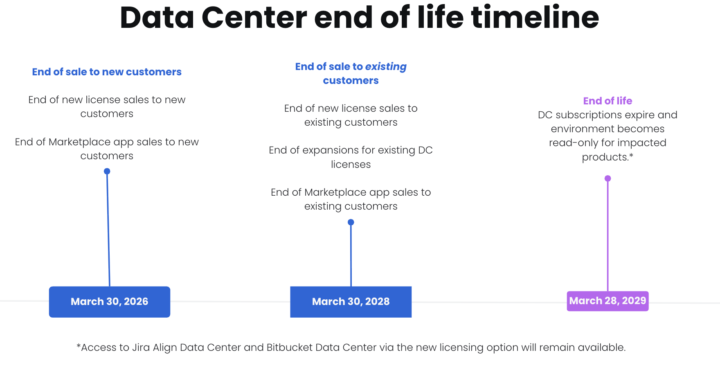
🚨 Jira Data Center EOL Alert: March 28, 2029
Hey team! Atlassian just announced some big news - Jira and Confluence Data Center will reach end of life on March 28, 2029. The Quick Timeline: - Dec 2025 - No new DC apps in Marketplace - March 2026 - No DC sales for new customers - March 2028 - Existing customers can't expand DC - March 2029 - Game over for DC Why the change? Simple: 99% of Atlassian customers are already on Cloud or migrating there (including 75% of enterprise customers). The market has spoken - Cloud wins for speed, cost, and AI features. What this means for you: If you're on DC, you've got 3.5 years to migrate. Sounds like plenty of time, but trust me - complex migrations take longer than you think, especially with: - Custom configurations - Integrations - Large datasets - Training needs My advice? Don't wait until 2028. Start planning now while you have options and aren't competing with everyone else scrambling at the last minute. Currently helping several organizations with their DC → Cloud migrations. If you're facing this transition and want to chat strategy, drop me a DM. Happy to share what I'm seeing work (and what to avoid). Anyone else dealing with this announcement? What's your timeline looking like? P.S. - Bitbucket DC gets special treatment with a hybrid license option, so source code folks have more flexibility.
1-10 of 32

@michalek-kj
I'm Atlassian SEM, and I am helping Scrum Masters, PMOs, BAs, or Managers to Master Jira, Confluence, or Service Desk Fast https://projectflow.co.uk/
Active 6d ago
Joined Nov 25, 2022
London UK