

Dec '25 •
Jira Just Got Smarter: Formula Custom Fields Are Here
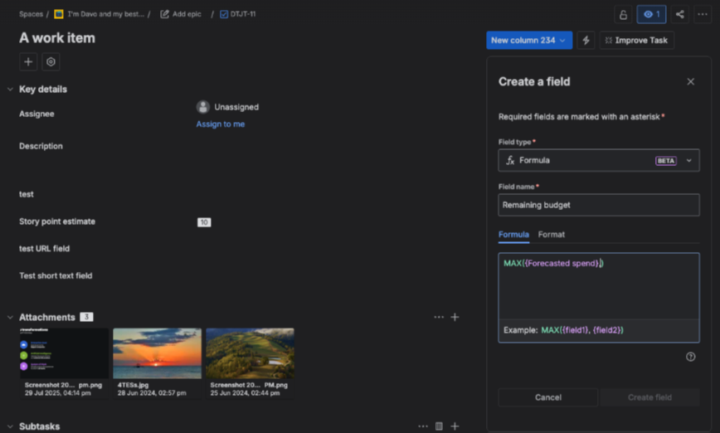
Atlassian just dropped something I've been waiting years for — Formula Custom Fields in Jira Cloud. This is rolling out now in open beta, and it's a genuine game-changer for how we handle calculated data in Jira. Let me break down what this means for you and why I'm excited about it. What Are Formula Fields? Think of them as Excel formulas, but native to Jira. You create a custom field that automatically calculates values based on other fields in your issue. No more manual calculations, no more "I forgot to update that field" moments. Real-world examples: - Risk scoring — multiply Probability × Impact to get an automatic risk rating - Cost calculations — Hours Estimated × Hourly Rate = Project Cost - Effort rollups — sum multiple effort fields into a single total - Date estimates — calculate target dates based on other date fields - Business impact scores — combine multiple factors into one weighted score The formula runs automatically. The field updates itself. You just read the result. How It Works Formula fields are a new custom field type. You set up the formula once, and Jira calculates the output for every issue where that field exists. Key things to understand: The fields are read-only — they display calculated values, you can't manually override them. This is actually a good thing because it means your data stays consistent. Formulas work within a single issue — you can't pull data from child issues or linked issues (yet). So if you're hoping to roll up Story Points from subtasks to a parent, that's not what this does. This calculates values from fields on the same issue. Once you pick an output type (number, text, date), you can't change it — you'd need to create a new formula field. So plan ahead. What's Available Now (December 2025) If you're on a team-managed project (Business, Software, or Service), you can start using this today: - Reference number custom fields and integers - Use mathematical operators and functions - Output as numbers, currency, or percentages - See results on issues and in the All Work view
1
0
Sep '25 •
🚨 Jira Data Center EOL Alert: March 28, 2029
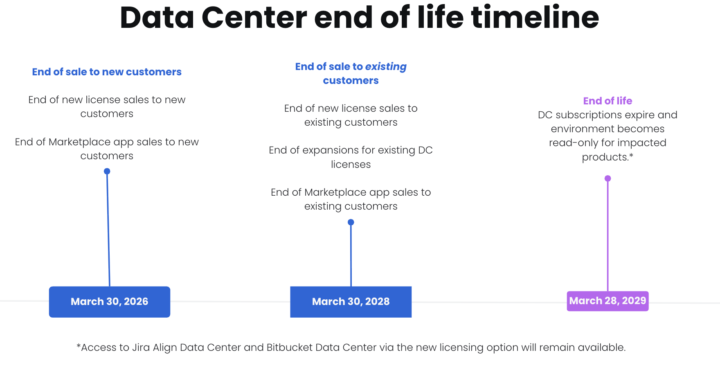
Hey team! Atlassian just announced some big news - Jira and Confluence Data Center will reach end of life on March 28, 2029. The Quick Timeline: - Dec 2025 - No new DC apps in Marketplace - March 2026 - No DC sales for new customers - March 2028 - Existing customers can't expand DC - March 2029 - Game over for DC Why the change? Simple: 99% of Atlassian customers are already on Cloud or migrating there (including 75% of enterprise customers). The market has spoken - Cloud wins for speed, cost, and AI features. What this means for you: If you're on DC, you've got 3.5 years to migrate. Sounds like plenty of time, but trust me - complex migrations take longer than you think, especially with: - Custom configurations - Integrations - Large datasets - Training needs My advice? Don't wait until 2028. Start planning now while you have options and aren't competing with everyone else scrambling at the last minute. Currently helping several organizations with their DC → Cloud migrations. If you're facing this transition and want to chat strategy, drop me a DM. Happy to share what I'm seeing work (and what to avoid). Anyone else dealing with this announcement? What's your timeline looking like? P.S. - Bitbucket DC gets special treatment with a hybrid license option, so source code folks have more flexibility.

Jul '25 •
Jira approvals?
Hi all, I'm new to Jira. We're thinking of starting to use Jira to assist with department data and technical requests, so I was wondering if you can set up approval processes in Jira? Can this be added to a workflow? Many thanks! 🙂
Mar '23 •
Jira Issue Collector
Hey, it's Mike and in today's episode, I'll dive deep into the world of issue collectors and showcase how they can transform how you gather and manage feedback for your WordPress website. An issue collector is an invaluable tool that allows you to seamlessly collect feedback, bug reports, and feature requests from your website visitors. By implementing an issue collector, you'll empower your users to share their thoughts and experiences, helping you identify areas for improvement and prioritize your efforts. We'll cover the following topics: - Selecting the right issue collector tool for your needs - Creating and customizing your issue collector form - Embedding the issue collector code into your WordPress site - Managing and responding to incoming feedback effectively Don't forget to like, share, and subscribe :) https://www.youtube.com/watch?v=Y08Frl4MB7k

Sep '23 •
Multiple owners
Hi everyone! I am perfectly aware that JIRA doesn't allow to assign an issue to multiple owners. However, some activities are carried out together by the whole team. For example, an inspection or a meeting. Therefore, usually I do it this way: I clone the issue multiple times as many as the people are and then I assign each of them to the various owners. But it is not as quick as it is said. Is there a smarter way to do that?
1-9 of 9
powered by

skool.com/project-flow-6674
Master Jira, JSM & Confluence with practical coaching to improve your project management and advance your career
Suggested communities
Powered by