Activity
Mon
Wed
Fri
Sun
Mar
Apr
May
Jun
Jul
Aug
Sep
Oct
Nov
Dec
Jan
Feb
What is this?
Less
More
Memberships
Learn Power Apps
2.5k members • Free
9 contributions to Learn Power Apps

Jul '23 •
Named Formulas ... finally "constants" in Power Apps :-)
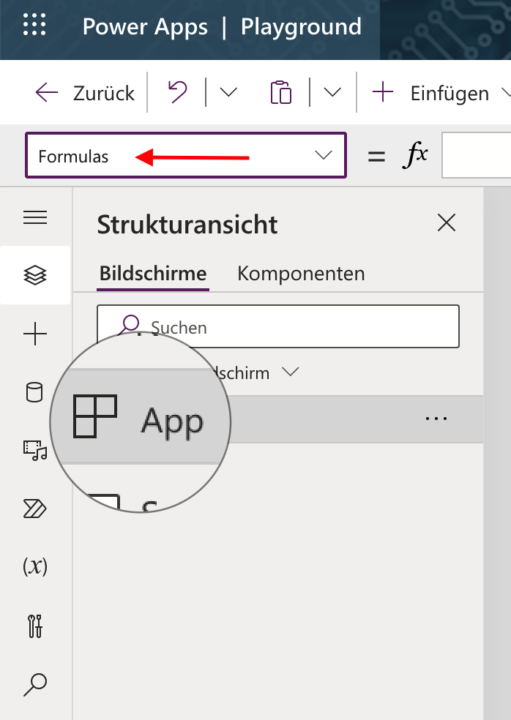
I love it! Named formulas recently moved from experimental to preview. You can define them in the App's properties Formulas. That's how you can actually define constants now, instead of defining variables onStart of your app. You can then use these constants everywhere in your app, like in properties & fx e.g. uMail = User().Mail; uFullName = User().Fullname; uMngr = Office365.Users.ManagerV2(uMail); (last one for those with 365 connectors. When using uMngr you have to add . followed by the actual value, like givenName, displayName and so on) Note, that I used the Mail constant, I set before, here) Note the ; at end of each line - ;; for my fellow Germans 🙄 Another good thing is that it's real-time and you don't have to run the Apps' onStart to initialize variables any more ... as I said: I love it 😉

2 likes • Jul '23
@Volker Blees Nice post. My favourite application of named formulas is for theming my apps. Example: fxFonts = { Heading: Font.’Lato Black’, Body: Font.’Segoe UI’, Size: { Normal: 12, Subtitle: 16, Title: 20 } }
1 like • Sep '23
I thought about writing this named formulas post for half a year until I finally came up with an interesting approach. Glad you enjoyed it Darren!

Sep '23 •
What Industry Do you Guys Work In?
I want to cater to my target audience's specific industries. Which are you in? For me, it is Information Technology, but I can't assume everyone comes from IT. Please share!
15 likes • Sep '23
Accounting.
Aug '23 •
When Your App is "Too Big"
Determining whether a Power Apps app has become "too big" can involve evaluating multiple factors, such as performance, maintainability, and user experience. Here are some signs that might indicate an app has grown too large: Performance Issues 1. Long Load Times: If the app takes a considerable amount of time to load, it could signify a problem. 2. Slow Response: Lagging or slow interaction within the app can frustrate users. 3. Resource Intensive: Consumes a significant amount of system resources, leading to sluggish behavior on some devices. Maintainability 1. Complex Logic: An app that has complex flows and intricate logic might become hard to manage and debug. 2. Reusability: Lack of modular or reusable components can make future changes cumbersome. 3. Updates: As the app grows, updates can become increasingly risky and time-consuming to implement. User Experience 1. Usability: An overly complicated UI can become confusing and difficult for users to navigate. 2. Consistency: If the app has grown haphazardly, it may lack a uniform look and feel. 3. Overwhelm: Too many features could make the app feel cluttered, detracting from the core functionality. Other Technical Limitations 1. API Limits: You may be hitting data source or API limitations. 2. Data Management: Struggling with effective data retrieval and storage. If you start encountering these issues, it might be a good time to consider optimizing your app. Sometimes breaking down a large app into smaller, more manageable modules or employing best practices in coding and data retrieval can go a long way in improving its performance and maintainability. Remember, size itself isn't the issue; it's how well the app performs and meets user needs that matters. @Michele McBride I think you asked this recently. 😊👍
4 likes • Aug '23
@Michele McBride Deep linking multiple canvas apps together is definitely a good idea. Microsoft does this for large canvas apps in their org.
Jul '23 •
No live stream today 7/8/23
Since I'm out of town today at a conference, there will be No live stream today 7/8/23. See you next Saturday, though! 😀👍👍
1 like • Jul '23
Which conference?
Jul '23 •
AI to Be a Solution Architect?
Global Blackbelt, Carsten Groth joined us in the live stream yesterday on Dataverse and provided some good expertise too. He created a whole blog post about it and how you can use AI to gain better insight into being a solution architect. Additional questions he posed and answered: - Deciding between using SharePoint lists and Dataverse for your data source? - Dataverse view inside a canvas app? - What kind of Dataverse data types are supported? - Options to secure access to Dataverse data? - How does Dataverse handle DateTime and is there anything special I should know when importing data from other sources? Here's the link: - https://carstengroth.wordpress.com/2023/07/01/power-platform-ai-to-be-a-solution-architect/ - https://twitter.com/carsten_growth
3 likes • Jul '23
@Patti Love IMHO, you will like Dataverse more outside of Teams. I haven’t yet found a good use case for Dataverse For Teams.
1 like • Jul '23
@Patti Love Yep, licensing is a blocker. If you can find the ROI return by an app it’s easier to convince. Like a selling tool to help salespeople in the field. Or an inspections tool to help technicians. Don’t let me stop you. Go forth and enjoy learning Patti.
1-9 of 9

@matthew-devaney-2544
Power Apps Super Fan 🦸♂️, Cat Lover 😻
Active 702d ago
Joined May 29, 2023
Powered by