Activity
Mon
Wed
Fri
Sun
Feb
Mar
Apr
May
Jun
Jul
Aug
Sep
Oct
Nov
Dec
Jan
What is this?
Less
More
Memberships
AI Automation Hub
2.8k members • Free
5 contributions to AI Automation Society

Nov '25 •
Went from 0 meetings/month to 10+
3 months ago I was grinding: -Cold calling 3 hours/day -Manually following up with everyone -Booking maybe 0-1 meetings/month -Completely burned out Now? 10+ qualified meetings/month. What changed? I built an AI system that: → Finds people who match my ideal client profile → Sends personalized emails (not generic blasts) → Handles 2-3 follow-ups automatically → Only pings me when someone actually replies Result: I only talk to people who WANT to talk, who are INTRESTED in my offer. Now I'm testing if this works for other industries (recruitment, consulting, agencies). If you're in B2B and tired of the prospecting grind, curious to hear if you'd want something like this. Drop your industry below—trying to see how universal this approach is.

1 like • Nov '25
How do tou deal with the personalized part ?
Nov '25 •
Just automated my entire client onboarding process. Thought I'd share how.
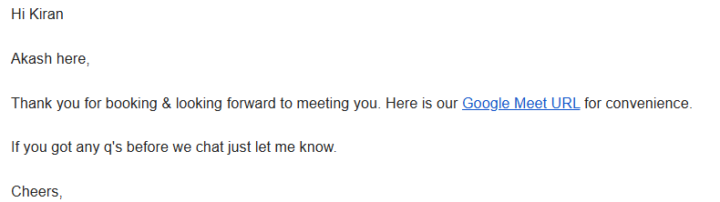
Used to spend 2-3 hours per new client just on admin work: - Sending calendar links back and forth - Manually adding them to my CRM - Writing up proposals after calls - Chasing invoices and payments - Sending follow-up emails It was exhausting. So I built an automation that does all of it: What happens now: → Client books a call on my calendar → They're automatically added to my CRM with all their info → They get an instant "thanks for booking" email with the meeting link → We have the call → System generates a custom proposal based on our conversation → Proposal gets sent to them automatically within 5 minutes → When they pay via Stripe, I get a notification → Client gets onboarded to their project automatically Total time I spend on admin now: Zero. I just show up to calls and close deals. Everything else runs itself. For anyone in B2B this is a game-changer. Happy to walk through how I built it if anyone's interested. It's not complicated, just took some time to set up properly. Drop a comment if you want the breakdown.
2 likes • Nov '25
Congrats ! Would love to have a look on the breakdown

🔥
Nov '25 •
I Extended The Gmail Agent Template To Actually Read Invoices (Not Just Forward Them) 🔥
Grabbed the community's 'Gmail AI Agent' template. It categorized emails perfectly. But client asked: 'Can it extract invoice data too?' Added 3 nodes. Now it does. THE BASE TEMPLATE: Using the popular 'Gmail AI Agent' (2,000+ downloads from community). Categorizes emails, drafts responses. Works perfectly for text. But ignores PDF attachments completely. CLIENT'S REQUEST: 'When invoice email arrives, can the agent extract vendor name, amount, due date? Right now it just forwards the email.' THE EXTENSION (3 NEW NODES): NODE 1 - IF NODE: Check for PDF attachment Triggers when email has .pdf file attached. Routes to document processing branch. NODE 2 - DOCUMENT PROCESSING NODE: Parse Invoice Configuration: Extract Structured Document mode. JSON Schema for invoice data (vendor, amount, date, invoice_number). Returns structured data. NODE 3 - SET NODE: Format for Agent Takes extracted invoice data, formats as clear text summary for agent to use. NODE 4 - ADDITIONAL TOOL: Give agent new capability Tool name: 'Extract Invoice Data' Tool description: 'Extracts vendor, amount, date, and invoice number from PDF invoices' Tool input: Email with PDF attachment Tool output: Structured invoice data THE RESULT: Agent now responds: 'I found an invoice from Vendor X for $1,245.50, due March 15. I've added it to your tracking sheet in row 47.' Before extension: Agent could only read email text, forwarded invoices manually. After extension: Agent extracts data, logs automatically, provides summary. IMPLEMENTATION TIME: 25 minutes to extend the base template. No need to rebuild agent from scratch. THE NUMBERS: - Processes 80+ invoice emails monthly - Saves 12 minutes per invoice (no manual entry) - Client processes $120K invoices monthly through agent - Zero manual data entry needed CONFIGURATION DETAILS: Document processing node settings: Use 'Extract Structured Document' operation. Define JSON Schema with required fields. Set confidence threshold at 0.85. Route low-confidence extractions to review queue.
2 likes • Nov '25
Oh great ! I will copy this !

Nov '25 •
AI AGENCY 101: How to Price Your Services as a Beginner
Breaking down exactly how to price your AI automation services the right way so you can confidently charge clients and build a profitable AI automation business. Whether you’re creating workflows in n8n, automating lead generation, building AI voice agents, or setting up fully automated systems for businesses, choosing the right pricing model matters. We’ll cover project-based pricing, hourly pricing, and monthly retainers, plus when to use each one and how to position your value so clients understand what they’re paying for.
2 likes • Nov '25
Many thanks ! Will be useful :)

Nov '25 •
Just made my first Voic Agent
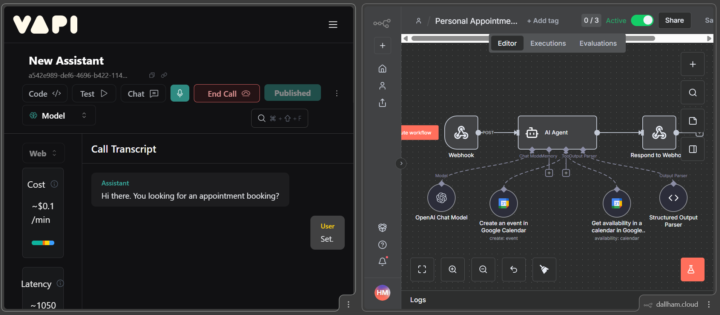
I am thrilled to share that i have created my first voice AI Agent using vapi ai & n8n for appointment booking. Here's how it works: - asks the customer for the prefered appointment time - check availablity of the slot using n8n - confirms booking - asks the customer for his email - books the appointment using google calendar and add the customer's email as attendee in google calendar
0 likes • Nov '25
Happy for you ! Was it a hard process ?
1-5 of 5

Active 4h ago
Joined Mar 30, 2025
ENTJ
Powered by