Activity
Mon
Wed
Fri
Sun
Jan
Feb
Mar
Apr
May
Jun
Jul
Aug
Sep
Oct
Nov
Dec
What is this?
Less
More
Memberships
Learn Microsoft Fabric
14.3k members • Free
6 contributions to Learn Microsoft Fabric

Sep '24 •
Issues with new connection Pipeline settings.
I'm having an issue with the Pipeline that is invoking a pipeline which there is in production, test and dev with the same name, and before this modification with pipeline connection, this error wasn't happening. Anyone here to help? Should I rename the pipeline? It doesn't make any sense
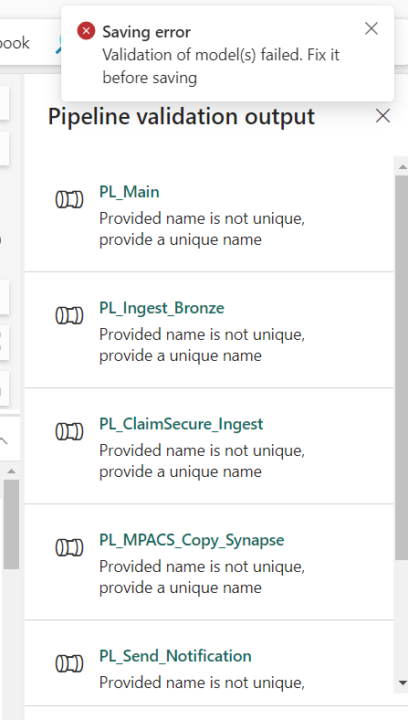
0 likes • Sep '24
(1) Pipeline doesn't exist on this workspace - Microsoft Fabric Community This is the error message that I'm receiving

Jun '24 •
connection to publicly Azure Blob - invalid credentials
Hi all, I'm trying to connect to publicly Azure Blob: https://lilablobssc.blob.core.windows.net/snapshotserengeti-v-2-0. Give the connection a name and log in anonymously. I do get an 'invalid credentials' though. Why would that be? Thx for support.
0 likes • Jun '24
Im not sure if these links can help you: IP address configuration - Power Automate | Microsoft Learn Azure Storage : Unable to access Container blobs with defined Credentials - Microsoft Q&A
May '24 •
Help with notebook reference.
Hello Skool, I need a little help. I'm not sure if it's possible to do what I'm thinking. Is it possible to run a cell from another notebook? I know that I can run a whole notebook from another notebook, using the command %run 'Name of the notebook' But is it possible to run only a cell? and how should I insert the reference in the "source" cell? I've been looking for this on these links: Introduction to Microsoft Spark utilities - Azure Synapse Analytics | Microsoft Learn How to use notebooks - Microsoft Fabric | Microsoft Learn Thanks.
0 likes • May '24
@Vinayak K So would it be possible to call a function in a cell? like type %run 'function in cell'?
1 like • May '24
@Prabhat Nath this approach I thought after I posted this, but you are the experts and I thought it could have another solution.
Apr '24 •
Merge in the same table.
Hello community, I would like to ask something. Is it possible to merge into the same table using fabric? (With notebooks) For example, I have a table called names with columns id and name, the data inside is id=1, name=John. Is it possible to "scan" this table to check if the data that is coming is already there? and then update if something is modified, and insert if it is not? tks
0 likes • Apr '24
@Eivind Haugen loved the code, did something like this using tables, but I didn't find anything with Python. It will help definitely. Thank you.
0 likes • Apr '24
@Ivan Ammirabile I used this one to do in SQL and it worked as well, tks Ivan.

🚀
Apr '24 •
NEW SERIES: DP600 exam preparation | Video 1 of 12 (Intro)
👋 Hey Fabricators! I just released the first video in a 12-part series on the DP-600 exam! I know a LOT of you have mentioned that you are looking to get certified, so I thought I'd try and make it as easy as possible for you! 🪜 We'll be stepping through each section of the DP-600 Study Guide over the next few weeks, starting with this intro to the course and the exam. In the next video (should be released in the next few days), we'll start with the first section: Planing a data analytics environment 🙌 🙏 Please like, share, comment - do all that good stuff as it helps the channel and the community grow - thanks!

1 like • Apr '24
following the video series with the microsof learn as well !!!
1-6 of 6

@luiz-fernando-1536
Just moved to a data job position where it is used Fabric all day, and I'm studying in a lot of ways to keep the pace up.
Active 435d ago
Joined Mar 27, 2024
Powered by