Activity
Mon
Wed
Fri
Sun
Jun
Jul
Aug
Sep
Oct
Nov
Dec
Jan
Feb
Mar
Apr
What is this?
Less
More
Memberships
Creative 3D Community
6.6k members • Free
3 contributions to Creative 3D Community

Apr '25 •
Walkman TPS-L2 vs DPQ-X1
Hi everyone, I finally finished this personal project...spare time wasn't much so it took a while. below some of the renders and the video. if you'd like to see the full project for more details and renders, this is the link for the Behance project https://www.behance.net/gallery/222538595/WALKMAN-DPQ-X1-Born-in-the-past-tuned-for-the-future

Nov '24 •
Sony Walkman TPS - L2
Hi everyone, after some small projects to gain some experience with plasticity, I finally decided to test it in combination with blender for rendering purposes. The bridge is mind blowings. I started to add some materials and only once finished I will setup the final scene. Right now it's just an HDRI.

0 likes • Nov '24
@Spencer Bigum hey, Yes...many actually for my workflow and archiviz. And having a long list of addon, they become too much to scroll... So, I got the one to control them all 🤣. It's called "N panel sub tab". There are similar free versions, but this allows you to separate per sections as you prefer. Then, many addon as:geoscatter, archipal, pivot transform, photographer, render raw, baga pie etc etc...depending on the situation. For the latest render, and I always use actually, photographer and render raw. Render raw it's fundamental in my opinion, photographer gives me more control on lights and camera, all in the same panel
0 likes • Nov '24
I'd have other stuff, but still a working progress...I'll post that later
Aug '24 •
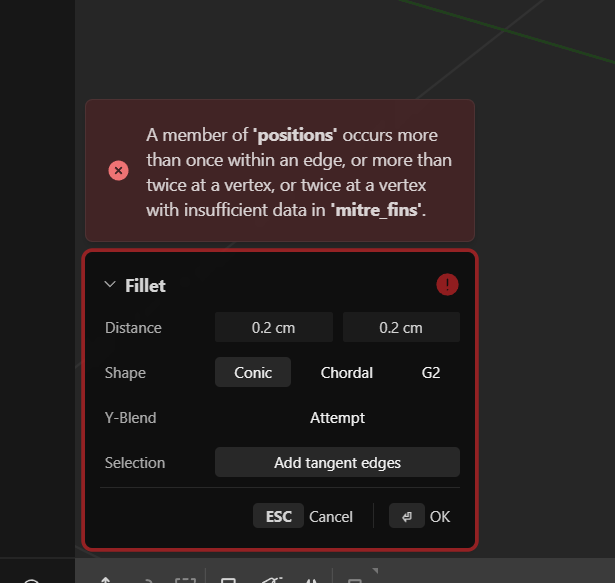
variable fillet
Hi everyone, pretty new with plasticity, I'm trying to gain some experience with the software modeling something that should be easy. problem is...I can't do variable fillet on my model and I can't understan why. this message appears... anybody knows the issue? Thanks in advance
1 like • Aug '24
I found the issue, I didn't know that the first time you press V, the command is meant to be click twice.....so, I thought that the first time I clicked it wasn't working, and so I pressed again in the same spot....silly me
1-3 of 3

@lorenzo-spinola-9213
I'm a 3d visualizer always keen to learn new software.
Many year of experience coming from c4d, then 3ds max and more recently switch to Blender.
Active 234d ago
Joined Aug 8, 2024
Powered by