Activity
Mon
Wed
Fri
Sun
Jan
Feb
Mar
Apr
May
Jun
Jul
Aug
Sep
Oct
Nov
What is this?
Less
More
Memberships
Mastering.com Members Club
28k members • Free
The Reverse Engineer
1.7k members • Free
25 contributions to Mastering.com Members Club

Aug 25 •
FEEDBACK
OK folks the time has come for me to drop a track so I can be raked over the coals. This is my solo project Ashes In the Delta's 2nd upcoming single I played all instruments and mixed and mastered and My best friend and heterolife mate is the vocalist. Let me know if you think it's launch ready. Also let me know if it's absolute garbage. I love this community and trust you.

2 likes • Aug 27
Wow! This is really good. The vocals are excellent, but the whole thing, the production, the mix and the master sound great.

Jun 3 •
Mastering question
Hello everyone. I'm in the middle of a project that is ultimately an audiobook with songs dropped in. It is a recording of a musical my wife and I wrote. It is complete with dialogue, narration and songs. My question is how to approach the final product. I'm guessing that if I put all the spoken word and songs in my mastering suite and set all the mastering chains and decisions to make the songs sound great, it may mess up the audio dialogue and vice versa. The show has a dozen songs and 36 minutes of dialogue. How would you approach mastering this and putting it together as one file?
5 likes • Jun 4
I would set up two mastering chains within the mastering session, one for the dialogue and one for all the music and then combine them on an aux track to get the complete product. So, what you would do, is duplicate the whole file so you have two identical tracks. On the first one mute out everything that isn't music. On the second one, mute out everything that isn't dialogue. Set up your normal master routing (typically an EQ aux, followed by a saturation/compression/limiting aux) separately for each of these two tracks and do whatever EQ, compression, saturation, limiting etc, you need to do to get the right sound for each separately. Then make the output of the master track for the music and the master track for the dialogue go to one final aux track which will be the master for the whole project. This is the track you want to bounce out to get the completed master.

May 31 •
Reducing breath noise
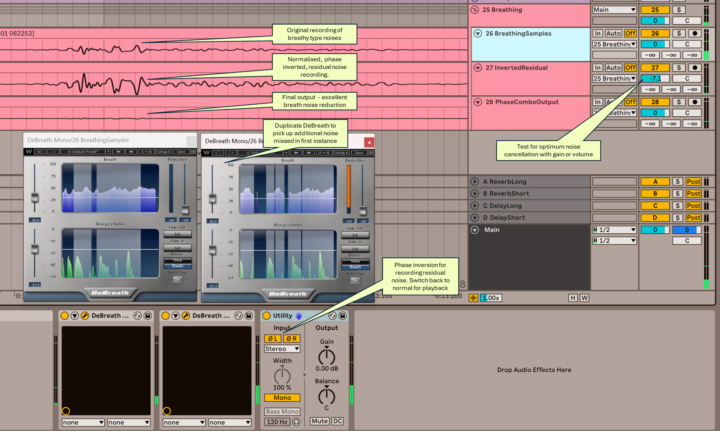
I've been exploring how to reduce breath noise when recording wind instruments (alto, tenor and bass recorders) and I reckon this would work pretty well for vocals too. It uses a combination of Waves DeBreath and phase inversion. Basically the process is to: - Run 2 Waves DeBreaths in series to capture the majority of noise - Use the Breath switches on DeBreath to only let the residual breath noise through - Use Utility to invert the phase and record the residual noise onto a new track - Export the residual noise track as a normalised mono track (matching the original recording) then import it back again - Cancel phase change on Utility so the original recording plays in normal phase - Play the original recording and the inverted residual noise track in together - Adjust the gain on the residual noise track down until you reach an optimal noise reduction point I've annotated a screenshot of Ableton to help. I'm no singer so let me know if this process works well for vocals. Any other tips on how you deal with breath noise (apart from not breathing!) would be much appreciated. Thanks Rob
3 likes • Jun 4
If you have Melodyne, you can simply eliminate breath noise between the sounds you want by clicking on the unwanted part and hitting the backspace key. Make sure they are disconnected from the notes you want to keep by clicking the pointer tool and double clicking where you want a break. This works well for instruments and vocals.
Feb 3 •
New Releases
I posted this on the Reverse Engineer community site but thought the Fix-the-Mix community might also enjoy that I have a couple of new releases. The first, Between Us, is an EP of 6 pop songs that I wrote, performed, produced, mixed and mastered. The second, Moonlit Dreams, is a collaboration with Ken Matsuda, under the name Soniq Mirage, of 4 pop songs that together we wrote, performed, produced, mixed and mastered. The Spotify links are here: https://open.spotify.com/album/0cY8FmzWf9MmJP4ThGtU6A?si=c91e62b9ae384b15 https://open.spotify.com/album/26y1SDKDklCDG7nSEc0eVH?si=kdXjLMw6RtaKJKb2grCPHA I hope you enjoy them. I'd also like to thank the Mastering.com team for all the training and mentoring that went into being able to create these works! They would not have been possible (or at least not as good) without all your help.
2 likes • Feb 10
@Julio C It looks like Spotify uses a pay-for-use service to add lyrics, which I do not intend to subscribe to. However, I did add all the lyrics through Distrokid, which will show up in about a week on Apple Music, YouTube, Deezer and several other streaming platforms, assuming these services accept them.
1 like • Feb 11
@Carlos Lydia Thank you !

Jan 29 •
🎧 Achieving Pro Sound in Your Tracks 🎧
Hey fam! What’s the one thing you do to make sure your music hits that professional level? Whether it's mixing, mastering, or production tricks, I’d love to hear what works for you! Let’s share some knowledge! 🔥🎶
3 likes • Feb 3
There are no “tricks” that will give you a pro sound, just solid production, mixing and mastering engineering. Having said that, sonic balance and referencing to ensure your song sounds the way you intended are two key elements of the process that will result in a pro sound when done right and combined with all the other elements of the process.
2 likes • Feb 4
@Berlin RedluX Thanks for the tip. I didn’t know we needed to look out for bots on this site.
1-10 of 25
@linda-wagner-7884
I am a retired electrical engineer who is having fun writing, performing, mixing and mastering my own songs.
Active 6h ago
Joined Sep 22, 2022
Powered by