Activity
Mon
Wed
Fri
Sun
Nov
Dec
Jan
Feb
Mar
Apr
May
Jun
Jul
Aug
Sep
Oct
What is this?
Less
More
Mastering.com Members Club
39.1k
4.8
Free
34 contributions to Mastering.com Members Club

Feb 26 •
Suno sonic cliff repair
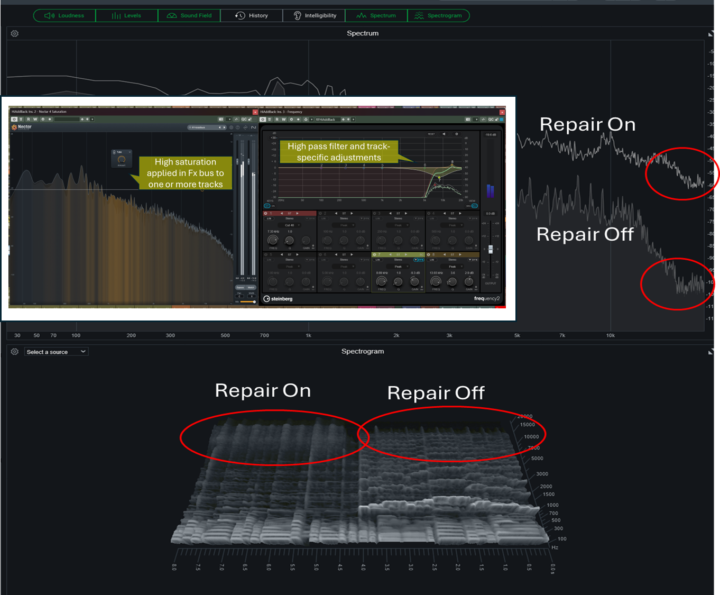
There's a high frequency (~15KHz) cliff that appears in AI generated music, apparently because the generative engine has been trained on low quality MP3 type audio so hasn't learned anything above that frequency. It becomes part of the fingerprint in AI music detection algorithms and, some people say, it results in AI music all sounding the same. Anyway, I've been messing around to see if it's possible to repair that cliff to some extent. By selective saturation it's possible to add back frequencies that are harmonics of the instrumentation so, in theory at least, something useful should happen. The composite image (Cubase) below shows the results from setting up an Fx bus with high-level tube saturation and a high pass filter. Give it a go and let me know what you think. I'd be interested to hear if anyone has better solutions...other than recreating stems with real music! 🤔
0 likes • Feb 27
@Tom Baldwin The harmonics are not dissociated from the instruments. I put the processing on a bus so I can send whichever instrument is required and the bus returns the top end harmonics back into the output mix. I guess it works a bit like parallel compression. As for telling Suno anything, let alone giving it specific instructions...it's a crap shoot! In this case, Suno's problem is that the material it is scraping to learn from is not all high quality so if it doesn't have anything to learn from it doesn't fill in the blanks at the top end.
0 likes • Feb 27
@Brian M Thanks for the tip!

🚀
Sep '25 •
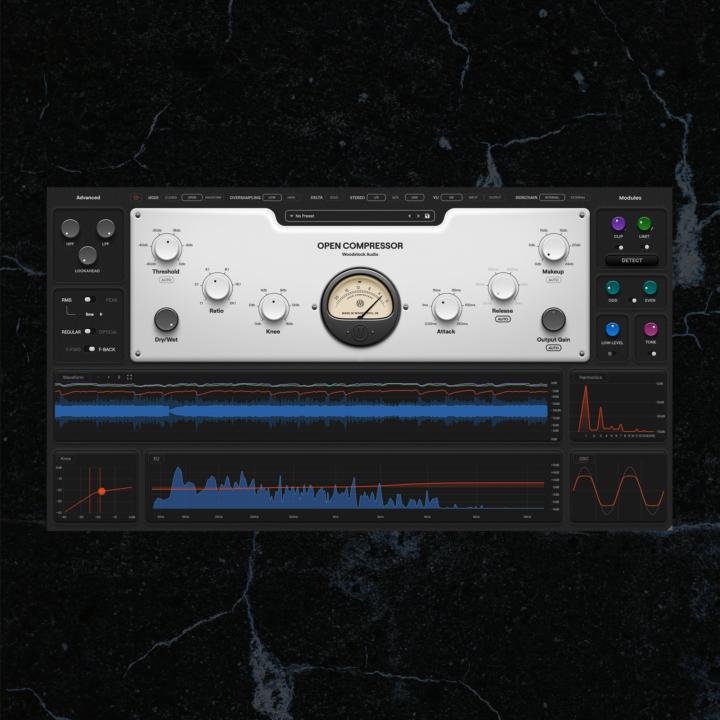
Revealing our first ever plugin
It's finally time to share all the details! Introducing our first ever plugin... Open Compressor - The all-in-one compressor that shows you under the hood If you want to learn all about it, we're hosting a value-packed launch event on Sep 25th to celebrate. RSVP here: https://courses.mastering.com/event_full/1757071997273x706016099407233000?utm_source=FTMSkool We built this compressor because we're very aware of the fact that compression is often the most difficult tool for people to understand. We set out to build a compressor that would help you understand compression by effectively seeing *inside* the compressor, while also being a world-class swiss army knife plugin that any engineer would use. Open Compressor is designed to give you all-in-one functionality (with clipping, limiting, saturation, and more) and allow you to effectively recreate any compressor you want using foundational, component-level controls... While simultaneously revealing what's actually happening under the hood, so you can develop a deeper understanding of the technical processes at play, and make better decisions for your music. Want to learn more? Register for the launch event, then on the following page you'll be able to see the full info on Open Compressor, and even save 30% by pre-ordering ahead of the public launch. All the info is here, simply register for the launch event to get started: https://courses.mastering.com/event_full/1757071997273x706016099407233000?utm_source=FTMSkool Hope to see lots of you at the launch event, it's gonna be a ton of fun! - Rob
2 likes • Sep '25
Looks very functional and with a very clean GUI. Well done team!

Jun '25 •
Bot central
Is it me or are there a lot more bots in this group than there used to be? An overwhelming amount I would say, almost making it hard to differentiate between real folks w concerns and questions and click bait. 😔
2 likes • Jun '25
@Kat V. , @Phillip Patterson one tip for bot spotting is their use of the Oxford comma. Most of us "warm, upright and breathing" folks don't write " x, y and, z" or " x, y or, z" in a list but ChatGpt does.
May '25 •
Reducing breath noise
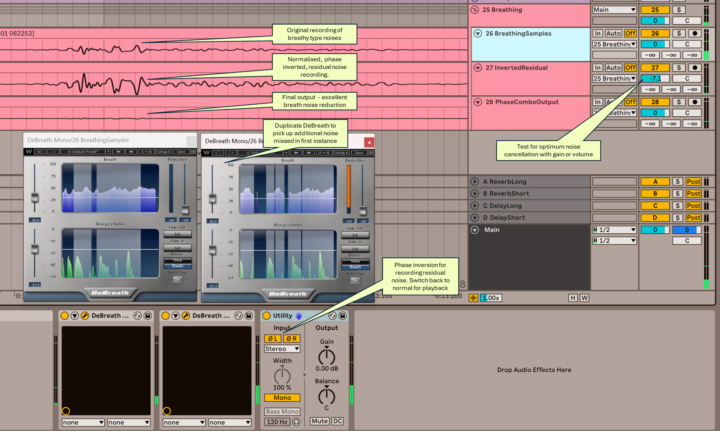
I've been exploring how to reduce breath noise when recording wind instruments (alto, tenor and bass recorders) and I reckon this would work pretty well for vocals too. It uses a combination of Waves DeBreath and phase inversion. Basically the process is to: - Run 2 Waves DeBreaths in series to capture the majority of noise - Use the Breath switches on DeBreath to only let the residual breath noise through - Use Utility to invert the phase and record the residual noise onto a new track - Export the residual noise track as a normalised mono track (matching the original recording) then import it back again - Cancel phase change on Utility so the original recording plays in normal phase - Play the original recording and the inverted residual noise track in together - Adjust the gain on the residual noise track down until you reach an optimal noise reduction point I've annotated a screenshot of Ableton to help. I'm no singer so let me know if this process works well for vocals. Any other tips on how you deal with breath noise (apart from not breathing!) would be much appreciated. Thanks Rob
1 like • Jun '25
@Andy Laird Yep!
1 like • Jun '25
@Andy Laird I tried your tip on placing a (condenser) mic behind and above my head - it worked well thanks, giving quite a clean result. Can't afford a Royer R-121 yet so will keep experimenting. Appreciate your help!

Jul '24 •
Your mastering EQ preference
Which EQ do you like using for mastering? If you were to pick one enhancement EQ.
2 likes • Jul '24
@Berlin RedluX I've been using Ableton EQ8 and EQ3 utilities, sometimes together. I've just started experimenting with the Waves Abbey Road mastering chain and Scheps channel strip plugins which seem to work well for me.
2 likes • Jul '24
@Berlin RedluX try an EQ8 then some EQ3s in a chain (adjusting their mid bands) to flatten or tilt the PAZ slope profile
1-10 of 34
@rob-forage-7599
I've learned lots from MP101, now Interested in collaboration with performing artists.
Active 178d ago
Joined Feb 26, 2024
Australia
Powered by