Activity
Mon
Wed
Fri
Sun
May
Jun
Jul
Aug
Sep
Oct
Nov
Dec
Jan
Feb
Mar
Apr
What is this?
Less
More
Owned by Krista
Ever wanted to know how to publish your own book? You're in the right place!
Memberships
90’s Nostalgia Club 👾
61 members • Free
19 contributions to Skill & Soul Studio

🔥
1d •
Keep hitting Claude’s usage limits.
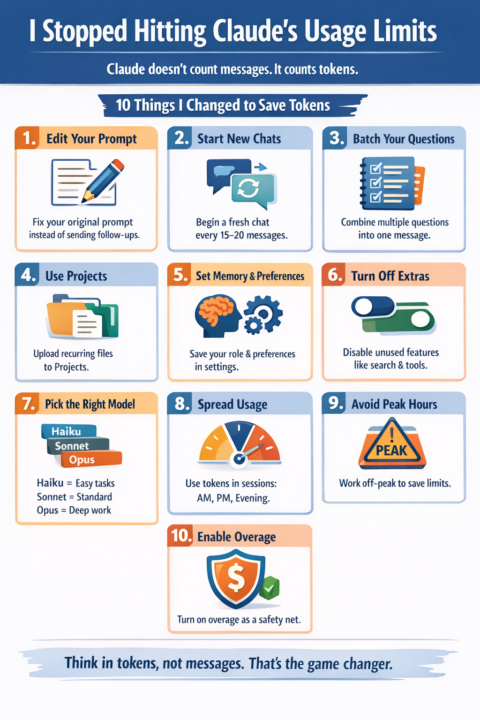
Turns out… it's not the model. It is how I am using it. Turns out Claude doesn’t count messages. It counts tokens. Once that clicked, everything changed. Here are 10 things that make a massive difference: 1. Edit your prompt instead of sending follow-ups If the response is off, don’t send: “No, I meant…” or “That’s not right…” Every extra message gets added to history. Claude re-reads ALL of it every time. Token cost grows fast: At ~500 tokens per exchange 5 messages = ~7.5K tokens 10 messages = ~27.5K tokens 20 messages = ~105K tokens 30 messages = ~232K tokens Instead: edit your original prompt and regenerate. You replace the history instead of stacking it. 2. Start a new chat every 15 to 20 messages Long chats are expensive. Most tokens get burned re-reading old context, not generating new output. One dev tracked usage: 98.5% tokens = re-reading history 1.5% = actual output Fix: Ask Claude to summarise → copy → start fresh chat → paste summary. 3. Batch your questions Stop sending multiple messages. Bad: “Summarise this” “Now list points” “Now give a headline” Better: “Summarise this, list key points, and suggest a headline.” One prompt = one context load. 4. Use Projects for repeat files Uploading the same file repeatedly = repeated token cost. Projects cache your files. Upload once → reuse without re-tokenising. If you use PDFs, briefs, or docs often, this alone saves a lot. 5. Set Memory and Preferences If you keep typing: “Act as…” “I’m a…” “I write like…” You’re wasting tokens every time. Save it once in settings. Claude remembers it. 6. Turn off unused features Search, connectors, advanced thinking all add token cost. If you didn’t intentionally turn it on, turn it off. 7. Use the right model Not everything needs power. Haiku → quick, cheap tasks Sonnet → standard work Opus → deep thinking Most people overuse powerful models and burn budget fast. 8. Spread usage across the day Claude uses a rolling 5-hour window. If you burn everything in one session, you waste the rest of your day.

🔥
3 likes • 1d
@Manda Jackson yeah honestly this makes me not even want to create a claude account for how I use AI
🔥
3 likes • 1d
@Manda Jackson would you say its best to keep paying for chatGPT and use claude for more heavy lifting
🔥
3d •
Happy Easter
Happy Easter 🐰 Wishing you a day filled with joy, chocolate, and a little bit of magic. May your Easter be as sweet as the treats and as bright as the season. MJ certainly had fun this easter, hope you all did to

🔥
7 likes • 3d
@Manda Jackson I stole your doll prompt and made myself into an EASTER EDITION
🔥
5 likes • 3d
@Manda Jackson yeah that is a lot to keep up with! I feel like one dog is too much these days
🔥
6d •
Claude Skills
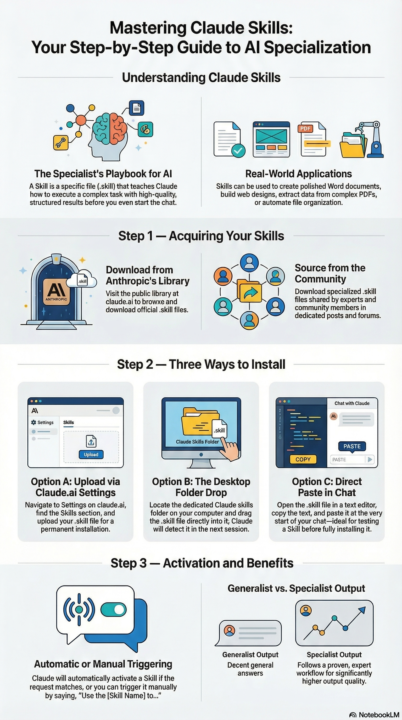
What They Are, How to Install & Use Them Most people use Claude out of the box. But there's a layer most users never unlock: Skills. Here's everything you need to know. What is a Skill? A Skill is a file that teaches Claude how to do a specific task really well — before it even starts helping you. Think of it like giving Claude a specialist's playbook. Instead of a generic answer, you get a structured, high-quality result every time. Examples: 📄 Create polished Word docs 🎨 Build beautiful web designs 📊 Extract data from PDFs 🗂️ Automate file organization Step 1 — Get a Skill You have two sources: From Anthropic's public library → Browse available Skills at claude.ai → Download the .skill file you want From this community → I share Skills in the classroom Step 2 — Install It Pick whichever method works for you: Option A — Upload via Claude.ai settings Go to claude.ai → Settings Find the Skills section Upload your .skill file Done ✅ Option B — Drop it into a folder Locate your Claude skills folder on your computer Drag and drop the .skill file in Claude picks it up automatically next session ✅ Option C — Paste it directly in chat Open the .skill file in any text editor Copy the contents Paste it at the start of your Claude conversation Claude will use it for that session ✅ (Option C is great for testing a Skill before committing to installing it) Step 3 — Use It Once installed, Claude activates the Skill automatically when your request matches. You can also trigger it manually: "Use the PDF skill to extract the table from this file." That's it. Claude reads the Skill, follows the workflow, and delivers a much better result than it would without it. Why bother? Without a Skill → Claude gives you a decent general answer With a Skill → Claude follows a proven, expert workflow The output quality difference is real. 💬 Questions about any of these steps? Drop them below and I'll help you get set up.
🔥
3 likes • 6d
Love the idea of having "skillz to pay the bills" 😆 I actually still have not yet opened a Claude account - I know I need to put that on my to do list.
🔥
11d •
Happy birthday Krista Brea (for tomorrow)
@Krista Brea birthday wish is to welcome a few more people into the community so KDP Publishing can reach 800 members. She’s only 5 away now, and it’s very likely she’ll hit the goal.

🔥
5 likes • 11d
@Jim Flach thanks for celebrating my special day.
🔥
3 likes • 11d
@Jim Flach hahaha exactly
🔥
14d •
Tip of the day
💡 Tip of the day: If it takes less than 2 minutes… do it now. That tiny task you keep putting off? It’s not about time. It’s about mental clutter. Every small thing you finish instantly: • clears space in your head • builds momentum • reduces overwhelm Stop stacking tiny tasks. Start clearing them. What tips would you add?
🔥
5 likes • 14d
Yeah I think the battle in my mind of should I do or or shouldn’t I do it goes on for at least 10 minutes 🤣🤣
🔥
3 likes • 13d
@Manda Jackson glad to know I am not the only one.
1-10 of 19

🔥
@kristabrea
Ever wanted to have your own book? I’m teaching you how to do KDP self publishing!
Online now
Joined Feb 25, 2026
Chicago