Activity
Mon
Wed
Fri
Sun
Sep
Oct
Nov
Dec
Jan
Feb
Mar
Apr
May
Jun
Jul
Aug
What is this?
Less
More
Memberships
AI Systems for Human Content
8.2k members • Free
Solo Founders Lab
3.9k members • Free
AI Creators Club
6.2k members • Free
Future Faceless Millionaires
7.3k members • Free
YouTube Growth Accelerator
562 members • Free
Online Business Friends
109.6k members • Free
Anaam – AI Automation Hub
4.5k members • Free
Creator Academy
10.3k members • Free
AI Automation Academy
141 members • $28/month
5 contributions to Learn Automation and AI

Nov '25 •
Video: Getting Started with n8n and Gemini 3.0
This is a deeper dive into the basics of n8n in case you're just catching up. Now is the perfect time to build your first workflow and connect it to Google's new Gemini 3.0 AI model. Let me know if you have any questions!

1 like • Nov '25
Thanks for the update. Do we need to upgrade n8n to use Gemini 3.0?
1 like • Nov '25
@Jay Peters let me give a try.
Oct '25 •
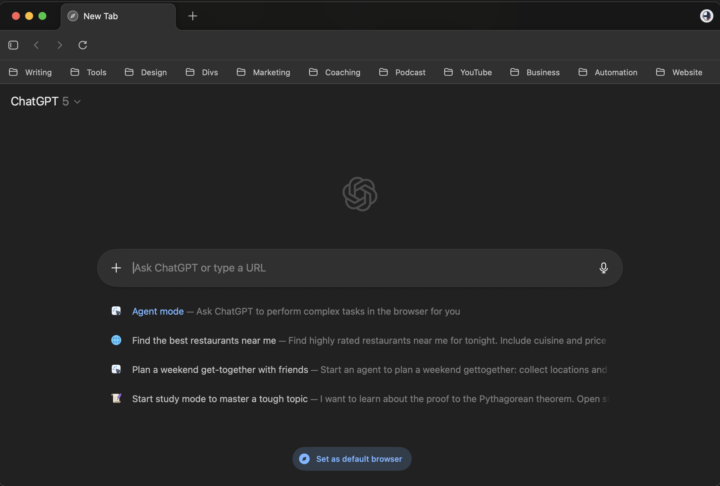
OpenAI's New Browser
Pretty excited about this one, I'm a bit of a GPT power user. Earlier today, OpenAI launched their Web Browser: ChatGPT Atlas available for MacOS Haven't had a chance to test it out too much yet but I would imagine it will be convenient to have it go do research in another tab for me or pull numbers from another site while I'm working on something. I never committed to Perplexity's Comet but I'll be giving Atlas a try. Let me know if you end up trying it out and what crazy uses you find for it
1 like • Oct '25
Is it available for windows users?
Aug '25 •
Video: Easy Image Editor with Nano Banana and n8n
With just a few nodes in n8n you can have a simple image editor using Google's Gemini 2.5 Flash Image model, codenamed "Nano Banana". I'm using an HTTP Request node to call the Gemini API directly, basically following the same process from https://aistudio.google.com/apikey, and with a n8n and a little base64 encoding and decoding, you've got a prompt-based image editor. Here is the JSON body example of the Gemini request for reference: `{ "contents": [ { "parts": [ { "text": "{{ $('On form submission').item.json.Prompt }}" }, { "inlineData": { "mimeType": "image/png", "data": "{{ $json.data }}" } } ] } ], "generationConfig": { "responseModalities": ["IMAGE"] } }` This was one of those immediately powerful workflows. I actually ended up using it create the thumbnail to remove the Salesforce branding from my sweatshirt after the fact. Really powerful model and really easy setup. May have to do a few more workflows using Nano Banana. Let me know if you try it out or have any other ideas you want to see! 🍌
1 like • Aug '25
@Jay Peters when I try to execute the workflow. I am receiving an error you exceeded your current quota, please check your plan and billing details. I am trying it for the first time, but still got this error. Do you have any idea?
2 likes • Aug '25
@Jay Peters now I understood. Thanks for the info.
Jul '25 •
Video Starter Kit Update
I'll have a video for this later, but I've updated the video starter kit with a few more options: - Transcribe video with timestamps - Options for segment or word timestamps - A generic ffmpeg command for editing video Updated code is below, but let me know if you have any questions https://github.com/jaypetersdotdev/self-hosted-video-starter-kit

1 like • Jul '25
Interesting one @Jay Peters. If possible please add couple of examples in your video.
Jul '25 •
Goal: Workflows without Apify
One of my goals for this community will be to create workflows that don't always rely on Apify. I'm sure I'll end up using it still, there's a reason it's so popular. Hard to beat being able to pick something from their market place, pay a little money, and get huge amounts of data plugged directly into your workflow. Usually makes more sense to get something working than spend a bunch of time building it yourself to find out it wasn't really worth the effort. Done is better than perfect. But as an engineer, I can't help but resist the idea of paying for someone else's code, when I could do it myself, especially when some scenarios are surprisingly simple to do. Admittedly I wouldn't even know where to start for some of the scrapers I've seen on there, but there are a few tricks that I do know. One of them is https://github.com/yt-dlp/yt-dlp It's a free Python library that can download any YouTube video or extract any transcript with a single command. I'm not sure YouTube will be cool with me talking about it, so this will be a Skool exclusive topic, but a workflow highlighting yt-dlp will be high on the list. Until then, what do you think of Apify? Have you used it? Any actors you'd like to run for free instead? Let me know what you think!
1 like • Jul '25
I would like to run LinkedIn job search and create custom resumes for free without using apify
1 like • Jul '25
@Jay Peters cool. Thanks for acknowledging
1-5 of 5

Active 8d ago
Joined Jul 17, 2025
Powered by