
Write something
Pinned
Aug '25 •
Accountability ✅
One of the best ways to stay consistent is having others to keep you accountable. It's something this community does for me already but I still have room for improvement. If you want to join me, I'd like to try out Accountability Posts. Super simple: 1. State your goal (daily, weekly, or monthly — up to you). 2. Post updates regularly (what you did, what you learned, or even what you struggled with). 3. Encourage others — a quick 👍 or comment goes a long way. I’ll be posting my own updates here too. I have a running goal of at least one YouTube upload per week so that's still pending. If you're interested in joining, drop your first goal below ⬇️

Pinned
Jul '25 •
Welcome!
Hey, thanks for joining! I really appreciate you being here. Feel free to check out the "🎦 YouTube Workflows" tab if you're looking for workflows or search at the top if you're looking for a specific workflow. This community is brand new so it's your chance to influence the direction. Any feedback or suggestions would be greatly appreciated. If you're just joining, you can make an "👋 Intro" post to introduce yourself and share your goals for n8n and automation in general, or leave a comment below to say hey. I'd love to hear what brought you here and how I can help. Whether you're looking to learn more about automation and AI, fix one of your workflows, or even start or grow a business, you're in the right place. Thanks again for joining, looking forward to building and learning together 🤝

Jul '25 •
Video: A Complete Beginner's Guide
Have you been wanting to learn more about automation on a platform like n8n but weren't even sure where to start? Now is the time to jump in! I'll walk you through a simple content posting system to help grasp the basics of connecting multiple accounts together and automating functionality in an easy way to help understand how powerful platforms like n8n, Make.com and Zapier can be when used correctly.
Oct '25 •
OpenAI's New Browser
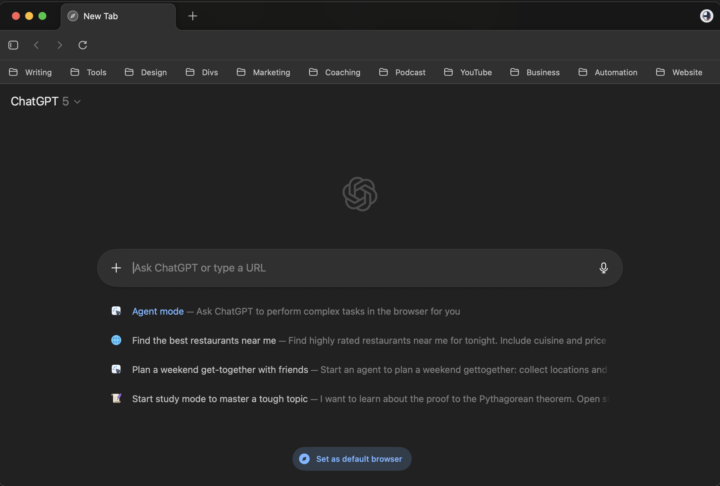
Pretty excited about this one, I'm a bit of a GPT power user. Earlier today, OpenAI launched their Web Browser: ChatGPT Atlas available for MacOS Haven't had a chance to test it out too much yet but I would imagine it will be convenient to have it go do research in another tab for me or pull numbers from another site while I'm working on something. I never committed to Perplexity's Comet but I'll be giving Atlas a try. Let me know if you end up trying it out and what crazy uses you find for it
Oct '25 •
Quick Friday Advice
Despite 13+ years of software, I am constantly reminded of this. Even automating things with “no code” takes longer than expected. Don't feel bad if it's taking a while. If you're really stuck, maybe even take a break and let your brain process it offline for a while... and get back to it on Monday! Have a great weekend!

1-30 of 83

skool.com/learn-automation-ai
Learn, build, and ship AI Automations in days, not months. Templates, live help, community.
Leaderboard (30-day)
1

+1
2

+1
Powered by