Activity
Mon
Wed
Fri
Sun
Aug
Sep
Oct
Nov
Dec
Jan
Feb
Mar
Apr
May
Jun
Jul
What is this?
Less
More
Owned by Joan
🚀 Comunidad para emprendedores, CEOs y marketers que quieren dominar la IA y automatizar su negocio. ¡Ahorra tiempo, escala y crece con 🧰 ToolBox!
Memberships
Launch 10k en 24h
1.9k members • Free
AI Automation Mastery
450 members • $7/month
DURAN ACADEMY LITE
325 members • Free
AI Marketing Hub Pro
219 members • $88/m
Design Turbo IA
9.5k members • Free
Ineffable.ai — Create with AI
491 members • $19/month
Ninjas AI Automation
3.8k members • Free
SistemIA
6 members • $100,000
🦎 Camaleones Digitales
253 members • $100,000/month
113 contributions to AI Automation Society

💎
⭐
21d •
⚠️HEADS UP: my X (Twitter) account has been hacked
Whoever has it is posting a crypto scam. That is not me. I would never promote anything like that. Do not click any links, send any money, or engage with anything posted from my account right now. I'm working on getting it back. Will let you know when it's secured. Thanks for looking out.

🔥
18 likes • 21d
@Nate Herk
💎
⭐
28d •
"This model isn't good enough yet. I'll wait for the next one."
I hear some version of this constantly and it's almost always wrong. Not because the models are perfect because I know they're not. But because "is the model good enough" blames the tech rather than yourself. AI adoption isn't binary. It's not "can the agent do this entire job for me? Yes or no?" It's "how much can it do, how much do I need to guide it, and where does it still make me faster than I was?" Right now there's a massive gap in how people use this stuff. On one end, someone is running a business by themselves that used to take a team of 15. On the other end, someone opens the AI tool their company gave them, asks for some research, watches it hallucinate everything, closes it, and decides AI just isn't there yet. If everyone has access to the same models, then why are we seeing people get drastically different outcomes? Because if someone is getting great results from a setup you could copy today, the bottleneck isn't the model. It's the driver. The way I think about it, there are three layers: → The model is the engine. Opus, GPT, Gemini, whatever you're running. Everyone can buy the same one. → The harness is the car built around that engine. Claude Code, Codex, OpenClaw. The tools it can reach, the way it spins up sub-agents to split up the work, the whole system that turns a raw model into something that can actually do a job. → You're still the driver. Your prompts. The context you feed it. The memory and skills you set up so it knows how you work. And the steering, for when it starts to drift. You can put the car on cruise control. But if you don't steer, you're still going to crash. (Yeah, I know some cars have lane assist now. You get the point.) A while back, Andrew Ng ran a version of this. GPT-3.5, an older and "worse" model, wrapped in a simple agentic workflow, hit around 95% on a coding test. GPT-4 on its own, no workflow, hit 67%. That workflow is the harness. A better harness around an older engine beat a newer engine running on its own.
🔥
13 likes • 28d
Thanks @Nate Herk 💫

Apr 30 •
PhD Student Paid Me $1,800 to Cut Literature Review From 120 Hours to 22 Hours 🔥
PhD student facing dissertation deadline in 4 months. Literature review: 6 months behind schedule already. Required comprehensive review of 200+ academic papers. Extract methodology, findings, limitations from each. Synthesize into coherent narrative demonstrating research gap. Manual approach: Read each paper carefully (45 minutes average), take detailed notes, extract relevant quotes, log complete citations properly. Estimated total time: 120+ hours minimum for thorough review. Current progress after 2 months of dedicated work: 34 papers fully reviewed, 166 still remaining. At current pace: 8 additional months needed to complete. Critical problem: Dissertation defense scheduled in exactly 4 months. Advisor already expressing serious concern about timeline viability. She paid me $1,800 to build academic paper processing system that could accelerate this dramatically. System functionality: Upload research paper PDF → Automatically extract key structured terms (title, authors, publication year, methodology type, sample size, key findings, stated limitations) → Generate concise one-paragraph summary → Auto-tag by research method category → Create fully searchable database. Processing time per paper: 3 minutes average versus 45 minutes manual reading and note-taking. Implementation timeline: Weekend 1 system development and testing. Weeks 1-3 systematically processed 247 papers (discovered more relevant papers than originally planned during search expansion). Total project time including setup: 22 hours from start to complete database. Result: Comprehensive literature review completed in 3 weeks instead of projected 8 additional months. Unexpected powerful benefit: Searchable database enabled sophisticated pattern analysis completely impossible with manual approach. Methodology breakdown became instantly visible: 87 studies used surveys, 34 used interviews, 18 used mixed methods. Critical research gap identification emerged from simple database queries that would have required weeks of manual cross-referencing and analysis.
🔥
3 likes • Apr 30
@Duy Bui , the pricing logic here is the part most people miss. You priced against the 98 hours saved, not the cost of running the pipeline — that's the whole game with academic clients. Two things I'd add from doing similar research-heavy work: 1️⃣ The synthesis step is where the deliverable lives or dies. Extraction is the easy 70%. Mapping the research gap into a coherent narrative is where reviewers will smell automation if you skip the human pass. 2️⃣ Re-selling. One PhD with a strong thesis tends to know 5–10 more in the same lab who are 3 months behind on the same problem. Ask for the warm intro before you deliver the final draft, not after. How are you handling source-checking when the model paraphrases a methodology section? That's the fail point I keep hitting 🔥

Apr 28 •
Leads and follow-ups.
I’ve been using an AI automation setup recently that completely changed how I handle leads and follow-ups. Before this, I was missing a lot of potential calls just because I couldn’t consistently follow up. Now the system I’m using: - captures leads automatically - follows up without manual work - helps turn conversations into booked calls more consistently It’s not a complicated setup, but it removed a major bottleneck in my process. I broke it down here: https://14lzvlw.atoms.world Curious has anyone else here solved follow-up in a better way, or still doing it manually?
🔥
0 likes • Apr 30
@George Jacob , the part most "speed-to-lead" setups get wrong is the second touch, not the first. Sub-5-minute first reply is table stakes now. The booked-call lift comes from what happens at hour 24 and day 4. What worked for me on a similar build: 1️⃣ First reply within 90s, but make it a real question, not "thanks for your interest." 2️⃣ Day 1 follow-up references something specific the lead said. If you can't, the model isn't ingesting the form properly. 3️⃣ Day 4 sends a one-line proof point (case study, screenshot) — no ask. That's where booked calls jump. What stack are you running it on? Curious whether you're going n8n + a CRM or keeping it inside one platform 💡

Apr 27 •
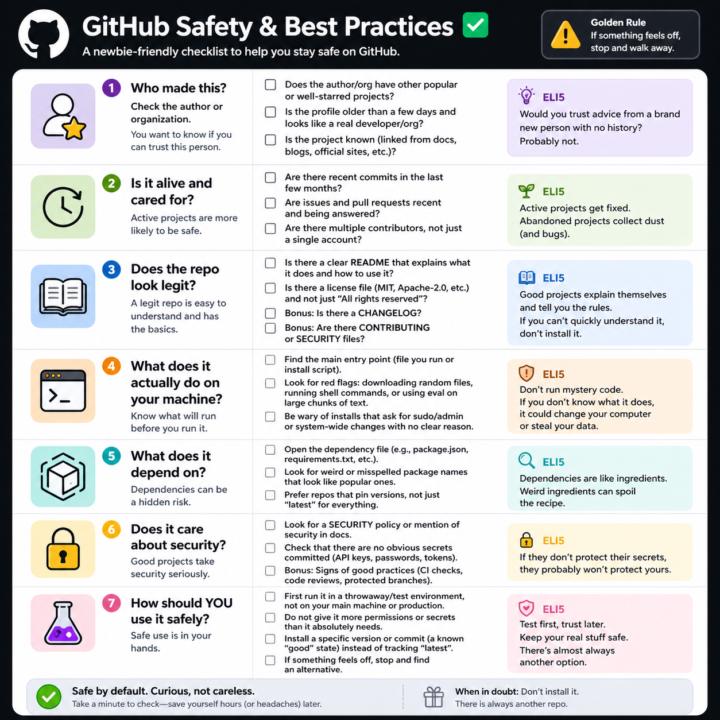
GitHub Safety and Best Practices Checklist
Here’s a simple, newbie‑friendly safety checklist you can run through every time you look at a GitHub repo. ## 1. Who made this? - Does the author or org have other popular or well‑starred projects? - Is the profile older than a few days and look like a real developer/org? - Does the project feel “known” (linked from docs, blogs, official sites, etc.)? If it’s a totally new account with one flashy repo, be extra careful. ## 2. Is it alive and cared for? - Are there recent commits in the last few months? - Are there recent issues and pull requests being answered? - Do you see multiple contributors, not just a single throwaway account? Abandoned projects aren’t always bad, but they age poorly from a security angle. ## 3. Does the repo look legit? - There is a clear README that explains what it does and how to use it. - There is a license file (MIT, Apache‑2.0, etc.), not just “All rights reserved”. - Optional but nice: CHANGELOG, CONTRIBUTING, SECURITY files. If you can’t quickly understand what it does, don’t install it. ## 4. What does it actually do on your machine? - Find the main entry point (the file you run, or the install script). - Look for obvious red flags: downloading random files, running shell commands, or calling `eval` on big chunks of text. - Be wary of “install” steps that ask for sudo/admin or system‑wide changes with no clear reason. If you don’t understand the install steps, don’t run them yet. ## 5. What does it depend on? - Open the dependency file (like `package.json` for Node, `requirements.txt` for Python). - Scan for weird or misspelled package names that look like popular ones. - Prefer repos that pin versions (not just “latest everything forever”). If the dependency list looks messy or huge for a simple tool, treat it carefully. ## 6. Does it care about security? - Look for signs of security features: security policy, mention of security in docs, or badges for scans/CI. - Check that there are no obvious secrets committed (API keys, passwords in plain text).
🔥
3 likes • Apr 28
Good checklist, @Matthew Sutherland One I would add as point 8: scan the lockfile (package-lock.json / poetry.lock / Cargo.lock), not just the manifest. Most supply-chain attacks land via a transitive dependency that the manifest does not even mention. Tools like `npm audit`, `pip-audit`, `cargo audit` give you that signal in 30 seconds. The post-install scripts comment from @Nigel Vargas is on point too — those are where 80% of the actually malicious code lives. 🔥
1-10 of 113

🔥
@joan-marquez-5213
🚀 Co-fundador de 🧰 Tool Box | IA, Automatización y Crecimiento 📈 | Transformamos procesos manuales en sistemas inteligentes.
Active 7h ago
Joined Aug 15, 2025
Madrid
Powered by