Activity
Mon
Wed
Fri
Sun
Jan
Feb
Mar
Apr
May
Jun
Jul
Aug
Sep
Oct
Nov
Dec
What is this?
Less
More
Memberships
Data Analyst University (Free)
229 members • Free
Data Alchemy
38k members • Free
4 contributions to Data Alchemy

Dec '23 •
Stuck in (Working with Environment Variables video)
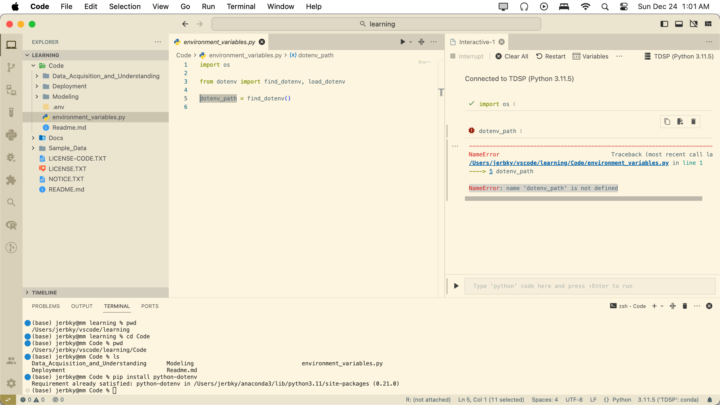
I need help, I've been working on this for a while, and I truly want to understand how to solve this and move on to the next step. I keep getting the "NameError: name 'dotenv_path' is not defined" I've double check everything and trace back my steps, but no luck, both ".env" and "environment_variables.py" files are in the same folder named "Code" when I run the "dotenv_path" it gives me that "NameError: name 'dotenv_path' is not defined"
3 likes • Dec '23
Thank you guys for the help, after trying to solve this with you're suggestions, reading some articles, and consulting with GPT, it seems this is just going to be one of those things that can't be fixed easily. I even tried to change to a downgraded version of Python. It seems that the problem is likely related to the metadata generation of the ` dotenv ` package itself rather than being an issue with ` pip`. This could be due to a compatibility issue or a problem with the package's setup script. I decided to move one to the next lesson and would come back to it when I truly need it for a project. Thanks!
6 likes • Dec '23
Update: 1- Created a new environment with Python 3.9 2- Installed Panda version 2.1.4 3- adding this line: jls_extract_var = '/Users/jerbky/vscode/learning/Code/' dotenv_path = jls_extract_var Sets the path explicitly. Since the error I was getting was "dotenv_path was not defined" issue resolved, I ended up learning more by trying to solve this.

Sep '23 •
Simplifying Black Installation
Hi everyone, I wanted to share a helpful video I came across that walks through the process of installing Black. While it's a straightforward process, there were a few nuances that I encountered along the way, which I thought I'd share for your benefit. You can watch the tutorial here: https://www.youtube.com/watch?v=YapHfCRCpig After obtaining Black, please verify if you already have a file named .vscode. If you do, navigate inside and locate the file named settings.json. Update its content to match the following code: { "python.formatting.provider": "black", "editor.defaultFormatter": "ms-python.black-formatter", "editor.formatOnSave": true } In the event that you do not find the .vscode folder for any reason, create both the folder and the file. Subsequently, paste the provided code into it. So, in summary: - Folder: .vscode - File: settings.json - Code: { "python.formatting.provider": "black", "editor.defaultFormatter": "ms-python.black-formatter", "editor.formatOnSave": true } I hope you find this information as useful as I did. Warm regards, Ana 😉
7 likes • Sep '23
Great video, I ran into a problem while trying to configure vscode from pep8 to black. Any idea how I can workaround this?
7 likes • Oct '23
Got it working, thanks!

1 like • Aug '23
Just azure in general
1 like • Sep '23
Those would do, thanks 👍
Aug '23 •
First post introduction
Hi, my name is Jermaine, I'm an undergrad studying Management Information Systems with an emphasis on data science. I'm self-taught in data science topics, I have a background in computer networks and I would love to learn how I turn this passion into something I can generate income from. One last thing, I'm happy to be a part of a group of like-minded individuals
1-4 of 4

Active 150d ago
Joined Aug 20, 2023
INTP
Dallas, USA
Powered by