Activity
Mon
Wed
Fri
Sun
Jan
Feb
Mar
Apr
May
Jun
Jul
Aug
Sep
Oct
Nov
Dec
What is this?
Less
More
Memberships
Home Lab Explorers
1.1k members • Free
KubeCraft (Free)
11.1k members • Free
2 contributions to Home Lab Explorers

May 9 •
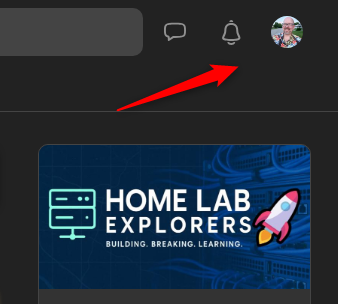
Skool has a dark mode 🙂
if you're like me and like dark mode, here is where to find the theme options.. Open your profile and follow these screenshots:

2 likes • May 13
just found this one yesterday! <3 really nice to have

May 3 •
🔥Challenge Accepted! Join the Home Lab Explorer Skill Missions!
Welcome to the first-ever Home Lab Explorer Challenge Series! This is a fun idea for all of our group members. From installing your first Docker container or orchestrating apps in Kubernetes, there will be a weekly challenge that fits your skill level. The idea is simple: pick a challenge, commit to completing it in the week, share your progress, and help others do the same. This is about learning together, building cool things, and supporting each other. Plus, you’ll walk away with new skills and maybe even some bragging rights! Eventually, we may even have a raffle or giveaway for the most challenge points, etc! 🧠 How It Works 1. Pick a Challenge - Choose the challenge that fits your current skill level or pushes you just a bit outside your comfort zone. 2. Declare It - Reply to this post in the “Challenges” category saying, “I’m doing Challenge #2, i.e. – Nginx Proxy Manager ingress controller!” 3. Do It - Tackle the challenge. Ask questions. Share screenshots. Post roadblocks and wins. 4. Wrap Up - When done, write a short post about what you learned, what worked, what didn’t, and maybe even share your config or a tip for others. Week 1 - Challenge Tiers ---------------------------------------------------------------------------------------------- Level 0 🟢 Beginner - Hardware and wiring challenge - Before getting into the software side, if there is a challenge that you would like to take on that is related to hardware, cabling, or other layer 1 type configurations that you would like to challenge yourself with, this would be great! Level 1 - 🟢 Beginner – "Build the Foundation" Virtual Machine track: - Install your first Proxmox host - Install your first virtual machine - Install an app in the VM that you want to self-host Docker track: - Set up a bare-metal or virtualized Docker host - Deploy a simple app like Portainer or Whoogle - Share your docker-compose.yml and setup steps Level 2 - 🟡 Intermediate – "Level Up Your Stack"
2 likes • May 13
Im starting on level one, getting a proxmox up and running, then i have a list of 10-15 apps i want to selfhost in a kubernetes cluster.
1-2 of 2

@henrik-nielsen-5545
Late joiner of kubernetes, but working with it everyday :)
Active 166d ago
Joined May 11, 2025
Powered by