Activity
Mon
Wed
Fri
Sun
Sep
Oct
Nov
Dec
Jan
Feb
Mar
Apr
May
Jun
Jul
Aug
What is this?
Less
More
Owned by Heather
A place where busy marketing pros come to work smarter, not harder. Trade show strategy, AI tools, weekly hacks, and a community full of heart.
Private hub where Booth Boss Bootcamp students post homework, get feedback, swap ideas, and level-up.
Revo Network Alliance
117 members • Free
Real Estate BFF
340 members • Free
W-2 → WTF: The Movement
78 members • $97/month
Community Builders - Free
12.1k members • Free
Growth Hub 365
12.5k members • Free
The AI Agents Course
4k members • Free
DCT AI Community
5.3k members • $17/month
Content Growth Engine
1.4k members • Free
Business Gurus Inner Circle
307 members • Free
57 contributions to Booth Boss

22d •
Show me Your Team 💥
What if your AI team had names, faces, and actual jobs? This week I am handing you the EXACT PROMPTS to build yours. Two steps. That is it. _____________________ This week we're building something visual. Something you're going to want to show people. Your own AI agent team org chart. Here's how it works in two steps: **𝗦𝘁𝗲𝗽 𝟭:** Go to ChatGPT. Upload a photo of yourself and use this prompt: "Create a hand-drawn doodle style illustration, simple black line cartoon character of me, [your name], (see uploaded image as reference) with me sitting at desk with laptop, playful handwritten text, colorful marker highlights, minimal shading, off-white background, notebook sketch aesthetic, social media graphic." **𝗦𝘁𝗲𝗽 𝟮:** Once you've got your cartoon, add this prompt: "Now use this style to create an org chart for this person. This person has [number] AI Agents that work under me. [List your agents and their roles]." 𝗘𝘅𝗮𝗺𝗽𝗹𝗲: Now use this style to create an org chart for this person. This person has 5 AI Agents that work under her! Cody the Copywriter, Dolly the Graphic Designer, Frannie the Final QC + Feedback Coach, Betty the Author Bio Expert, and Lincoln the LinkedIn Strategist. Don't have agent names yet? Just pick five jobs you wish someone else was doing and give them names. That's how I started. Two prompts. That's it. You'll end up with a custom cartoon org chart showing YOUR AI team reporting directly to YOU. 𝗧𝗔𝗞𝗘 𝗔𝗖𝗧𝗜𝗢𝗡 𝗡𝗢𝗪: Once you've built your org chart, drop it below.

Jul 10 •
Create AH-MAZING Slides with Manus
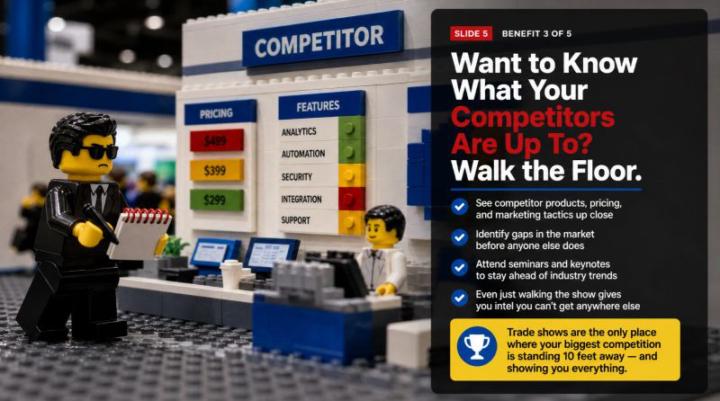
That LEGO slide you're looking at? I built an 8-page LEGO slide deck. With Manus. With one prompt. 𝗪𝗵𝗮𝘁 𝗶𝘀 𝗠𝗮𝗻𝘂𝘀? Manus isn't a chatbot. It's an autonomous AI agent, which means you give it a goal and it goes to work on its own. Everything happens in the cloud, so you don't even need to keep your computer on. Once you start a task, Manus keeps working until it's done and then sends you a message with the results. Think of it like handing a project to a really capable assistant and walking away. 𝗛𝗲𝗿𝗲'𝘀 𝗷𝘂𝘀𝘁 𝗮 𝗦𝗔𝗠𝗣𝗟𝗘 𝗼𝗳 𝘄𝗵𝗮𝘁 𝗠𝗮𝗻𝘂𝘀 𝗰𝗮𝗻 𝗱𝗼: 💥Build full websites and web apps. 💥Create AI agents. 💥Generate presentations and slides. 💥Do deep multi-source research. 💥Connect to Telegram, Slack, and WhatsApp. 💥Write and run code. It's one of my VERY favorite tools. I use it sparingly because it takes credits to do things, but when I need it, there's nothing quite like it. 𝗪𝗵𝗮𝘁 𝗱𝗼𝗲𝘀 𝗶𝘁 𝗰𝗼𝘀𝘁? Manus runs on a credit-based system with four tiers: - Free at $0/month with 300 daily credits - Standard at $20/month with 4,000 credits - Customizable at $40/month with 8,000 credits - Extended at $200/month with 40,000 credits - Annual billing saves 17% 𝗡𝗢𝗧𝗘 - a single deep-research task can burn through 900 to 1,000+ credits, and Manus doesn't tell you the cost before you hit go. 💲My 8 LEGO slides cost me 555 credits. 💲A 1 minute video I created was 6,561 (it was really good though!) 💲The app I built took about 6,500 credits (I used Claude to write it first) 𝗣𝗿𝗼 𝘁𝗶𝗽: Have Claude write the slide content first. Pro tip 2: Break your project into smaller pieces so you can use your free 300 daily credits, or tell it to show you the first 5 slides and wait for your approval to proceed, and then tell it to proceed the next day with another set of slides. You HAVE TO be in Manus Lite for the 300 credits to be pulled first! 𝗛𝗼𝘄 𝗜 𝗺𝗮𝗱𝗲 𝘁𝗵𝗶𝘀: I inserted 5 pages of copy from a "history of trade shows" session. I uploaded it to Claude to create the copy for each slide. Then I went to Manus and used 1 prompt.
0 likes • Jul 10
The actual prompt: "Using the enclosed document for copy, create a presentation in LEGO brick style where the entire scene is constructed from photorealistic LEGO bricks and minifigures. Include LEGO buildings, LEGO charts made of stacked bricks, and LEGO minifigure workers on a green baseplate. Every element should be made of actual LEGO pieces. Make it look like a professional studio photograph created for a $25,000 agency project."
0 likes • 27d
@Kathy King Oooo - I haven't played around with Veo yet. Its been on my list FOR MONTHS! Do you use it? It looks amazing.
Jun 22 •
Meet Betty
She's one of my AI team members and she's about to rewrite your bio for you. For free. In minutes. So it doesn't read like a crappy résumé. ____________________________ Writing your own bio is one of those things that feels like it should be easy. It's not. You sit there staring at a blank screen trying to sound impressive without sounding braggy, professional without sounding robotic, and interesting without sounding like every other bio on the internet. So you write something safe. Something flat. Something that technically says who you are but doesn't make anyone feel anything. I've been there. I originally wrote a SUPER lame one too. Then Betty asked me a few questions and pulled things out of me I'd completely forgotten about. Experiences I never thought to mention. Moments that actually mattered. And my bio went from forgettable to something I'm genuinely proud of. That's what Betty does. 𝗕𝗲𝘁𝘁𝘆, 𝘁𝗵𝗲 𝗔𝗜 𝗕𝗶𝗼 𝗪𝗿𝗶𝘁𝗲𝗿 is a 𝗙𝗥𝗘𝗘 custom tool I built specifically for people who need a powerful, professional bio and don't have time to struggle through writing one themselves. 𝗛𝗲𝗿𝗲'𝘀 𝗵𝗼𝘄 𝗶𝘁 𝘄𝗼𝗿𝗸𝘀: 1) Click here: https://chatgpt.com/g/g-69d54e9c34f88191b830f33ba01a8277-betty-bio-writer-turning-authors-into-authorities 2) Betty asks you a handful of smart questions. She's not just collecting bullet points. She's digging for the real stuff. The kind of details that make someone read your bio and think "I need to know this person." Then she writes it. A polished, platform-ready bio that positions you as the authority you already are. Betty writes bios for Amazon author pages, speaker profiles, LinkedIn, media kits, book back covers, and more. And she's ready to work right now. 👉 𝗧𝗿𝘆 𝗕𝗲𝘁𝘁𝘆 𝗳𝗼𝗿 𝗳𝗿𝗲𝗲 𝗵𝗲𝗿𝗲: https://lnkd.in/grs7gYHc 𝗧𝗔𝗞𝗘 𝗔𝗖𝗧𝗜𝗢𝗡 𝗡𝗢𝗪: Try her, and let me know what you think below.

0 likes • Jun 28
@Kathy King Wow - you JUMPED RIGHT IN pretty much at the start of it all. OK, so...how many AI agents do you have on your team/org chart these days?
0 likes • Jun 28
@Kathy King I did it in chatgpt/images.

Jun 20 •
Roles reversing
After 20+ years in the industry I am exhibiting. Small brand in a 3D Printing show of about 3.5k ppl. Would love recommendations for my swag quantities of tees with fun artwork. Source suggestions?
1 like • Jun 23
@Paul Defrin Purple Cow, as is Seth Godin? Or legit a purple cow? =) You can have a mascot in your booth. As for it walking the floor, you can try the "ask for forgiveness afterwards", trick or take a gamble and ask the show itself if its not in the show book already. I think if you have a mascot, you will also need a "handler" walking with it.
0 likes • Jun 28
@Paul Defrin Wow - that's exciting Paul! Damn your video reminded me of Sora2 (RIP). I didn't think I'd miss it as much as I do. Did you create that video in Meta? NanoBanana? or something else?
Sep '25 •
START HERE ----- Introduce Yourself. 👋
👋 Welcome to the Community! Let’s break the ice and get to know each other. Drop your intro as a comment on this thread. 👉 Share anything you want about yourself, but here are some options/ideas: - My name is: - My company is: - I live: - I specialize in: (e.g., brand strategy, event marketing, demand gen, trade shows, copywriting, content, paid ads, etc.) - My audience is: (who you help) - My experience with (industry) is: - I help them by: (how you solve their problems / what results you deliver) - What I post about: (topics we might see on your LinkedIn or socials) - My marketing “superpower” is: (e.g., turning boring copy into scroll-stoppers, making booths magnetic, spotting data insights others miss) - My current marketing challenge is: - What I want to get out of this community is: - A fun fact about me is: - LinkedIn URL: - Best way to connect with me: (call, DM, email, etc.) ✅ Next Steps 1. Post your intro below (bonus points if you drop a photo or GIF 🎉). 2. Like and reply to others to welcome them in. (This is how you’ll start building your network here fast!) 3. Keep it casual—this is your chance to show off your professional side and your personality.

1 like • Jun 9
@Paul Defrin Orlando is a great location for tradeshows, assuming you are somewhat close to the convention center. Emergencies always happen in our industry, and being closer to the Convention Center is a huge bonus for potential clients. Freeman is my favorite GC since they seem to be the most organized i.e. Quick Facts come out early and has the details exhibit houses and exhibitors need quickly. And their prices for their shows seem to be fair. For printing, do you do dyesub/fabric printing? Hanging signs? I love how "the sky is the limit" when it comes to 3D printing, but I'm not creative enough to come up with use cases for them. A client of mine just bought a 3D printer, and he is playing around with little things like fidget spinners and replacement parts for around his house. Can you print mini replicas of peoples booths? Or 3D QR codes?
1 like • Jun 28
@Kathy King Hi Kathy!!! Its soo good to have you here with us! OMG, OMG, OMG! I totally related with your story and was glued to your every word. I too have been doing tradeshows for over 30 years, however I work at a women owned exhibit house here in the Chicagoland area. We don't do all the marketing, collateral, and campaign assets like you do, so I'd love to learn more about your services so I can refer people your way (I design and sell the booth itself + offer trade show training.) I freaking LOVE your company name and love the name of your method (CROWN). So clever! I bet you do a lot of interesting campaigns for your clients, or at least give them amazing ideas that help them reach their goals. Regarding AI: Are you also a follower of Alicea Lyttle, and if not how have you learned so much about AI? I'm so excited to have you here! We are blessed you joined our group!
1-10 of 57

@heather-bundgaard-6964
Booth Boss Bootcamp: Educate. Empower. Profit. Learn quickly, skip costly mistakes, make smart decisions, and profit at your next tradeshow!
Active 5d ago
Joined Aug 22, 2025
Chicago