Activity
Mon
Wed
Fri
Sun
Apr
May
Jun
Jul
Aug
Sep
Oct
Nov
Dec
Jan
Feb
Mar
What is this?
Less
More
Memberships
Learn Power Apps
2.5k members • Free
69 contributions to Learn Power Apps

Jul '25 •
Power Apps Choices() Function Does Not Return Users from SharePoint Person Column
I have a SharePoint list that is open to all user. In this list, there is a Person column.On the SharePoint side, I can select any user I want in this Person column without any issues. However, when I create a form in Power Apps, the Person DataCard appears correctly, but when I click the ComboBox inside it, no users are displayed. I’m using the following formula: Choices([@'App Users'].Person) I have used this code in many other tenants without any problems.This is the first time I am experiencing this issue. If I retrieve users with:Office365Users.MyProfile().DisplayName it works fine — which means I have access to users.However, the Choices() formula does not return any users. What could be the reason for this? Thank you in advance for your help

0 likes • Aug '25
I'm doing this from memory... Assuming the information is on the actual combo box or dropdown control (whichever is in that data card), you need to click on that combo box or dropdown control and on the right hand side of the screen there is that properties panel. There should be a blue hyperlink text called "fields" or something. When you click that fields box another fields property panel pops up to the left of the normal property panel. There should be I think 2 drop down fields here. Something like display and search. Basically you change those drop downs to be what you want the combo box search control to use to look up the "people/group" column and the second one to decide what is physically show during the selection process (e.g. the user display name or email).

Aug '25 •
Components
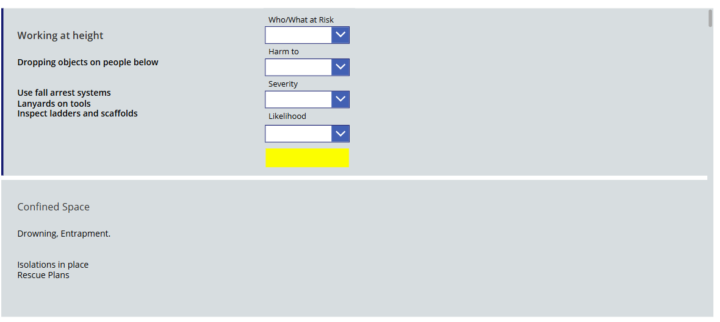
I am trying to add a component into a gallery row is this possible? I have tried many options but none have proved successful yet and I thought I would come at ask the experts. The reason I am adding component is to reduce the number of controls in my screen, I am getting a warning that this may cause issues going forward. I am trying to build an app that user can conduct a risk assessment and therefore there could be multiple rows. The user will select the number of job steps and this would then create the number of row s in my gallery, hence why using drops down in each row could be heavy on the app. Any comments , workarounds or ideas greatly appreciated
0 likes • Aug '25
Is the gallery displaying the all answers for that question or from any completed assessments.... or is the gallery being used to provide a place for each new risk assessment to be filled out? It may be helpful to see the table where each assessment is being captured and then the history table where each completed assessment answer is saved.

Jun '25 •
PowerApps Competitors
Who has tried other lowcode platforms out there.. Share you experience with us.. i wanna hear it😃
1 like • Aug '25
I started learning power apps on my own in may 2023. However, recently my coworker had someone at our sister company sure us their no code/low code cloud based app platform they use called AirTable. His demonstration was good and the program flow overall was fine. I merely pointed out to the that it costs $10,000 plus $45 or so per user license AND you still have to make stuff... nothing is already built for you. To make stuff you have to pay $200 for a contractor to help you develop stuff. I said "we already pay for Power platforms which can do everything AirTable can do and I can make any app y'all need." Apparently the severely recipe is "management but in." 🧐🤨

Jun '25 •
Best Approach for Managing User-Level and Row-Level Security in Power Apps with Azure SQL
Hi Everyone, I’m currently building a CRM application using Power Apps connected to an Azure SQL database for my company, which has multiple retail stores. The application is designed with the following access needs: - Sales Table: Each store should only see their own sales data (read-only) - Product Table: Viewable by all stores (read-only) - Customer Table: Stores should be able to search, view, add, and edit customer data - Back Office: Full access to add/edit products and customer data. I’ve seen a lot of great content online that shows how to connect Power Apps to Azure SQL at the developer level, but I haven't come across a clear explanation on how to manage user-level or row-level security once the connection is made at the user level. My questions are: 1. Where should user-level and row-level security be managed — in Power Apps or directly in Azure SQL? 2. If it’s best handled in SQL, what’s the recommended way to create and manage security roles for Power Apps users? I would really appreciate any guidance, especially if anyone has faced a similar use case. Thanks in advance!
0 likes • Jul '25
I'm probably not really qualified to answer this but I going to help by reasoning through it somewhat. my personal experience is with Power BI. when i connect to a data set, power bi asks me if I want my credentials to carry through to whoever access my power bi desktop report that I am building. this access level question I think happens depending on if the report is a "direct query" or downloaded (i cant remember what it is expressly called). the smart IT (business analysist) that worked on our data at my last work place used Microsoft's SQL studio. they granted access rights to data within SQL studio (im pretty sure). so whether you had access to the power bi report or not didnt matter as you could only see data relative to your own organization and level. pragmatically, I would manage the "user-level and row-level security" on the system (power Apps or Azure) which provides the easiest setup and maintenance of those access level rights (either for you or the customer to maintain).
Dec '24 •
We are so lucky
Nothing wrong with doing this work. I'm also glad I can do what I do! https://youtu.be/Q9w6pXmU8zY?si=enFrp9YT9WB64Kjl
1-10 of 69
@guy-johnsen-1313
Quality Engineer for Kitco Defense. B.S. in Bio-Environmental Science from Texas A&M University 2006. Power Apps Noob!
Active 25d ago
Joined May 12, 2023
Powered by