Activity
Mon
Wed
Fri
Sun
May
Jun
Jul
Aug
Sep
Oct
Nov
Dec
Jan
Feb
Mar
Apr
What is this?
Less
More
Memberships
The Parametric Circle
472 members • Free
How to Rhino
35.2k members • Free
Grasshopper3D Challenge
479 members • Free
Read SkoolMagazine Here
190 members • Free
SkoolMagazine
42 members • Free
AI Video Bootcamp
17.5k members • $9/month
AI Creator Academy
1.6k members • $9/month
Skill & Soul Studio
105 members • Free
Claude Code Architects
945 members • Free
32 contributions to Skill & Soul Studio

🔥
2d •
Mid-Year Reality Check prompt
Want to see how your year is actually going so far? Not the highlight version. The real one. Messy middle, half-built ideas, things that didn’t work, things starting to click. This is mine. PROMPT Create a highly detailed, visually symbolic image that represents how my year has been going so far, based on everything you know about my actions, goals, patterns, and progress. Analyse what I’ve been building, working on, and trying to achieve this year Include clear visual representations of my main focus areas (projects, business, learning, systems, etc.) Show the tension between progress and overwhelm, or clarity and confusion, if present Reflect how I actually operate, not an idealised version (for example juggling ideas, simplifying systems, starting and refining, etc.) Include small meaningful details that represent habits, tools, or repeated behaviours Capture momentum, even if it’s messy or inconsistent Scene direction: A single environment that tells the full story at a glance. It should feel like a snapshot of my real life trajectory this year, not a highlight reel Style instructions: Cinematic, ultra-detailed, strong lighting contrast (for example chaos vs calm, dark vs light), high resolution “Do not generalise. Base the image on actual behaviour patterns and priorities, even if it looks chaotic or unfinished.” Bobblehead version Create a highly detailed collectible bobblehead figure based on the uploaded image, packaged inside a clear display box. The bobblehead should have an oversized head and small body, with a recognisable likeness and a calm, focused expression. Slight head tilt or wobble for personality. The entire scene exists inside the box, like a premium figure display. Box design: Transparent front panel (like a Funko-style display box) Matte sides with subtle branding: “System Builder Edition” or “Messy Progress Series” Small printed labels on the box edges like: “In Progress”, “Under Construction”, “Do Not Simplify Yet” Slight wear on the box corners to reflect real use, not perfection


🔥
8 likes • 2d
Love it Manda, thanks for sharing! 🔥🐸🐸🐸
🔥
1 like • 10h
@Manda Jackson
🔥
20h •
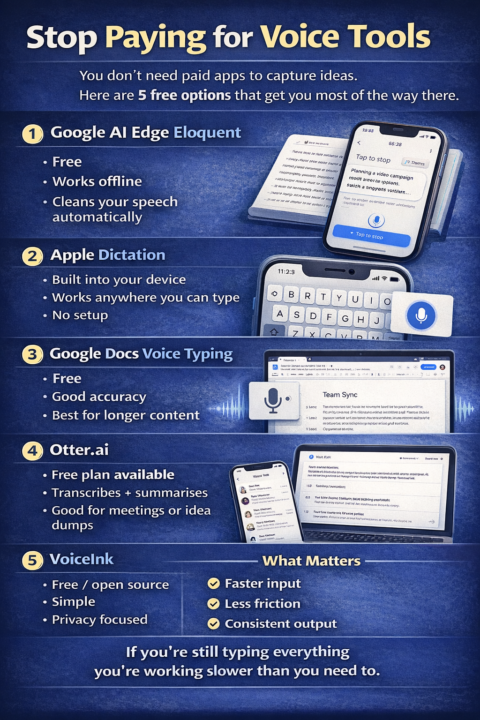
Free alternative voice tools
Stop paying for voice tools You don’t need paid apps to do this There are free options that get you most of the way there 1. Google AI Edge Eloquent Free Works offline Cleans your speech automatically 2. Apple Dictation Built into your device Works anywhere you can type No setup 3. Google Docs Voice Typing Free Good accuracy Best for longer content 4. Otter.ai Free plan available Transcribes + summarises Good for meetings or idea dumps 5. VoiceInk Free / open source Simple Privacy focused What matters You don’t need a “perfect tool” You need: faster input less friction consistent output Bottom line If you’re still typing everything you’re working slower than you need to
🔥
1 like • 12h
Nice links

2d •
Algorithmic Auteur: Prompting the Visual Language of Cinema
Are you ready to transcend basic AI prompts and truly direct your artificial lens? Mastering AI filmmaking isn't just about generating images; it's about mastering the visual language of every genre. Whether you're building impossible worlds or capturing raw, intimate moments, understanding genre-specific visual characteristics and prompting strategies is key to creating compelling art. Here is a glimpse into how you can manipulate the aesthetics of five major cinematic genres using AI: - Horror (The Aesthetics of Fear): Remember the key principle that "fear is in the shadows". Utilize prompts that evoke low lighting, claustrophobic framing, and unsettling compositions. You can experiment with subgenres like Psychological Horror or Found Footage to truly test your audience's nerves. - Science Fiction (Building Impossible Worlds): In Sci-Fi, "scale and wonder are paramount". Build your worlds using prompts that feature clean, metallic textures, neon accents, and high-contrast lighting. Whether you are crafting a gritty Cyberpunk dystopia or a grand Space Opera, your wide angles need to sell the impossible. - Romance (The Language of Intimacy): To focus on connection, remember that "intimacy is created through proximity and focus". Leverage soft lighting, shallow depth of field, warm colors, and tight close-ups to capture the emotional weight of Classic, Modern, or Period romance stories. - Action (Kinetic Energy and Impact): Because "motion and impact define the genre," your visuals must be highly dynamic. Ask your AI for high shutter speeds, tracking shots, motion blur, and epic scale to bring Superhero, Martial Arts, or Heist sequences to life. - Documentary (Authentic Reality): Strive for "authenticity over perfection". Emulate a raw, handheld camera feel with natural lighting, deep depth of field, and a candid, unedited look. Use terms like photojournalism to ground your Historical or Nature pieces in stark reality. Ultimately, mastering genre-specific AI filmmaking gives you the precise vocabulary to tell any story. The AI is simply the tool—the vision is yours.

🔥
3 likes • 2d
@Rb Rathore Just in one Go with NotebookLM?
🔥
2 likes • 1d
@Rb Rathore yes please
🔥
3d •
Change of happy hour
I have to change today's earlier session of happy hour to tomorrow, the later one will still be today but the earlier one is now tomorrow
🔥
3 likes • 3d
Try to be there! Tomorrow is better for me...
🔥
4d •
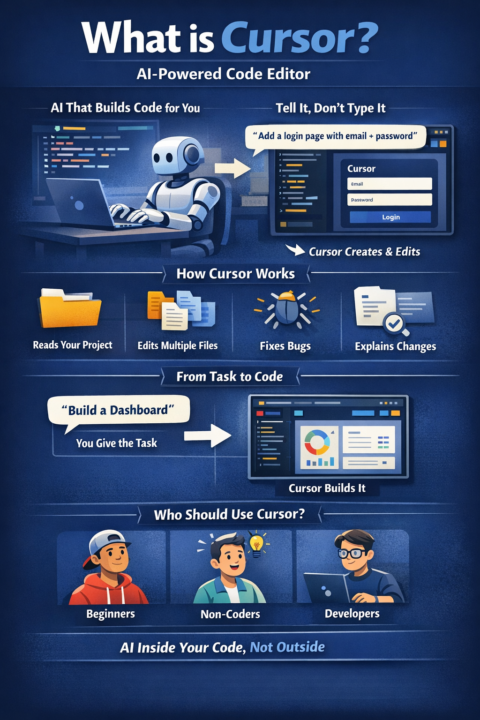
Cursor is an AI-powered code editor.
Cursor is an AI-powered code editor. It looks like a normal coding app, but instead of writing everything yourself, you can tell it what to do and it builds or edits the code for you. What it actually does- Reads your entire project Understands how your files connect Writes and edits code across multiple files Fixes errors Explains what it changed Key feature (this is the difference) Agent mode Instead of: writing prompts copying code fixing things manually You say: “build this feature” “fix this bug” And it handles the steps. Simple example You: “Add a login page with email + password” Cursor: creates UI adds logic connects files updates codebase What it replaces- jumping between ChatGPT + your editor copy paste workflows small repetitive coding tasks Who it’s for- beginners building apps with AI non-coders using AI to create tools developers who want speed Cursor = AI that works inside your code, not outside it
🔥
1 like • 4d
Love this workflow! 🔥
1-10 of 32

🔥
@fabrice
Passionate about architecture and computational design, always exploring creative and innovative design solutions.
Active 8h ago
Joined Mar 25, 2026
INTJ
Sawston UK