Activity
Mon
Wed
Fri
Sun
Nov
Dec
Jan
Feb
Mar
Apr
May
Jun
Jul
Aug
Sep
Oct
What is this?
Less
More
AI Developer Accelerator
11.4k
Free
4 contributions to AI Developer Accelerator

Apr 6 •
AI Developer Accelerator — Coaching Call - April 7th
Last week someone tried to demo a voice-integrated Claude Code setup live on the call... and the microphone had other plans. We never got the clean demo. This week, we're coming back for it. 📞 HOW THE CALLS WORK The calls can run 2+ hours. We want to make sure we're respecting everyone's time. Especially those of you who actually show up. Here's the structure: 👉 Reply to this post with your questions before the call 👉 If you submit a question and you're on the call, you go first 👉 We work through questions in the order they came in 👉 Then we open it up for everyone else If you can't make the call but want your question answered, drop it in the comments. We'll get to it. But priority goes to people who are there. The goal is simple: if you're taking the time to show up, you shouldn't have to wait behind questions from people who aren't even on the call. There's plenty of unfinished business from last week worth picking back up. Ty and Paul were both going to spin up Proxmox and Tailscale on their gaming PCs — curious how that went. Alex offered to share his full local AI stack as an MD file and we'd love to actually see it. And Ryan's hedge fund expense app is early-stage but has real legs — worth a check-in on where the architecture is heading. 🔗 ZOOM LINK (save this) https://us06web.zoom.us/j/81995207847?pwd=Xe6u6LmIQOmCP5VTnOwWYjDBfZNKGB.1 📅 WHEN Tuesday April 7th at 6PM ET Looking forward to seeing you on the call!

0 likes • Apr 6
How can I book a seat to show my one stop text to SQL AI APP at the coahing call meeting?
Apr 6 •
Show a demo for my one stop text to SQL AI APP
Can I show my one stop text to SQL AI APP at the coahing call meeting?
Jun '25 •
Make a youtube to introduce how to call Google Vertex Agent Engine API for local test and Slack Channel
Hi Brandon, I am a senior data engineer, and a beginner for AI. I have leant a lot from your courses: agent-development-kit-crash-course. deploy-adk-agent-engine. They are really amazing videos and git. To be honest, your videos are the best for AI in youtube. Your logic is very clear and straight forward. It is very easy to follow and understand. Based on your course and code, I have deployed the Agent to Vertex Agent Engine, however, I need to call the Agent Engine API for the front end. For example, I want to test the APP(Vertex Agent Engine API) in my local browser first, and then deploy it my Slack Channel. I tested to use HTML and Java Script to call the API in my local followed by the instruction from Chatgpt, however, the API can not be called even I have setup all authorization. I just wonder if you could please make a youtube and GitHub to introduce how to call the Vertex Agent Engine API for local test, and how to deploy it to Slack channel. I have searched the entire Youtube and Google search, and I have not seen one. You should be the first if you can do it. Thank you very much.
0 likes • Jun '25
Hi Brandon, GM, I do not have Postman account. I just use the regular js to call the API. My code are attached. The workflow is: Project Setup (if not already done): my-chatbot-project/ ├── server.js <-- The Node.js backend code ├── package.json <-- Generated by `npm init` ├── node_modules/ <-- Dependencies installed here └── public/ ├── index.html <-- Your HTML file ├── style.css <-- Your CSS file (if any) └── script.js <-- The updated browser-side JavaScript Install Node.js Dependencies: Open your terminal, navigate to your my-chatbot-project directory, and run: Bash npm install express @google-cloud/dialogflow-cx Configure server.js: Open server.js and replace "your-gcp-project-id", "your-vertex-ai-agent-id" with your actual Google Cloud Project ID and the ID of your deployed Vertex AI Agent. Crucial for Authentication: Ensure your Node.js environment is authenticated to access Google Cloud. The easiest way for local development is to run gcloud auth application-default login in your terminal. For production, you'd typically use a service account key file via the GOOGLE_APPLICATION_CREDENTIALS environment variable. Place Frontend Files: Make sure your index.html, style.css (if any), and the updated script.js are placed inside the public/ directory. Start the Backend Server: In your terminal (still in your project directory), run: Bash node server.js You should see confirmation messages like: Backend server listening at http://localhost:3000 Frontend accessible via http://localhost:3000/index.html Access in Browser: Open your web browser and go to http://localhost:3000/index.html (or http://localhost:3000 if your server config serves index.html by default). Now, your chatbot should correctly send messages to your Node.js backend, which will then use the Dialogflow CX client to interact with your Vertex AI Agent, and stream the responses back. This setup provides the secure and recommended way to integrate with Vertex AI Agent Engine APIs from a browser-based frontend.
1 like • Jun '25
Hi @Tom Welsh Thanks a lot for your comment. Please see my above reply comment.
Jun '25 •
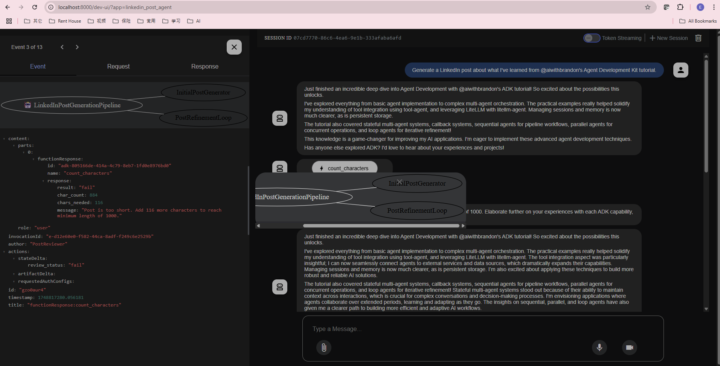
Could you please help me trouble-shooting
I am learning ADK, and followed with your Youtube: Agent Development Kit (ADK) Masterclass: Build AI Agents & Automate Workflows (Beginner to Pro). I have a trouble for my http://localhost:8000/dev-ui/?app=linkedin_post_agent. For the Event workflow in the web UI, it is not correct showing, I only see the Root agent and first level sub_agents, and don't see any others. Also, I don't see the green color. Please see attached. Could you please help me trouble-shooting to figure out what happend? Thank you very much! Best regards, Eric
0 likes • Jun '25
Thank you very much! Brandon. I will attend your class afternoon.
1-4 of 4

Active 183d ago
Joined Jun 1, 2025
Powered by