Activity
Mon
Wed
Fri
Sun
Mar
Apr
May
Jun
Jul
Aug
Sep
Oct
Nov
Dec
Jan
What is this?
Less
More
Memberships
Ep - reMarkable Tablet Support
595 members • Free
3 contributions to Ep - reMarkable Tablet Support

5d •
🚀 New Update Released - version 1.0.22
☑️ Better wireless support. ☑️ Improved reliability when pushing planners to your device ☑️ Safer device connection handling to prevent sync conflicts ☑️ Better protection of handwriting/content files during updates ☑️ More stable carousel uploads ☑️ General bug fixes and stability improvements Download: MacOs: https://www.einkpads.io/api/calsync/darwin/releases/latest Windows: https://www.einkpads.io/api/calsync/win32/releases/latest

1 like • 4d
WOW - 1.0.22 has FIXED my connection issues!!! Well done! Things are REALLY started to work, this is a great release. What I have noticed is that I no longer connect and then time out when syncing! I have two issues currently. First, I need to restart my device to see the updates. I use your "reboot" option as that is SUPER fast, and once I reboot the calendar appears!!! What I also noticed is that it doesn't update in the "Activity & Synce Status" section of your tool, but it is syncing. Keep up the GREAT updates, and if you need any troubleshooting let me know. This is GREAT, as I have had connection issues all along. Bravo, glad you figured this out!
1 like • 4d
@Jason Smith It is VERY evident that you and your team are working through some challenges and making great progress. One quick update - it looks like I don't need to reboot to have the updates post. If I sync "twice", the updates apply. The logs still don't show that anything has synced, but they are showing up. Bravo! Keep the updates coming! Thanks! DaveR
Dec '25 •
🔌 Help Us Diagnose CalSync Connection Issues (Quick Check)
We’re seeing a small number of users who are having trouble connecting CalSync to their tablet, while most connections work normally. Because everyone’s setup is different (network, OS, tablet model, security settings), we’d love your help collecting a few details so we can pinpoint what’s going on and fix it properly. If CalSync is not connecting for you, please reply to this post with the following: 📋 Connection Details 1. Tablet model 2. Operating system 3. Connection method 4. Are you on a restricted network? 5. What do you see on the Connect screen? 6. Exact step where it fails 🧪 Optional (If You’re Comfortable) - A screenshot of the Connect screen - Whether Developer Mode is enabled on your tablet - Whether CalSync worked for you in a previous version (and which version) 💡 Why This Helps Every computer and network behaves a little differently. By gathering this info, we can: - Identify patterns (OS, network type, tablet model) - Fix edge cases faster - Make CalSync more reliable for everyone Videos and screenshots welcome! Anything you think we need to troubleshoot your issue. Thanks for helping us improve this — we really appreciate the support and patience 🙏
0 likes • Dec '25
Greetings - I have been having this issue as well. I was able to get my very first sync to work (v1.0.12) on windows, and ever since it looks like it times out after the connection is established. I am on v1.0.17 and it holds the connection longer than the previous versions, but it still isn't happy. I want to try connecting my PC to my hot spot and remove my local network and see if that helps/works, I just haven't had time. For now, here are my data points (and I am GLAD to troubleshoot for you): First, I am in Dev Mode and running a beta version. I have since had a beta rev/update, so that probably isn't it. As mentioned, it only worked on my first sync on v1.0.12. I made a post before about an error I received when I launched the app a second time, but that error screen has never returned. If you have a clean uninstall, that might help with troubleshooting....anyway, here you go! 1. Tablet model (RM Pro) 2. Operating system (Windows 11) 3. Connection method (Both cable and wifi) - but now I am only testing on Wifi 4. Are you on a restricted network? (No) 5. What do you see on the Connect screen? (see details below) 6. Exact step where it fails (2 places - see details below) Here are the exact details when I try for the first time: 1) Run CalSync 2) Click Access Planners, it says connected, waiting to be regenerated, 3) I click regenerate (and the icon spins), after about 10 seconds it says: "Unable to maintain a secure connection to your tablet", then a few seconds later, it says Connection lost. 4) I click "Access Planners", it says "waiting to be generated". I just pause on this screen, and while showing "connected", it eventually says "Unable to maintain a secure connection to your tablet", then "connection lost". When I have time this week I will try my hotspot, and, as mentioned if you have a way to remove all pieces/parts on my windows system, that might help since my only success was my first sync... THANKS! DaveR
0 likes • Dec '25
@Jason Smith Hi Jason, I have Malwarebytes running, and I don't have any folders syncing to the cloud. But I do have some great news (see below). I had a HUGE breakthrough as I now have a stable connection from my Windows PC to my RMPP. Basically, when I disconnected from my home Wi-Fi network and used my Verizon hotspot, it WORKED! I had to use the cable to connect to my RMPP, but it finally was a VERY stable connection to my device (100%). I did have to reboot my device to see the updated folder and document, but it appeared and the connection was VERY stable. I then reconnected my PC to my Wi-Fi, and the connection was unstable again (using my RMPP to connect via Wi-Fi as well). What is really strange is that from this point on my connection via USB-C has been stable whereas before it would drop on Wi-Fi or USB-C. I hope this helps! DaveR In summary: Using either a Wi-Fi or USB-C connection from my Windows PC to my RMPP was NOT stable when connected to my home Wi-Fi. After connecting my PC to my Verizon iPhone (using it as a hotspot), my USB-C was 100% stable. When I connected my PC back to my home Wi-Fi, the USB-C is now 100% stable but Wi-Fi to my RMPP is still crashing after 30 seconds.
Dec '25 •
🚀 CalSync Update — Improved Syncing & Stronger Annotation Protection
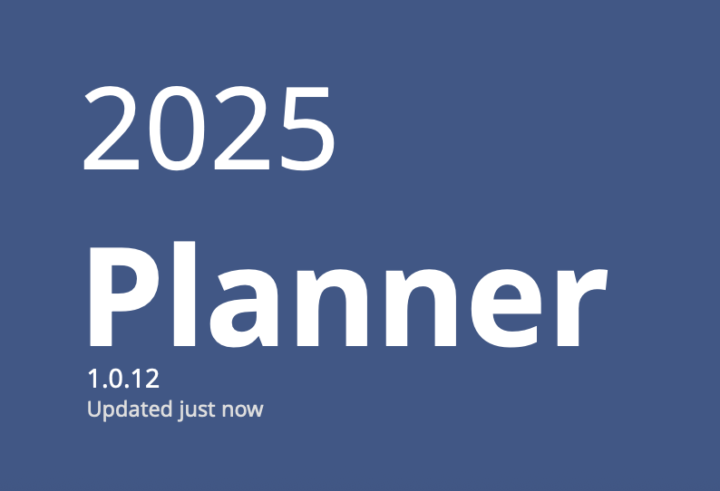
We just shipped a new CalSync update focused on reliability, syncing accuracy, and protecting your handwriting during planner updates. Here’s what’s new: ✅ Auto-Sync Now Regenerates Properly CalSync will now always rebuild your planner before pushing it to your tablet. This ensures your events are fully refreshed and always up to date. ✅ Handwriting Is Better Protected We added new safeguards so your handwritten notes stay intact during updates. CalSync now detects when your tablet has newer annotations and prevents accidental overwrites. ✅ Smarter Sync Logic When regenerating, CalSync can automatically pull the latest annotation data from your tablet if needed—helping keep everything in sync even after device-only edits. ✅ Version and update status added to the planner cover. ✅ Walkthrough Improvements The onboarding walkthrough has been refined, and you can now reopen it anytime from the Connect screen. ✅ General Enhancements Performance improvements, smoother UI behavior, and several under-the-hood fixes to keep the app running reliably. MacOs https://www.einkpads.io/api/calsync/darwin/releases/latest Windows https://www.einkpads.io/api/calsync/win32/releases/latest
0 likes • Dec '25
Hey there - I just downloaded the windows version (.13) above, and I when I run the app, I received a JavaScript error (cannot find module 'uuid'). Version .12 worked fine, but this won't launch. I wasn't sure how best to share this info. Thx! DaveR
1 like • Dec '25
Well - Now it worked! Not sure why...huh...it failed multiple times, but now a few hours later it launched. I will post if there is an issue. Thx
1-3 of 3

Active 2d ago
Joined Dec 3, 2025
Powered by