Activity
Mon
Wed
Fri
Sun
Aug
Sep
Oct
Nov
Dec
Jan
Feb
Mar
Apr
May
Jun
Jul
What is this?
Less
More
Memberships
AI Automation Society
419.1k members • Free
168 contributions to AI Automation Society

1d •
Superpower Skill
Hey, sorry, I wanted to reach out to this group and figure out what happened to the super power skill. I joined this group because I am new to Claude. I also am new to AI agent builder. I have my own company, but I was curious about this super power skill as I look for the plugin or the skill set itself. It is missing from Claude Custom. Why is that? Did Anthropic get rid of it? Are there any resources like super power, or are there better ones now? Up for discussion. Let me know. I'm curious. Also, before I leave, happy Fourth of July, everyone! Love the group!

1 like • 1d
Hey Eli, here is the Skool post where Nate covered Superpowers: https://www.skool.com/ai-automation-society/new-video-unlock-the-next-evolution-of-claude-code-with-one-plugin?p=154c0831 The Skool post has PDF attached also, see screenshot below for reference. Superpowers GitHub link: https://github.com/obra/superpowers

💎
⭐
Oct '24 •
Welcome! Introduce yourself + share a career goal you have 🎉
Let's get to know each other! Comment below sharing where you are in the world, a career goal you have, and something you like to do for fun. 😊
1 like • 2d
@Marcia Lewis Hey Marcia, regarding finding the CLAUDE[.]md file, it's attached to the post you mentioned. When viewing Skool on mobile device, you need to swipe left/right beside the YouTube thumbnail in order to see the attachments. See below link and attached screenshot for reference: How I’d Teach a 10 Year Old to Build Agentic Workflows (Claude Code): https://www.skool.com/ai-automation-society/new-video-how-id-teach-a-10-year-old-to-build-agentic-workflows-claude-code?p=60a379bc Hope this helps! 👍
1 like • 2d
@Marcia Lewis P.S. You should find the following useful also, great for finding resources associated with Nate's videos: 📌 YouTube Video Database: https://www.skool.com/ai-automation-society/classroom/2f950376?md=a4e5d4109aa64a3b941627624ac24737

5d •
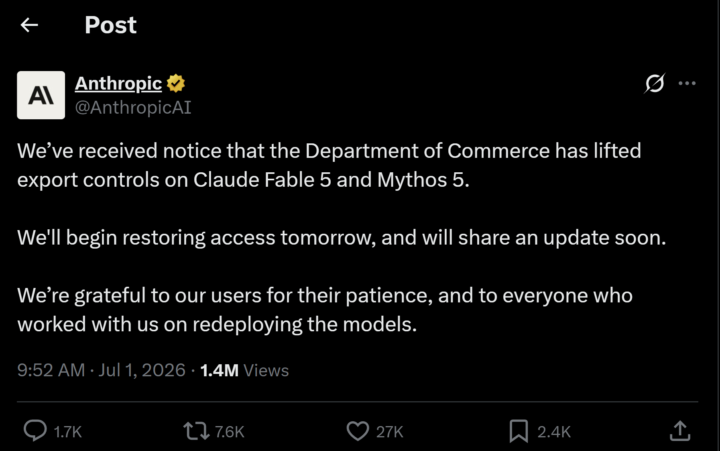
Fable 5 Access Is Being Restored Tomorrow
Anthropic has announced that Fable 5 access will begin rolling out again tomorrow. 🔗 https://x.com/AnthropicAI/status/2072106151890809341 If you have been waiting to explore Fable 5, now is a great time to prepare your projects, workflows and ideas. It will be interesting to see what new capabilities and use cases the community discovers as access expands. Question for the community: 💬 What's the first thing you are planning to build with Fable 5? Share your ideas below—I would love to hear what everyone is working on.
1 like • 5d
@Robin Gafvelin Here is the full statement from Anthropic: Redeploying Fable 5: https://www.anthropic.com/news/redeploying-fable-5 Snippet: "The new classifier also comes at the cost of flagging benign requests more often during routine coding and debugging tasks. As with all our safeguards, we’ll continue to refine this to better distinguish genuine misuse from legitimate requests and reduce false positives." As you can see above, they are NOT blocking all coding and debugging tasks in Fable 5, just that with the new classifier safeguards, benign/safe requests may be flagged more often, perhaps then being routed to Opus 4.8. CC: @Karl Stenor

0 likes • 12d
Hi Lateefah, that course is no longer available here in AIS free community, it was on offer for $49 about a month ago, that offer is now EXPIRED, details about it here: https://www.skool.com/ai-automation-society/the-skill-clients-pay-5000-for-and-its-not-automations-2?p=f22421d5 The course is only available now as part of AIS+ paid community: https://www.skool.com/ai-automation-society-plus/about

May 30 •
7 Days AIS Challange Day-1
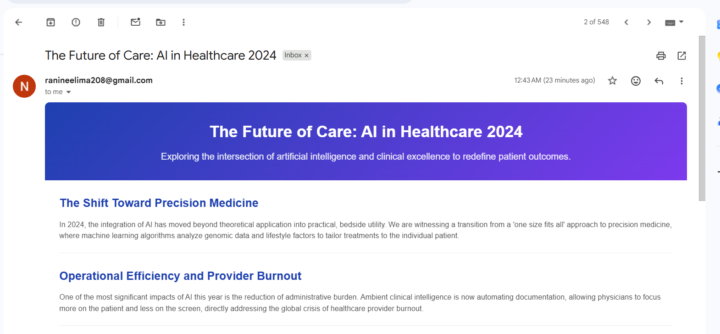
Finally, I have taken on this challenge. At the start, I was confused, so I reached out to @Muskan Ahlawat , who shared a video on how to set up Claude Code in Visual Studio Code. That video covered the free Claude Code setup with its limitations. I then implemented the process that Nate Herk mentioned in his video. The best concept from it was WAT (Workflows, Agents, Tools), which gave me a clear vision for building automations. Following that, I successfully implemented the newsletter. I now have the confidence that I can build workflows. Thank you for giving me this confidence, @Nate Herk and Muskan Ahlawat. I know this is not a perfect implementation, but it has given me the belief that I can keep going. Thank You!
1 like • 12d
@David Steward Hi David, here is link to Nate's YouTube Video Database: https://www.skool.com/ai-automation-society/classroom/2f950376?md=a4e5d4109aa64a3b941627624ac24737&utm_campaign=skool_link_post&utm_content=b51c57150c70495899bf4bc8aaee8166 Open any of Nate's videos directly in YouTube, check the Published Date, then search for that video by date in above spreadsheet. Once you find the relevant video, check the Resources column on far right, it will link to resources related to the video, e.g. Skills etc
1-10 of 168

@david-potter-4157
Software Developer, exploring AI Automation potential.
Active 3h ago
Joined Feb 18, 2025
Powered by