Activity
Mon
Wed
Fri
Sun
Jul
Aug
Sep
Oct
Nov
Dec
Jan
Feb
Mar
Apr
May
What is this?
Less
More
Memberships
AI n8n Automation Collective
2.8k members • Free
Brendan's AI Community
25k members • Free
Voice AI Bootcamp 🎙️🤖
9.1k members • Free
AI Automation Society
387.1k members • Free
53 contributions to AI Automation Society

Feb 12 •
Lessons learned starting with Lovable
First, I am amazed at Lovable’s capabilities and ease of use. It’s almost too good, which caused me some extra work. Here are some tips: I started my projects working with Claude to create a scope of work, and a project description. It help me build n8n workflows, design the UI, scope the database and tables, and ultimately a big Lovable prompt. My biggest mistake was creating my database and associated tables in Supabase. Don’t do that! Link Lovable to Supabase and it will create those databases for you. u my own caused a lot of confusion as Lovable was not using them. Just give Lovable the full script and let it work. You will have many revisions. Everything from small tweaks to big changes in the layout, adding pages (terms of service, Privacy, ADA, contact, etc). Test everything. If you integrate a payment platform like Stripe, test it. If you have a free trial, make sure that Lovable actually sets an expiration date for the trial. Follow the suggestions to fix security holes. Make your site ADA-compliant. Test it on multiple devices. Make sure it renders well on mobile. Lovable makes suggestions after it executes most prompts. Use them. You can build a great app with fewer than 200 tokens, even 150. That’s making something that looks professional and COMPLETE.
0 likes • Feb 12
This was at 180.20 credits as of this morning ( I tweaked a few things). It would have been fewer had I not made the mistake of creating my own redundant Supabase database, then having to clean that up.
Feb 12 •
First sellable app built with Claude and Lovable
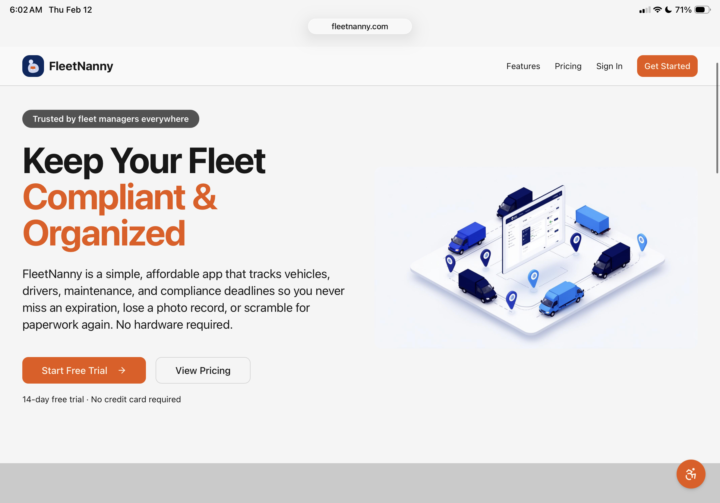
I’ve been focused on building automations for my company. Everything from a company credit card and bank account auditor to processing terrible pdf reports into a nice proposal with a great pricing table in PadaDoc. Also created transient voice agents that are incredibly useful. My latest project was to make something to track our small fleet of about 15 vehicles and drivers. Most platforms out there were expensive, and didn’t really do what I want, which was to alert my fleet supervisor (part time) when something was expiring - like registration, insurance, service contract, aged vinyl wraps, even the driver’s licenses. I used Lovable as my UI for this. Workflows in n8n and Supabase for the backend. It’s pretty cool. I don’t have GPS yet, as that requires buying a dongle that plugs into the car’s ODB port, but that is next. I was more concerned with the administrative side vs. physical tracking. This app called Fleet Nanny does that. You enter users and give them a role; admin, supervisor or driver. Then send an invite. They are then responsible to add their info and upload their DL. AI extracts the info from the DL and populates the fields (Date of birth, address, expiration date, etc). Likewise, the cars are added with basic info and assigned to a driver. The driver takes pictures of each side of the car, interior, etc and tracks the mileage, reports when service was performed, updates the mileage and so on. They get a reminder email monthly to do these things. The supervisor gets monthly reports on everything, including alerts when something is coming up for expiration. I decided that this can be monetized with a monthly subscription. Please check it out if you have some time. https://www.fleetnanny.com Future upgrade will include the GPS layer with geofencing and reports from whatever useful I can get from the Dongle provider.
0 likes • Feb 12
One feature I love is that it generates a roster of the drivers and the vehicles. This is really helpful every year when my insurance broker asks for lists of both (commercial insurance is a pain!).
0 likes • Feb 12
@Hicham Char You made me think of another use for that. Since the driver is required to take annual photos of the car, including the rear, I could use AI to confirm the registration stickers are applied. You would be surprised how they won’t put them on. We all work remote, so I don’t see the vehicles very often.
Feb 11 •
Will GPT 4.1 disappear?
When open AI discontinues 4.0, will 4.1 mini disappear also? I can’t find information on that. I have a lot of workflows that rely on it and it will be a big job to upgrade it. I tried five mini and it does not do what I want.
0 likes • Feb 11
I did swap out gpt-4.1-mini with 5o mini, and it did not do what I need it to do.
0 likes • Feb 11
@David Potter I am using it through OpenRouter in n8n workflows.

3 likes • Nov '25
This is nice. But what if the caller want’s property info sent to them? Grabbing emails has been my sticking point. Voice agents just struggle with that.
0 likes • Jan 31
@Nicole Jolie Hi Nicole, just following up on this. I have a transient voice agent that works very well. LinkedIn to a vector database with caching to recall lots of info very quickly, I have a sub workflow that uses ai to confirm/correct spoken emails which works pretty well. I work with a lot of real estate agents, and I have a deep dataset of domain names that I use as a reference to get the domain right. I also do a whois lookup to confirm domains. It’s still the email account that can be difficult. What have you done to improve that?
Jan 15 •
Callers are still reluctant to talk to a voice agent
So many people are just weird about speaking to a voice agent. We have tried several different greetings to build confidence, but people still simply want to leave a voicemail. For those of you building successful voice agents to answer the phones. What have you found to be the best greeting to lead people to a conversation?
0 likes • Jan 17
@Syed Mashar Ali Interesting. Can you give me an example of what you might say?
0 likes • Jan 19
@Scarlett Cherry We do state that it is on a recorded line. But we say that with our human service reps as well, and no-one cares. The problem is that there are so many bad voice agents out there. They can't answer questions, they don't have proper guardrails, they don't have memory and so on. Too many companies selling generic voice agents that are simplistic that it gives the whole idea a bad reputation.
1-10 of 53

@philippe-heller-2951
Small business owner implementing AI wherever possible
Active 22d ago
Joined Jun 9, 2025
92065
Powered by