Activity
Mon
Wed
Fri
Sun
Sep
Oct
Nov
Dec
Jan
Feb
Mar
Apr
May
Jun
Jul
Aug
What is this?
Less
More
Memberships
AI Automation Made Easy
19.8k members • Free
Lifestyle Founders Group™
13.2k members • Free
1of10: The Youtube Blueprint
2.4k members • Free
AI Automation Society
434k members • Free
Clief Notes
43.7k members • Free
Ecom Consulting Accelerator
538 members • Free
75 contributions to Clief Notes

Jun 21 •
My Interpretation of ICM - The Weld
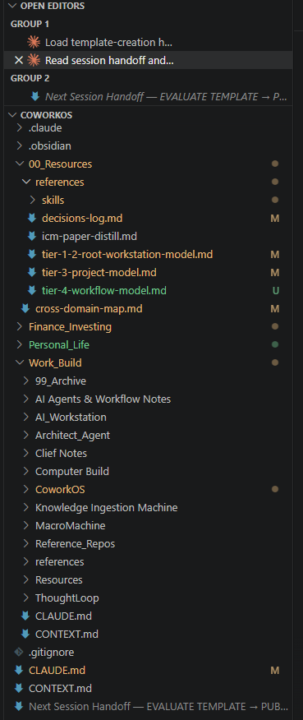
Repo Template Here. I originally built my AI workspace based on a Jeff Su video about cross-domain folder hierarchy. Shortly after, I watched Jake Van Clief's videos and the Interpretable Context Methodology (ICM). I thought what I was building was an ICM setup at first. But as I learned more, I realized I was doing something different. So I found a way to weld the two ideas together into a more comprehensive system. Here is how the integration works: Tiers 1-3 (The Reasoning System): This is the Jeff Su inspired structure. It handles routing and context delivery for different topics, sorted by Tier 2 domain. By the time you reach a Project at Tier 3, you hit the reasoning level, where the context and Claude md roles completely change depending on the work. These are organized by State/Kind rules embedded in the system, and reasoning sessions are distilled and indexed with key points synthesized to project context. Tier 4 (The Workflow): Once the reasoning is stable at T3, ICM comes in as the workflow layer underneath it. Figure out what you want to build in the reasoning Tier 3, configure the factory to build it in Tier 4. I've mapped out the basic folder structure in the diagram below, and attached the actual markdown doctrine file that runs it. CoworkOS Workspace Structure ============================ ROOT/ ├── CLAUDE.md (Tier 1: Root Map & Routing) ├── CONTEXT.md (Tier 1: Operator Contract & Global State) ├── 00_Resources/ (Tier 1: Global Reference docs) │ ├── Workstation_A/ (Tier 2: Broad Domain) │ ├── CLAUDE.md (Tier 2: Workstation Map & Routing) │ ├── CONTEXT.md (Tier 2: Domain Posture & State) │ │ │ └── Project_1/ (Tier 3: Reasoning Project) │ ├── CLAUDE.md (Tier 3: Project Identity) │ ├── CONTEXT.md (Tier 3: Live Reasoning Synthesis) │ ├── _reasoning-log/ (Tier 3: Spent thinking & ideation) │ ├── references/ (Tier 3: Settled constraints) │ │ │ └── tier-4-workflow/ (Tier 4: ICM Pipeline)
1 like • Jun 25
@Leo Saraiva Leo, genuinely appreciate you walking through the concept instead of just providing dismissive criticism. That's what made it land. You've named something I'd half-built without seeing clearly. The cold entry is already the construction version, not the discipline one, for a fresh run: a new session has nothing else in the window, so there's no parent synthesis to attend to even if it wanted to. The discipline only carries the in-session case, when I've navigated the tree first and the synthesis is sitting there. So your "make it the only thing that can happen" is right, and the way to get it for every run instead of just the cold one is running each stage in its own scoped context that receives only its declared inputs. That's the sub-agent delegation the paper itself describes, and it's the part I haven't fully built. Right now I lean on entering cold rather than enforcing the isolation per stage. On the diff: no, I haven't been running cold and in-session and comparing them. Cold is just the mode I trust to begin with. But you're right that the diff is the stronger check, it would surface a divergence I'd otherwise never see, since a silent one is invisible exactly while it's working. I'm going to steal that. The override being the tight half is good to hear. That came from domain separation more than any clever design. The projects genuinely never meet, so there's nothing to reconcile.
0 likes • Jun 28
@Leo Saraiva @Mira Bradshaw I just want to publicly apologize for being defensive when a legitimate point was raised. Have thought about this and I now understand where you're coming from. Thank you for bringing that information to me. There's much more to learn. This is my voice not an llm.

Jun 28 •
🚨 UPDATE: FIXED IT! 🤖 Local LLM + VS Code = Not Autonomous (Yet?) | OpenCode vs. Claude Code
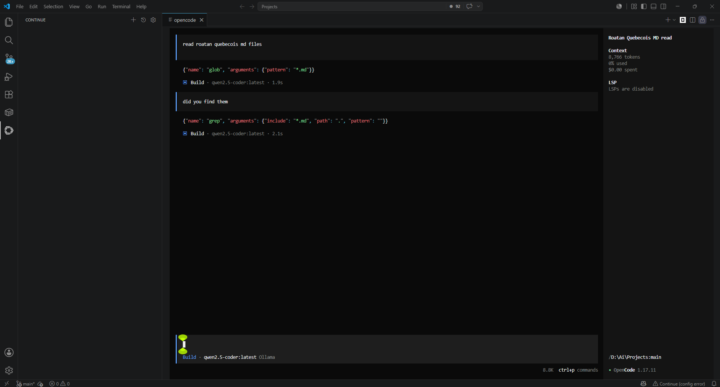
It turns out this wasn't an architectural limitation of VS Code extensions—it was a combination of using a model that was too small for agentic tasks, and a misconfigured context window that was suffocating my hardware. Here is exactly what I was doing wrong and how to fix it to get that true "Claude Code" autonomous experience locally: 1. The Model was Too Small for Tool-Calling I was using qwen2.5-coder:latest (which defaults to the 7B version). The 7B model is great for fast autocomplete, but it is fundamentally too small to reliably format the hidden JSON tool calls required to autonomously read and write files. The Fix: I switched to qwen3-coder:30b (an agent-tier model). The qwen2.5-coder:32b-instruct-q4_K_M would have also worked perfectly. Once you cross that 30B parameter threshold, the model is smart enough to actually use the VS Code extension's file-system tools on its own. 2. The Context Window was Crashing My RAM Even with the 30B model, it was initially taking over 3 minutes to read a file. Why? Because the VS Code extension (and Ollama GUI) was defaulting to an insane 256k-token context window. - Asking a 30B model to hold 256k tokens of memory caused its size to balloon to 45GB. - It overflowed my 32GB of RAM, spilled entirely onto my SSD pagefile, and bogged down my CPU trying to swap data. The Fix: I clamped the maximum context window down to 32k tokens. The model now runs flawlessly at 20GB, fits entirely inside my physical RAM and GPU VRAM, and operates at blazing-fast speeds. Conclusion: Yes, you absolutely can get that autonomous, repo-wide Claude Code experience locally in VS Code for free. You just need a 30B+ model and strict context window management! The Setup: I installed OpenCode extension in VS Code with Continue running qwen2.5-coder:latest locally. My goal: get that Claude Code autonomous agent experience (where the LLM reads files, writes code, runs commands, delivers results) but inside VS Code with a local model.
1 like • Jun 28
@Patrice Roatan Quebecois Your prompt is immaculate 😂

Jun 27 •
Streamlining my work with Antigravity and ICM.
Oh boy, I am a happy camper . I downloaded the paper on ICM and converted that into an .md file. Just for fun I also downloaded the README.md from the github repository. Than asked Antigravity to read these two files and do an audit om my filestructure based on the information in the two .md files. It gave me excellent feedback and wrote an implementation plan to rearrange the file structure to be fully compliant, reorganized all the files and either edit or create the relevant files. He also created an agents.md file in its configuration section that tels Antigravity to read the claude.md files for instructions. After all that work I had it do an audit again and everything was OK. Including the .md file that holds the templates and file structure that i to use when I need to create a new client. It took while for this proces but now I am ready for working with this system which will save a ton of time, I expect. This of course was necessary work for the next step, which was to have Antigravity sync the complete development structure for a website, I was building for a client, from my development server to my laptop, had it do an audit on the code, made some suggestions which I accepted, Antigravity again wrote an implementation plan that I reviewed and accepted, after a few changes and then had it deploy the website environment to my hosting server . After resolving some issues the site is now in the test area. Now the only thing I need to do is refine this whole process so that I can automate these steps and have Antigravity do audits on my development work and when ready for test, deplot it directly to me test server online for the client to test. All this took me about half a day. Hours well spend, so that now the structure and procedure are there in place I can focus on development and have the rest basically automated (supervised for now). BTW I develop websites using the Django framework and python scripts and occasionally wagtail. The ICM system keeps me and Antigravity organized and I can easily do handoffs and pickups .

1 like • Jun 28
Are you using Antigravity IDE or 2.0? Have been playing with IDE as a backup if i run out of claude
1 like • Jun 28
@Nico Veenkamp I've mostly been in vs code + claude code extension, so the IDE feels more like home. But I haven't graduated to spinning up agents or orchestrating multiple, which i think is where 2.0 shines from what i've read

Jun 26 •
My son and I have been building a game without knowing how games are built. How do we start over?
My son and I have been building a baseball game together in Claude Code. He designed what he wants in a PRD, He drives the build while I watch, and we've gotten pretty far just describing what we want and letting the AI write it. It kinda works, he can kinda play it. But we've hit the limit of vibe-coding our way through it. Here's our problem: we don't actually understand the fundamentals of how a game is put together. So when something's off, we're guessing. We moved one base on the field across many separate sessions because we have no mental model for how this stuff is supposed to be structured.That's just one example of many. We're fighting it instead of building it. We don't want a quick fix. We want to learn the foundation so we stop flailing. What we're asking the community: 1. If you've built a game, what core concepts do we have to understand before anything else? We keep hearing "game loop," "state," "sprites," "collision" but we couldn't explain them to you. Explained to a 10 year old. 2. What's the right way to think about structuring a game so it's not one giant file? Ours is basically one 2,800-line file right now. 3. Best beginner resource you'd actually recommend for someone who learns by building, not by reading docs cover to cover? Course, YouTube, anything. Bonus if it's something a kid and a parent can work through together. 4. For someone using AI to write the code, what do we need to understand ourselves vs. what we can let the AI handle? For context, it's a React app drawing on a web canvas, but we think our gap is conceptual, not language-specific. We made the repo public and there's a full PRD if anyone wants to see what we're going for: - Repo: https://github.com/ruben-aguirre/diamond-scholar - The plan (PRD): https://github.com/ruben-aguirre/diamond-scholar/blob/master/docs/PRD-v2.1.md Not looking for someone to build it for us. We want to understand it well enough to direct it. My son and I are connecting, but now I'm getting frustrated because I can't help him the way I'd like, and the game isn't looking they way he wants it.
2 likes • Jun 26
Grade A dad behavior. Someone smarter than i help the man!
2 likes • Jun 28
@Mira Bradshaw Wow! I'm actually going to study that myself😂

Jun 27 •
Poll: What's In Your Toolbox?
Edited: 100+ have voted Results to follow Thank You Please take ten seconds to respond to this poll — it helps everyone see the real meta! I’ll like every comment. BONUS: If I can twist @Jake Van Clief ’s arm, we’ll pick one random commenter for 1 month of premium access — for free once we hit 100+ votes! Vote and reply! Main method you use for interacting with AI agents right now? WHAT"S IN YOUR TOOLBOX RIGHT NOW?
Poll
169 members have voted

3 likes • Jun 27
I'm still working with vs code Claude code extension. Looking forward to upgrading soon though, I noted that your workflow progression was about hitting the limits with ICM first. Have been trying to stick to that discipline before exploring the Hermes/Cognee + local model setup from your corner.
2 likes • Jun 27
@David Vogel Thanks for the heads up on Cognee. I could imagine synthesizing two open sourced projects would be difficult - haven't gotten to that level yet 😂 but i did ingest all of your posts to learn. hope that's okay LOL
1-10 of 75

@daniel-terry-8872
The vision = Macroeconomic AI analysis across major assets. MacroMachine.
Let's connect on LinkedIn!
Active 3d ago
Joined May 13, 2026
Powered by