Activity
Mon
Wed
Fri
Sun
Jun
Jul
Aug
Sep
Oct
Nov
Dec
Jan
Feb
Mar
Apr
May
What is this?
Less
More
Memberships
Climbo Accelerator
732 members • Free
Aminos Community
6.2k members • Free
68 contributions to Climbo Accelerator

Feb 11 •
Removing Multiple GBP Accounts
What is the best way to remove multiple GBP accounts? Disabling seemed to not work. Anyone had any success with this in the past?

0 likes • Feb 11
Yes, it is possible to remove multiple Google Business Profile (GBP) accounts, but the reason "disabling" didn't work for you is likely because of a common point of confusion: removing a profile from your dashboard is not the same as deleting it from Google Maps. When you simply "Remove" a profile, you are often just revoking your own access/ownership. The listing itself remains on Google Maps as an "unclaimed" business. Here is the best way to handle this, depending on your goal. Method 1: The "Bulk Removal" (For Dashboard Cleanup) If you have dozens of locations in your dashboard and want to clear them out at once: * Sign in to your Business Profile Manager. * Tick the boxes next to the profiles you want to remove. * Click the Actions button (top right). * Select Remove businesses. * Note: If you want them gone from Maps too, you must mark them as "Permanently Closed" before clicking Remove. Method 2: The "Suggest an Edit" (To Remove from Maps) If you want the listings to actually disappear from the public eye, you need to tell Google the business no longer exists. * Search for the business on Google Maps (while logged into a different personal account for better results). * Click Suggest an edit. * Select Close or remove. * Choose Doesn't exist here or Duplicate of another place. * Pro Tip: Having multiple "Local Guides" (friends or colleagues) suggest the same edit often speeds up the verification process. Method 3: Merging Duplicates (The "SEO-Safe" Way) If you are trying to remove accounts because you have multiple listings for the same business, do not delete them. You will lose the reviews. * Ensure the Name, Address, and Phone (NAP) are identical on both profiles. * Contact GBP Support via the Help Center. * Request a Merge. This combines the reviews and photos into one "Master" profile while deleting the extra account.

Feb 9 •
Managing multiple locations with QR codes and Google Business profiles
Hi all, quick question. @Giacomo Chinellato I’m testing a setup for a brand with multiple locations. One owner, same brand, but several physical locations. I can add multiple locations in his plan, but when it comes to connecting Google Business Profiles, it seems like I can only connect one Google page per setup. How do you usually handle this in practice? Do you: - create one QR code per location, each linked to its own Google Business profile? - manage multiple QR codes within one workspace? - or use a separate workspace per location? - Trying to understand the cleanest and most scalable structure. Thanks in advance!
0 likes • Feb 9
This is the best solution is to create one QR code per location, each linked to its own Google Business profile? If the owner is having different business names then he or she should have a different plan for each business

Feb 9 •
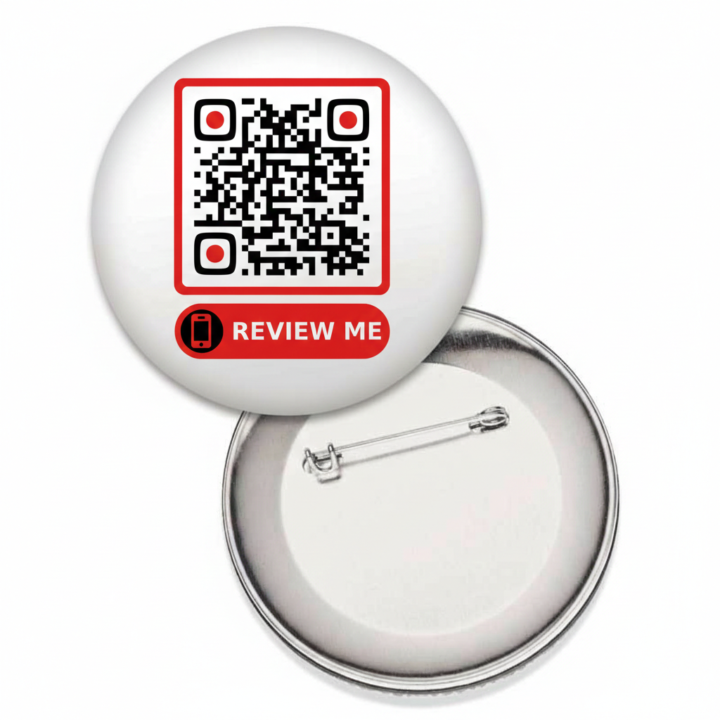
QRcode pin badge
For retailers with physical staff, I thought that a pin badge displaying the QR code for requesting review, attached to each person, could encourage their customers to scan it. Price is very affordable and it is easily customizable in small quantities. There are even machines for making them yourself. What do you think of this?
0 likes • Feb 9
@François Poullain so 2 to 3
0 likes • Feb 9
@François Poullain what button machine do you think we all should buy and where can we buy it? Thanks for your help

Feb 9 •
Stripe Checkout Page Branding
I've almost finished the technical set-up of Climbo. But I can't seem to figure out how to customise my brand colours and logo on the Stripe checkout page. I've just logged into Stripe and changed the branding in my account but when I click on the checkout pages linked to my pricing plans in Climbo they are still just all white without any customisation at all. Also, on my checkout page under 'Start for free' it only asks for the customers email address to start the free trial. But in the 'Test Client's Onboarding' video training, I see that on Giacomo's example checkout page it also asks for the customers name, but can't figure out how to add this field. I think it's useful to have the name of the customer in trial for follow ups, etc. Does anyone know how to customise these?
1 like • Feb 9
@Andrew Frater Here is what visitors see on my page. I did everything in climbo 2.0
0 likes • Feb 9
on your plan send me the link if your logo is in branding and it is the correct size it should show up
Feb 9 •
Video testimonials widget ?
I couldn't find in the Roadmap when the video testimonials widget will be added. Has this feature already been requested? Among my clients migrating from V1 to V2, I have one who uses videos testimonials and displays them on their website using the widget!
1 like • Feb 9
Yes, it’s in Climbo 2.0. When you create a plan, make sure you enable “Add Video Testimonial.” If you don’t add it to the plan, it won’t appear for your customers.
1-10 of 68

@dan-whiting-4188
I provide business solutions that attract more customers, enhance brand visibility, and build a solid reputation through positive reviews.
Active 2d ago
Joined Jan 12, 2026
Ohio United States
Powered by