Activity
Mon
Wed
Fri
Sun
May
Jun
Jul
Aug
Sep
Oct
Nov
Dec
Jan
Feb
Mar
Apr
What is this?
Less
More
Memberships
Ep - reMarkable Tablet Support
819 members • Free
7 contributions to Ep - reMarkable Tablet Support

9d •
🚀 CalSync v1.0.35 is Live — Stability + Accuracy Update
We’ve just pushed Version 1.0.35 and this one focuses on tightening things up where it matters most — stability, accuracy, and security. What’s new in 1.0.35 - Fixed crashes affecting some Intel (x64) Mac users - Fixed all-day events showing at incorrect times - Strengthened tablet directory structure for better security - General bug fixes + UI improvements Download the Latest Version Apple Silicon (M1 / M2 / M3) https://www.einkpads.io/api/calsync/darwin/arm64/releases/latest Intel Mac https://www.einkpads.io/api/calsync/darwin/x64/releases/latest Windows (Now an Installer) https://www.einkpads.io/api/calsync/win32/releases/latest Linux https://www.einkpads.io/api/calsync/linux/x64/releases/latest 💬 Real Talk Every update like this is us getting closer to making CalSync work smoothly across all setups — and that’s not easy. Different devices, networks, operating systems… it’s a moving target. But we’re in it with you. If you’ve had issues before, update and give it another run — this release specifically targets some of the pain points we’ve been seeing. 🔥 We Need Your Feedback After updating, drop a comment: - What device are you on? - Did your issue get fixed? - Still seeing anything off? That feedback is what shapes the next release. We’re building this with you, not just for you.

0 likes • 8d
I'm not winning. Its not connecting through wireless or cable. I have no firewalls. I've switched the tablet on and off after installation of the update. I'm using Windows 11, Thinkpad with ARM64 - connecting to Rm2 using the supplied remarkable cable direct from laptop to remarkable
0 likes • 7d
@Jason Smith Downloaded - will try it this evening
21d •
⚠️ Help Us Fix Connection Issues (Quick Poll)
version 1.0.34 - We’re dialing in connection stability across all setups — but here’s the reality: Everyone’s environment is different. Different tablets. Different OS. Different networks. So we need your help to pinpoint exactly where things are breaking. 🔍 First — answer this: Can you successfully connect CalSync to your tablet? 💬 Then drop a comment with: (THIS is where we get the real data) - Your tablet model (reMarkable 1 / 2 / Paper Pro) - Your OS (Mac / Windows / Linux) - How you’re connecting: - What actually happens: 🍳 Why this matters We’re basically trying to cook one dish that works for thousands of different setups. And right now, the “spice levels” are hitting differently depending on your environment. This poll + your comments will help us isolate patterns fast and fix this properly.
Poll
13 members have voted
0 likes • 21d
Windows 11 ARM64 - Rm2; tried connecting with both USB and Wifi, no luck
1 like • 21d
@Jason Smith no firewall and using the remarkable original cable, same as before. My installation behaves the same as @Bernard Côté below. Stable up to 1.30

27d •
APP Version
got the epcalsync subscription - there are a lot of app versions for download - how do I know the right one?
1 like • 27d
Hi Andreas - if you open your app, bottom left (circled in red here) shows your version and licence type. If you click on the version number, it will open up the updates list, and allow you to download the latest version from here

30d •
updating calendar messed up my notes
Calsync has just done to me the *one* thing I counted on it not to do. When I first created my planner for this year, I added a blank notes page after every daily page. All pushes have worked fine so far. However, when I pushed updates today, every single note I have taken, whether on the planner day itself of on the notes page, has shifted by several days. No note or daily plan I have written on the planner is in the correct location any more.
0 likes • 29d
I'm using a similar work flow, but have not yet installed the latest updates. Will you let us know if/how it was resolved.

Mar 3 •
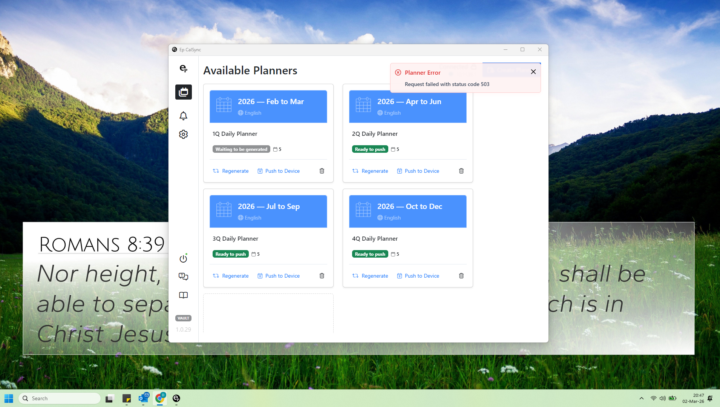
Sync not working 1.0.29
The sync function is not working in 1.0.29. When logging the program can not load the settings. Then when you regenerate a planner, I get a Planner Error: request failed with status code 503.
0 likes • Mar 3
I'm having the same problem. Calsync blinks as if it has synced and pushed the calendar to the device. But nothing arrives. I don't get an error code when I regenerate
0 likes • Mar 3
@Jason Smith that worked. Thanks for reminding me
1-7 of 7

@cecilia-hattingh-6742
Geologist, enthusiastic about new ways to make my job easier
Active 7d ago
Joined Jan 25, 2026
Powered by