Activity
Mon
Wed
Fri
Sun
Nov
Dec
Jan
Feb
Mar
Apr
May
Jun
Jul
Aug
Sep
Oct
What is this?
Less
More
E-Ink Tablet Users
1.5k
Free
7 contributions to E-Ink Tablet Users

May 2 •
Planner Error
Does anyone know what this error means? Planner Error Request failed with status code 500
0 likes • May 5
It works now. Thank you.
0 likes • May 12
I didn't do anything. I waited. I believe the issue is a server issue that the host company needs to fix.

Apr 15 •
🚨 Windows Users — This Just Got WAY Easier
We’ve officially rolled out a Windows Installer for CalSync. No more manual setup. No more extra steps. Just download, install, and go. 👇 Download the latest version here (1.0.36) : https://www.einkpads.io/api/calsync/win32/releases/latest This is a big step toward making CalSync smoother and more accessible for everyone. If you’ve been waiting for a simpler Windows experience… this is it. As always — keep the feedback coming. We’re building this with you.
0 likes • Apr 15
Is it supposed to install every time I click the icon?
0 likes • Apr 16
Thank you. @Patrick Mccarthy you gave me an idea of what to do. I found the program icon in the Desktop folder because I do not have icons visible on my Desktop.
Mar 3 •
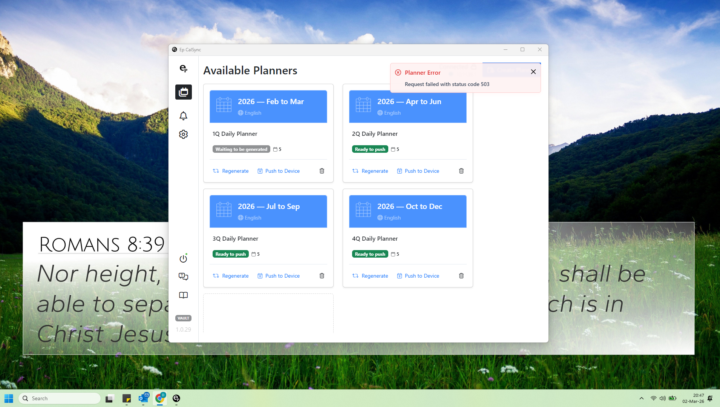
Sync not working 1.0.29
The sync function is not working in 1.0.29. When logging the program can not load the settings. Then when you regenerate a planner, I get a Planner Error: request failed with status code 503.
1 like • Mar 3
It was not last night, but everything is working this morning. Thank you.
Feb 20 •
🚀 CalSync v1.0.26 Is Almost Here
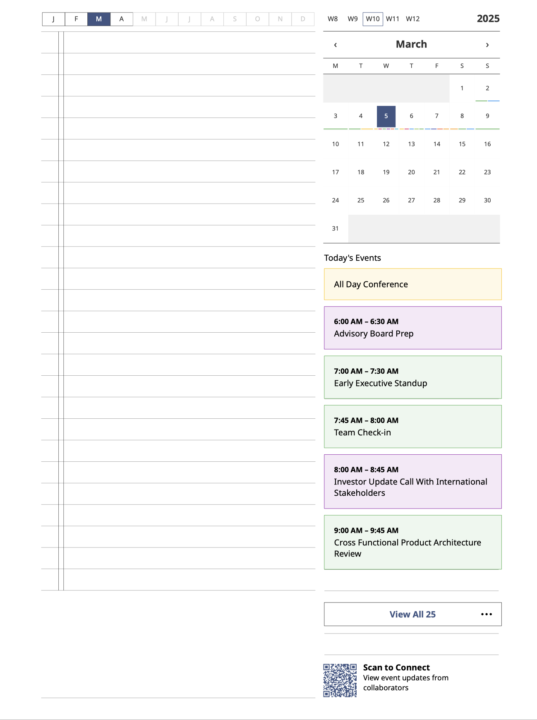
We’ve been heads down this week — tightening the engine, refining rendering, and expanding flexibility. Version 1.0.26 is one of the most polished releases we’ve shipped. Here’s the high-level overview 👇 📚 New Planner Display Option – Stacked Event View We’ve added a new planner style that displays events in a stacked vertical format instead of traditional time blocks. This is not a replacement — it’s an additional way to experience your day. You can now choose between: - 🕒 Structured time-block layout - 📋 Clean stacked event layout The stacked view offers: - A different visual rhythm - Clear hierarchy - Smooth scanning for busy days - A minimal, modern feel More flexibility. Same powerful sync. 🎨 Enhanced Calendar Coloring We refined color rendering to: - Improve contrast on e-ink - Make overlapping calendars easier to distinguish - Reduce visual clutter - Increase readability at a glance Subtle improvements — big usability impact. 🧵 Smarter Wrapping Logic We enhanced how event titles render: - More intelligent line breaks - Consistent alignment - Cleaner spacing - Better handling of longer titles This improves both planner layouts and carousel rendering. 👻 Ghosted All-Day Event Fix Some users experienced lingering “ghosted” all-day events after calendar updates. We identified the issue as stale render state not clearing properly when events changed. v1.0.26 includes: - Proper normalization on refresh - Clean re-render logic - Removal of overlay artifacts - Accurate clearing when calendars update All-day events now behave correctly when changes occur. 🧠 Stronger Event Normalization We tightened timestamp handling to prevent: - Time drift - Duplicate timezone conversions - Offset inconsistencies Rendering is now consistent across: - Planner views - Carousel - Secondary displays 🔄 Improved Connection Stability Refinements to SSH + network handling now: - Reduce false disconnect states - Improve reconnection behavior - Make sync cycles more predictable
0 likes • Feb 23
@Jason Smith Yes, sir. After the update the hyperlinks on the calendar days in the upper right no longer work.
1 like • Feb 23
@Jason Smith It did. Thank you.
Feb 6 •
"Why CalSync Might Feel Slow (And Why That’s Actually a Good Thing)"
I’ve seen a few comments about the software feeling a little clunky, and that’s a fair observation from the outside. So I want to explain what’s really happening behind the scenes. The reMarkable tablet is designed to be a distraction-free writing device, not a high-performance computer. Because of that, it runs with: • Very limited RAM and processing power • Storage optimized for battery life and ink stability—not speed • File operations that naturally take longer than what we’re used to on phones or laptops Meanwhile, the CalSync desktop app is running many times faster than the tablet itself. So when it feels like the app is “waiting,” what’s actually happening is this: The app is intentionally pausing so the tablet can safely catch up. Those pauses allow the device to: • Finish writing files correctly • Refresh its internal indexes • Prevent planner corruption or crashes If we pushed everything at full speed, it could break planners, lose data, or freeze the device—and protecting your files always comes first. The easiest way to picture it: It’s like a hungry dog waiting for food. The dog is ready instantly… but it still has to wait for the owner to place the bowl down safely. In this case: Your computer = the fast, hungry dog The reMarkable = the careful owner placing the bowl We know waiting isn’t glamorous, and we’re continuously optimizing every step. But those brief pauses are there for one reason: To keep your planner, your data, and your device safe. And we truly appreciate everyone here who’s been patient, supportive, and part of improving CalSync every day.
1 like • Feb 6
Thank you, Jason, for explaining. You and your team are doing great with the programming.
1-7 of 7

Active 26d ago
Joined Nov 14, 2025
Powered by