Activity
Mon
Wed
Fri
Sun
Dec
Jan
Feb
Mar
Apr
May
Jun
Jul
Aug
Sep
Oct
What is this?
Less
More
Super Affiliate Academy (Free)
12.4k
Free
us peptide club
16
Free
Fitbodies After 40
28
5.0
Free
LinkDeal Skool Insiders
10
Free
WAGMI HQ Academy
10
Free
4 contributions to Skool Extensions 🧩

Sep 21 •
Hilfe bitte
Hey was hab ich falsch gemacht? plötzlich sind alle Profil-Bilder verschwommen, keine Ahnung wo ich mich da verdrückt hab kann mir bitte jemand helfen? hab Brave Browser (Chrome Prinzip) und bei den Ext. wohl irgendwas irrtümlich verstellt 🤷🏽


🔥
1 like • 18d
Nice

🔥
Jul 17 •
TAG.... you're it...
Tell me a tag you are using with your community members! I need some ideas on things I can use with the CRM feature.... so lets start with tags... most creative tag wins a prize... ** Did you know that if you hit the colored dot you can add an emoji or change the color to something other than what it assigns to you? Once you create a tag and tag members, you need to tell Claude (or whoever you use) the tag label you assigned to it, he can see the tag and the members who are assigned that tag, but he can't see the name you chose for that tag ... he only sees ID numbers... 😉

🔥
0 likes • 18d
@Adam McCollough Amazing Man

🔥
Mar 30 •
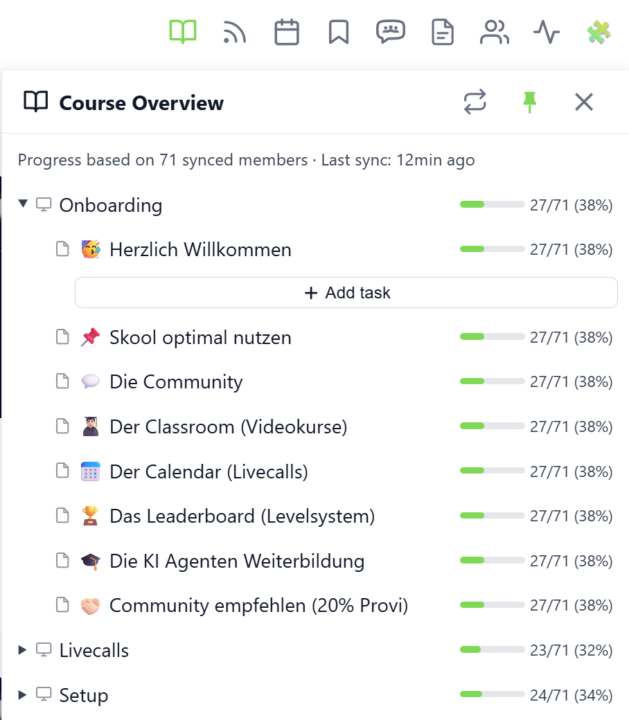
Course Overview (VIP Feature 💎)
𝗖𝗼𝘂𝗿𝘀𝗲 𝗢𝘃𝗲𝗿𝘃𝗶𝗲𝘄 — 𝗬𝗼𝘂𝗿 𝗘𝗻𝘁𝗶𝗿𝗲 𝗖𝗹𝗮𝘀𝘀𝗿𝗼𝗼𝗺 𝗦𝘁𝗿𝘂𝗰𝘁𝘂𝗿𝗲 𝗮𝘁 𝗮 𝗚𝗹𝗮𝗻𝗰𝗲 Managing a Skool classroom with multiple modules, folders, and pages means a lot of clicking and scrolling to understand the full picture. Course Overview adds a dedicated sidebar panel that shows your complete course structure as an expandable tree — every module, every folder, every page — without leaving the page you're on. Click the book icon in your toolbar to open the panel. Each module shows as a collapsible row with a folder icon for subfolders and page icons for individual lessons. Click any module to expand it and reveal its nested content, loaded directly from Skool's data. The tree remembers which modules you've expanded, so your view stays consistent as you navigate. The real power comes from the completion stats. If you've synced your members' course progress, each module displays a green progress bar showing what percentage of your members have started it. Hover over the bar to see member names, or click it to open a popup with the full list — complete with avatars, tags, and pipeline status. A note at the bottom shows how many synced members the percentages are based on. Hit the refresh button to reload the course structure or update completion stats. The panel respects the 24-hour sync cooldown and shows when the next sync is available. You can pin the panel to keep it open while you browse, resize it by dragging the left edge, or close it when you're done. Course Overview is available for admins and owners only, and works on any page within your community. The feature can be toggled in the Toolkit Settings under the Admin section. --- 𝗞𝘂𝗿𝘀ü𝗯𝗲𝗿𝘀𝗶𝗰𝗵𝘁 — 𝗗𝗲𝗶𝗻𝗲 𝗴𝗲𝘀𝗮𝗺𝘁𝗲 𝗖𝗹𝗮𝘀𝘀𝗿𝗼𝗼𝗺-𝗦𝘁𝗿𝘂𝗸𝘁𝘂𝗿 𝗮𝘂𝗳 𝗲𝗶𝗻𝗲𝗻 𝗕𝗹𝗶𝗰𝗸 Eine Skool-Classroom mit mehreren Modulen, Ordnern und Seiten zu verwalten bedeutet viel Klicken und Scrollen, um das Gesamtbild zu verstehen. Die Kursübersicht fügt ein eigenes Sidebar-Panel hinzu, das deine komplette Kursstruktur als aufklappbaren Baum zeigt — jedes Modul, jeden Ordner, jede Seite — ohne die aktuelle Seite zu verlassen.
🔥
2 likes • 18d
Nice Man THis Is In German ...? Only

🔥
Sep 20 •
Adding Admins...
Hey! 👋😍 I'm sure I didnt dream this, but I'm sure I saw an option to add other admins to the Skool Extension... I wanted to be able to allow other users to be able to use the tags that I have set up. Ideally, I could show / hide some for other users, but this is not vital at this stage. Had this admin feature now been removed or am I just not able to find it? And if it does exist, does it allow me to do this? Thanks... Adam
🔥
0 likes • 18d
👍
1-4 of 4

🔥
@bilal-hq-2028
Technical Builder & Execution Partner for GHL Agencies. I build custom dashboards & n8n automations to save 20+ hours/week.
Active 3h ago
Joined Oct 2, 2026
Powered by