Activity
Mon
Wed
Fri
Sun
Nov
Dec
Jan
Feb
Mar
Apr
May
Jun
Jul
Aug
Sep
Oct
What is this?
Less
More
Owned by Ares
G öttliche E nergie L iebt D ich Auch Geld hat seine Frequenzen! Deutsch-sprachige Community für finanzielles & spirituelles Wachstum BEIDES wichtig!
Runen & ihre Mythen, Mysterien, Herkunft, verschiedene Deutungen, Rätsel-Lösungen, Sprach-Verwirrungen, Magie & eine Komplettierung nach Helmut Arntz.
Claude Masterclass
692
5.0
$25/m
Community Lab
82
$49/m
Balance Buddies
23
Free
Community Business (german)
460
Free
Skool Extensions 🧩
1k
5.0
Free
the Freebie Circle Club
142
Free
Marc Galal Erfolgscommunity
6.4k
Free
Disziplin & Lebensqualität
1.3k
Free
Skool Community (deutsch)
5.3k
Free
11 contributions to Skool Extensions 🧩

🔥
18d •
1000 members 🥳🥳🥳
I love improving our daily Skool game. Let's make Skool even better and more individual together. A big thank you. A small well-known game is coming with the next update 🐍 (Edition 1000)


5 likes • 18d
Is das nicht bissl zuviel für eine Community? 😜🤣😇
4 likes • 18d
@Daniel Spitzwieser sehrwohl! Calvin hat das auch plausibel dargelegt, was sein kann, wenn es zuviel wird. Aber ich denke in dieser Community is es ne Ausnahme, weil da geht es ja um Skool-Erweiterungen selbst. Ist ja unvergleichbar ... so gesehen ... hast du sogar recht 😜
21d •
Hilfe bitte
Hey was hab ich falsch gemacht? plötzlich sind alle Profil-Bilder verschwommen, keine Ahnung wo ich mich da verdrückt hab kann mir bitte jemand helfen? hab Brave Browser (Chrome Prinzip) und bei den Ext. wohl irgendwas irrtümlich verstellt 🤷🏽

2 likes • 21d
@Andreas Wolf habs gefunden
3 likes • 21d
mann, wie schön versteckt 🤣 habs gefunden - sieht man nur kaum, weil irgendwie alles weiß - könnt ihr das bitte auch optimieren? DANKE ;)
🔥
Jun 19 •
🔥 Moderator #2 Found!
Looks like @Kimberly Armatys won't be alone for long. I've now found a second moderator for the community! Please give a warm welcome to @Kristine Alise 👇🏼 Together, they'll help create more engagement, discussions, ideas, and activities to make this community even better. I'm excited to see what we'll build together and what will emerge from this community in the months ahead. 🚀

2 likes • Jun 22
Hola! Gratuliere 🧡
Jun 2 •
Auf zur finanziellen Fülle .... (alles fängt im Kopf an!)
Die Community ist grade etwas ruhig, aber wird demnächst wieder mehr belebt ... so ist der Plan. Es geht darum, in die Fülle zu kommen, finanzielle zusätzliche Möglichkeiten werden angeboten, und Wissen, die du dein Leben finanziell am next Level bringen kannst. Geld & Spiritualität ist der Kern-Punkt dessen, denn Spirit = Geist, und Geist beherrscht Materie! Geld ist auch Energie, und Energie = Geist. Da setze ich an, um klar zu machen, wo die Fülle tatsächlich anfängt: bei dir im Kopf ;) 🔗 Hier geht's zur Community 👈🏽

1 like • Jun 2
@ChrisTina Maywald aso das 𝗳𝗲𝘁𝘁 𝘀𝗰𝗵𝗿𝗲𝗶𝗯𝗲𝗻 meinst du? ja hab ich schon lange gesehen ... aber was hat das mit dem Puzzle zu tun?
1 like • Jun 2
@ChrisTina Maywald aja, danke ;)
🔥
May 21 •
Community Pins
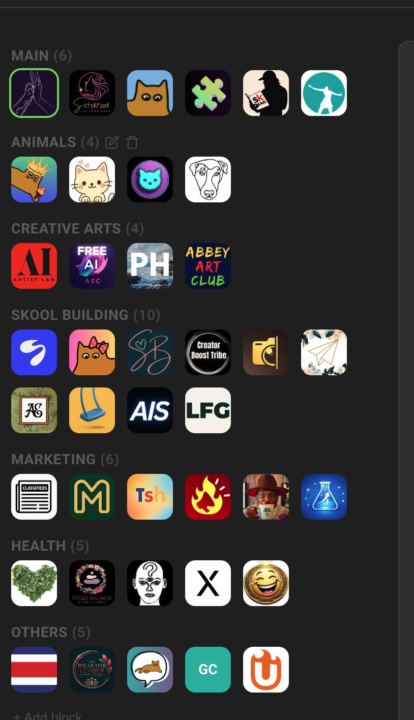
Replace Skool's left community switcher with a strip that holds every community you belong to, grouped into named blocks Skool's left sidebar only surfaces a handful of communities at a time — the rest sit behind a switcher dropdown you have to open every time. If you're active in a dozen or more, the ones you visit daily end up buried in a list you keep scrolling through. Community Pins replaces that switcher with a redesigned strip down the left edge that shows every community you belong to at once — your logos flow in rows across the space beside the page instead of one cramped column. Hover any community to see its name in a tooltip, and the one you're currently in is marked. Group your communities into named blocks. Add a block, head it "AI", "Clients", or whatever fits — each heading carries a live count of how many sit inside. A permanent "Pinned" block catches every community on its own: join a new one and it lands there, leave one and it drops out. Manage it all inline in the strip — "+ Block" adds one, the pencil renames a heading, and the trash icon removes a block (after a quick confirm) and drops its communities back into "Pinned". The "Pinned" block itself can be renamed but never deleted. Drag to organize. Reorder communities inside a block, pull one across to another block, or grab a block's heading to move whole blocks up and down. A custom mouse-driven drag tracks your cursor one-to-one, with no HTML5 ghost image or forbidden-drop flicker to get in the way. The strip scrolls quietly once the list grows long — a slim green scrollbar appears on hover and stays hidden otherwise, so the sidebar stays calm at rest. The whole arrangement is cloud-synced: lay your blocks out on one device and they show up the same on the next. Community Pins can be toggled in the Extension Settings under Appearance. --- Skools linken Community-Switcher durch einen Streifen ersetzen, der jede Community enthält, in der du bist, in benannten Blöcken organisiert Skools linke Sidebar zeigt immer nur eine Handvoll Communities auf einmal — der Rest steckt hinter einem Switcher-Dropdown, das du jedes Mal aufklappen musst. Wenn du in einem Dutzend oder mehr aktiv bist, sind die täglich besuchten in einer Liste vergraben, durch die du immer wieder scrollst.
8 likes • May 21
Supa! Ich hab jedoch bewußt nur 7 angepinnt, mir reicht das 😇
1-10 of 11

@empfehlungsmeister
Eine alte Seele bewegt die Welt, indem sie einfach immer noch da ist 🕉️
👉🏽 Lebe jetzt & hier, denn danach ist es zuspät für deine Chancen 😜
Active 20m ago
Joined Mar 30, 2026
Austria
Powered by