Activity
Mon
Wed
Fri
Sun
Jun
Jul
Aug
Sep
Oct
Nov
Dec
Jan
Feb
Mar
Apr
May
What is this?
Less
More
Memberships
AI Automation Society
357.2k members • Free
Brendan's AI Community
24.5k members • Free
1 contribution to Brendan's AI Community

Aug '25 •
Sending call data from Retell AI into Google Sheets or Airtable
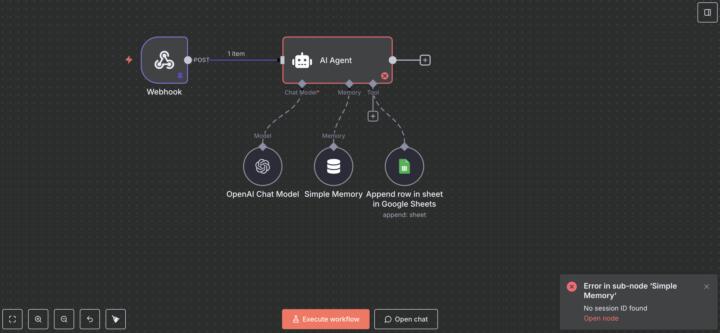
I am getting super frustrated and feel like I'm missing something simple. I'm working with a business that wants an inbound agent who can answer questions and take messages and then send them on to a spreadsheet they can review later. It doesn't matter if it's google sheets or Airtable or whatever. I just need it to work. 1. I'm having issues with the n8n webhook not triggering when the Retell agent receives a call. It will get the call data when I run it as a test, but when I switch to the production link nothing happens. I've tried it with a chat trigger and it works perfectly. It gets the data, parses it, and sends it on to the correct fields 2. Even when I get the webhook test data, there's a problem with the simple memory. It says there is no sessionId coming in from the Retell webhook and I can't find a sessionId. I'm new to n8n so I have no idea what I'm doing wrong. I've spent days working on this and watched hours of tutorials. If n8n isn't the solution, I need to know what is. I gave up on n8n last night and started trying Zapier. It is receiving the call data from the webhook, but it's not parsing out the categories like Name, Phone Number, etc. and sending them on to the correct fields in my spreadsheets. It would be great if it would message them via Telegram, WhatsApp, or something else to notify them know there's a new call to review, but at this point, I don't even care about that. Any help would be really appreciated. I'm drowning here.
0 likes • Aug '25
@Thiago Ricci How do I create a function to collect that data? Is that in n8n? Would it go retell call ends —> webhook trigger —> function to collect data —> google sheet?
1 like • Aug '25
Thank you so much for your help! I got it working the way I need it to finally! For some reason it's creating two duplicate entries in google sheets each time the agent receives a call, but at least it's working now. I'll keep working at it to figure out why it's creating two rows each time, but I couldn't be more relieved that it's working. Going to demo it for my customer tomorrow.
1-1 of 1

@ben-capers-3179
Graphic Designer. Videographer. Digital Marketer.
Active 261d ago
Joined Aug 7, 2025
McAlester, OK
Powered by